
AgentMon Live
AgentMon Live adds a live monitoring pane to Claude Code. Follow tool calls, Git commands, and subagents as they work, while an advisor model flags potentially missed steps. Available in six languages.
claude plugin validate to auditGuide →Makes outbound network requests, calls MCP servers, or requests auth handles.
Statically scanned from hooks & source. Learn how to audit
AgentMon Live
Claude Code, Codex and Kiro Crew. Follow your coding sessions in one browser.
See what each session is doing without switching between terminals. Follow tool calls, file changes and verification results live, with usage information where the tool provides it.
Keep working in your usual tools. Switch between sessions in AgentMon.



Like it? Give AgentMon Live a star.
Install · Kiro Crew · Codex · Why you want it · The pane · The web view · Cost and privacy · Make it yours · More
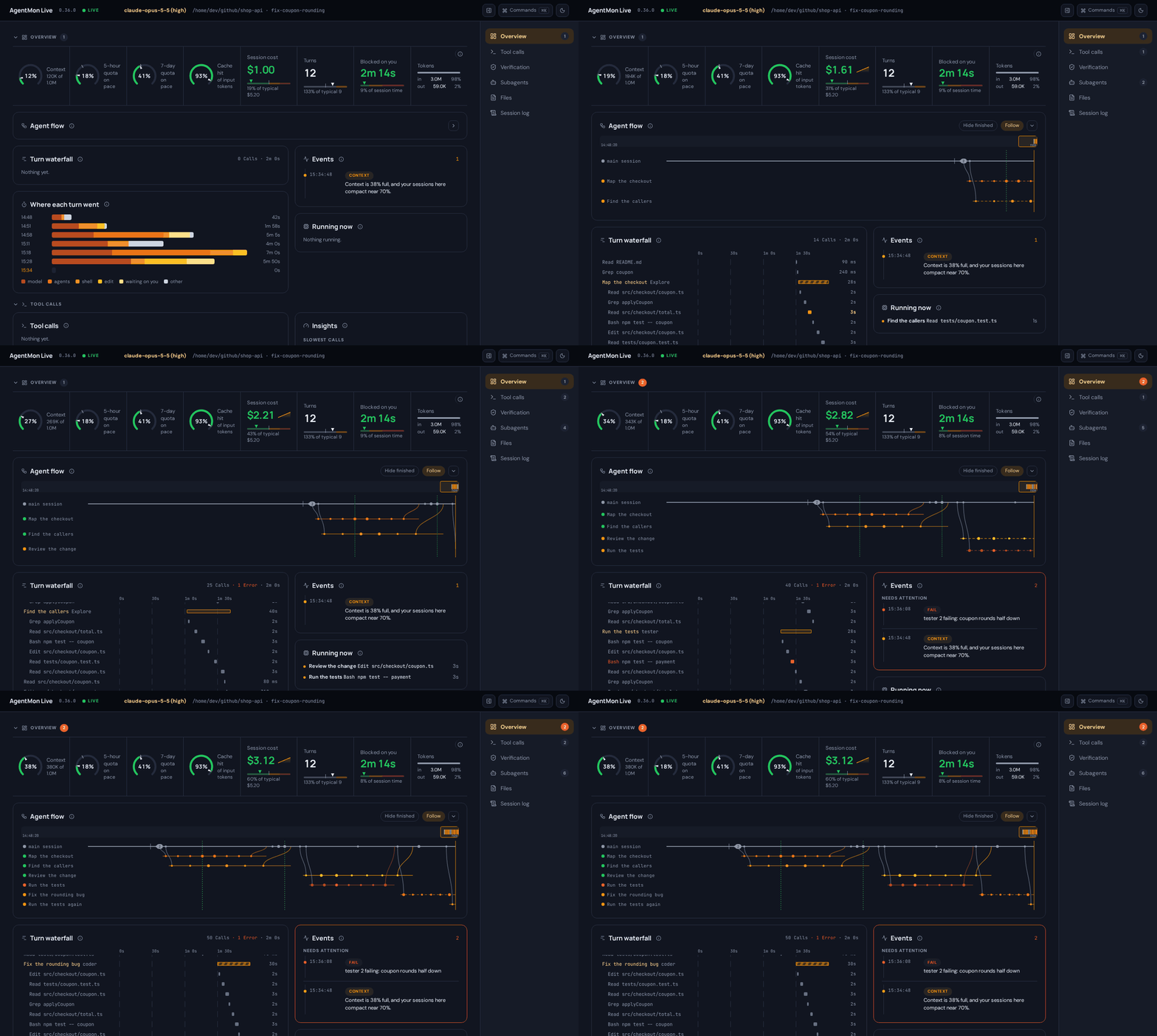
Press o and your session opens in the browser. See who started whom, what each agent does right now, and where the money goes. See all of it.
You can use the Codex or Kiro Crew setup without running Claude Code. The browser view needs Node.js.
Using Claude Code? AgentMon also checks before it says "done". Its done gate catches unfinished work such as failed checks, stale test results and test runs that selected no tests. Changed assertions and added skips are highlighted for review.
The done gate, Focus and project learning are Claude Code features. Available monitoring data differs between tools; the installation sections explain what each integration shows.
Install
In a Claude Code session (2.1.308 or later):
/plugin install agentmon-live --marketplace codenotary/agentmon-live
Answer y to add the marketplace and pick a scope. There is nothing to set up. The pane opens by itself when the terminal is wide enough (not on the mobile app), or with /agentmon.
From a shell, the desktop app, or let Claude do it
claude plugin install agentmon-live --marketplace codenotary/agentmon-live
Desktop app: click + next to the prompt box, then Plugins, Add marketplace with codenotary/agentmon-live, then Add plugin.
Or paste this into a Claude Code session:
Install the Claude Code plugin agentmon-live from the marketplace codenotary/agentmon-live
(claude plugin install agentmon-live --marketplace codenotary/agentmon-live). Tell me to restart
Claude Code when done.
Kiro Crew
The web view lists every open Kiro Crew chat beside your Claude Code sessions, whatever harness the chat runs on (kiro-cli, Claude Code, Codex and the others). It reads the log Kiro Crew writes, so this needs nothing installed in Kiro Crew: open the web view and the chats are there.
A tab beside the chat: install AgentMon as a Kiro Crew app
To have AgentMon start with Kiro Crew and show in a tab beside the chat, install this repo as a Kiro Crew app. It needs node.
git clone https://github.com/codenotary/agentmon-live
kirocrew app install <path>/agentmon-live
Then turn it on in Kiro Crew:
-
Open Library in the left bar. AgentMon Live is listed under Disabled: click Enable. Kiro Crew asks you to trust the app before its code runs. That code is
kiro/hooks.py, about 100 lines of standard-library Python that run with Kiro Crew's own rights and start the web view's server. Read it before you say yes.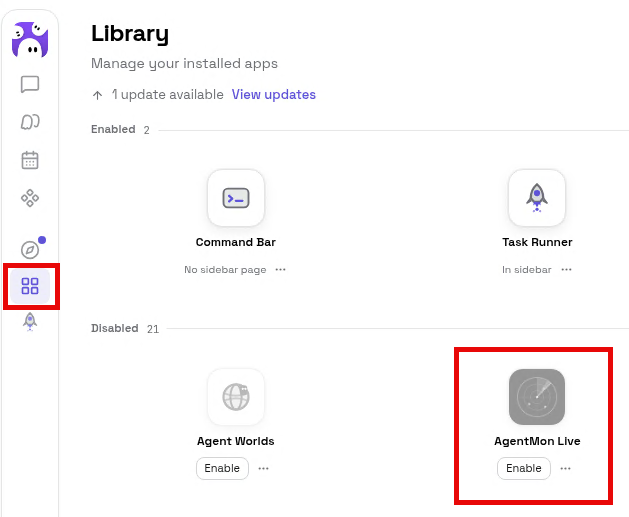
-
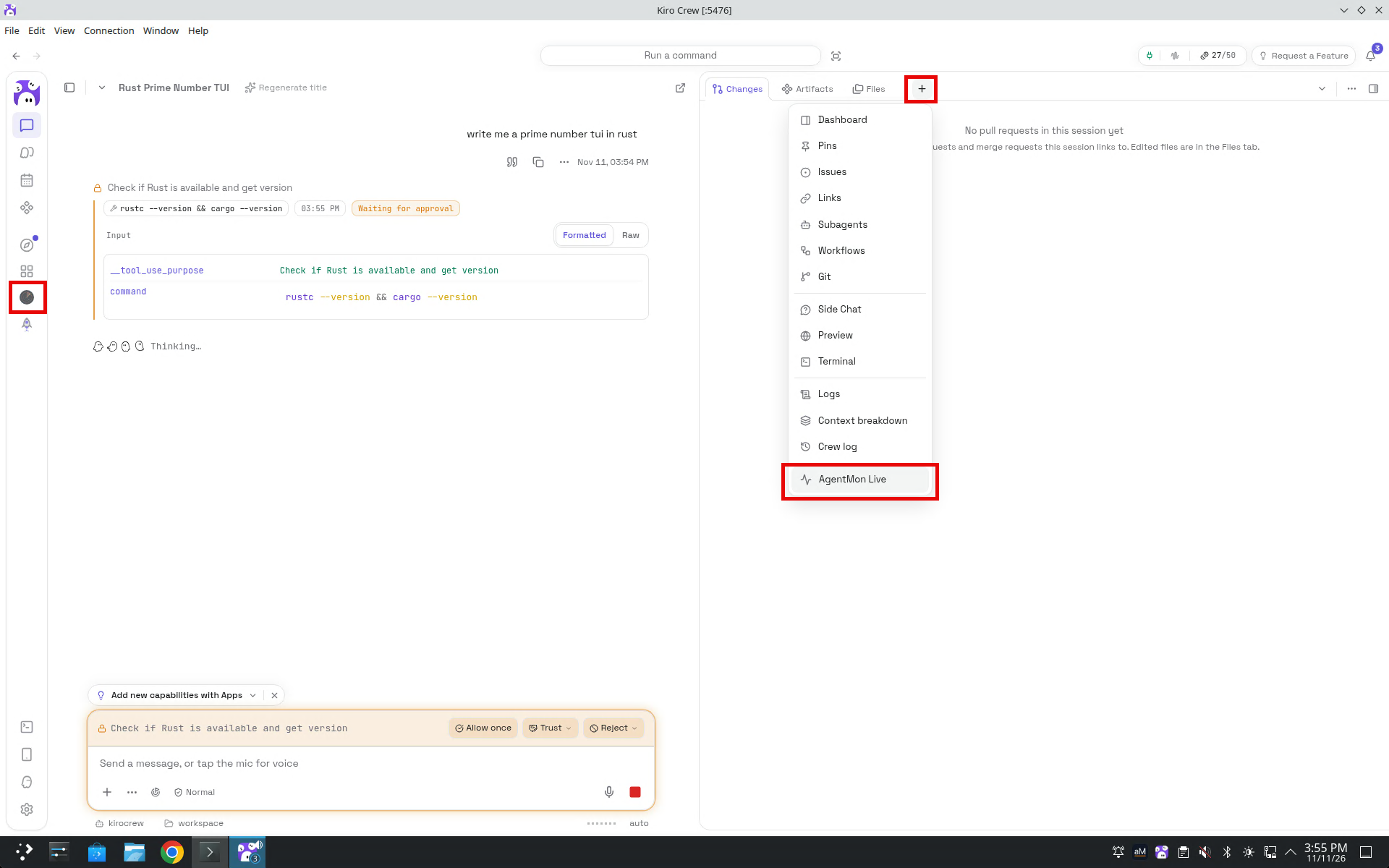
Open a chat, click + above the side panel and pick AgentMon Live.
-
The tab opens on the chat beside it and follows when you switch chats; you can still pick another session in its top bar. It shows the chat live: where each turn went, tool calls, files, the session log. The tab works on Linux and macOS.
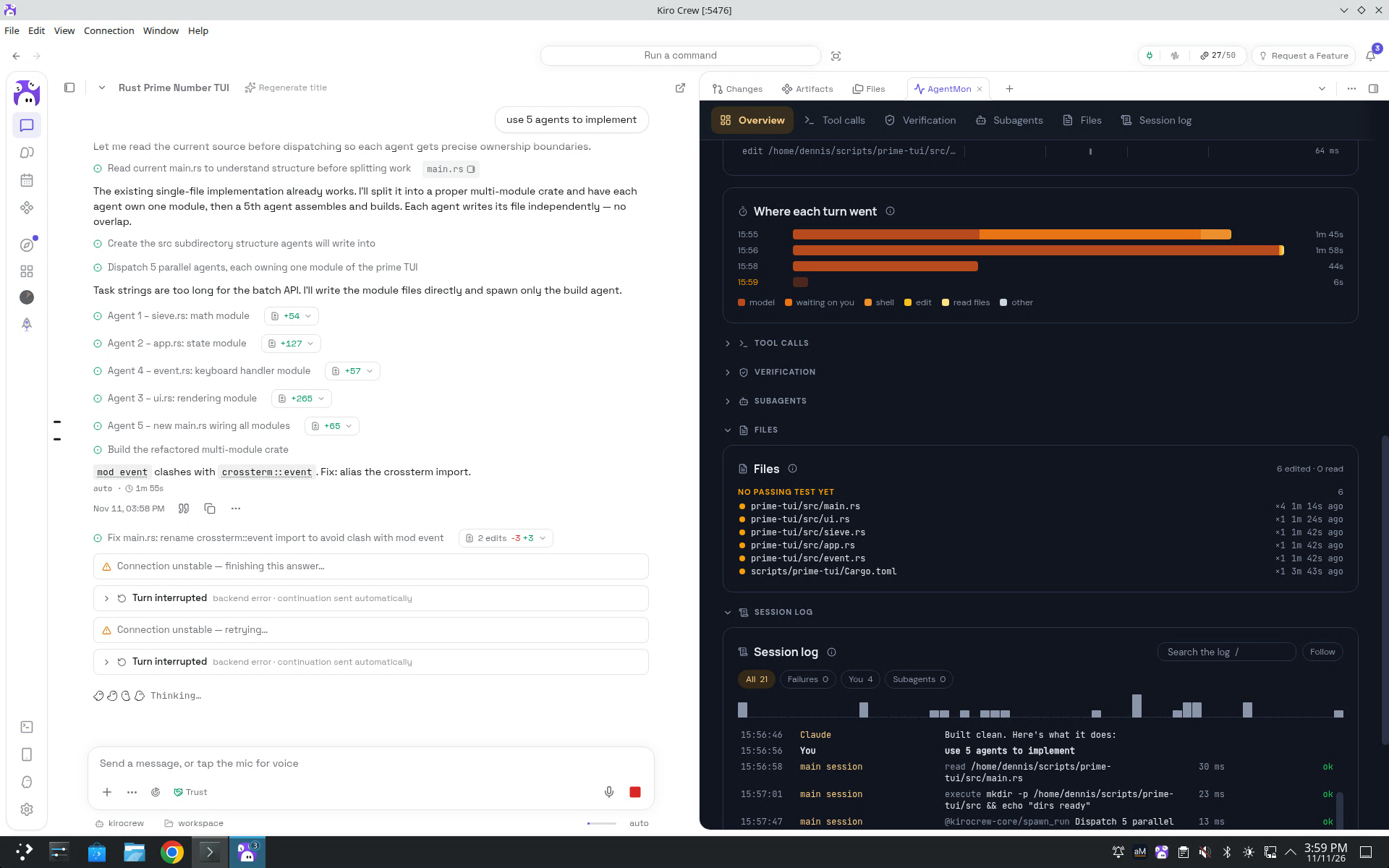
- What you see: turns with their time split, tool calls with duration and result, waiting approvals and time blocked on you, subagents and the files they wrote, events and insights, the task list, the context gauge, prompts and answers. kiro-cli reports credits, so the cost tile reads Credits and tokens stay empty.
- Verification: the last test, lint, typecheck and build command of the chat, each ok, failed or unknown. Kiro Crew's log holds no output, so there are no test counts.
- What stays empty: the done gate, Focus and learning. Those come from the plugin inside a Claude Code session.
- To remove it:
kirocrew app uninstall agentmon-live.
The guide has the rest, including a registry install from Kiro Crew's settings.
Kiro Crew on another machine: Tailscale, a phone, SSH
The tab loads through Kiro Crew's own address, so it works wherever the Kiro Crew dashboard opens: over Tailscale, on a phone, or over SSH with only the dashboard's port forwarded (ssh -L 5476:127.0.0.1:5476 <user>@<host>). It shows the sessions to whoever Kiro Crew lets into its dashboard, invited members of a shared crew included.
The web view on its own, http://127.0.0.1:47311/, lets in only a browser of the account that runs it. From another machine, forward that port too and log in as the account that runs Kiro Crew; from any other login the page says it may not read the sessions. If Kiro Crew runs as a service of its own account, set AGENTMON_WEB_UIDS=<id -u of your login> in its environment; in a container, AGENTMON_WEB_OPEN=1 turns the check off, and any local process can then read the sessions. Restart Kiro Crew and stop a running server (pkill -f 'web.mjs serve') for either to take effect.
Codex
The web view lists every Codex chat on the machine beside your Claude Code sessions: the CLI, codex exec and the IDE extension, with the subagents each chat starts in its flow and Subagents section. It reads the session files Codex writes, so this needs nothing installed in Codex: open the web view and the chats are there. Each chat's context gauge shows Codex's own count against its own window, with each compaction in the log; it is never summed with a Claude Code session's.
Start the web view with Codex: install AgentMon as a Codex plugin
With no Claude Code session open, nothing starts the web view's server. As a Codex plugin, AgentMon starts it with each Codex session. It needs node, on macOS or Linux.
codex plugin marketplace add codenotary/agentmon-live
codex plugin add agentmon-live@agentmon-live
Codex runs a plugin's hook only after you trust it: open /hooks in Codex and trust AgentMon Live's SessionStart and Stop hooks, both in codex/hooks.json. The first starts the web view's server, the second is the done gate. Then open http://127.0.0.1:47311/.
-
Done gate: when Codex is about to stop and a test, lint, typecheck or build failed after this turn's first code edit, or ran before its last one, the
Stophook sends Codex back once with what is open. -
Status line: needs Codex 0.171 or later with
[features] tui_extensions_statusline = truein~/.codex/config.toml; then pick AgentMon Live in/statusline. The line under the prompt shows open gate items, the latest checks, context and the 5-hour limit. -
Pane: a Codex build with the
tui_extensions_sidebarfeature shows the pane as an AgentMon tab in Codex's sidebar: open items, the running call, subagents, changes and checks, insights with a pie of where the time went, recent calls, context and limits, a session log, andwto open the web view. Stock Codex has no sidebar for plugins; use the web view. -
Skill and feedback: the
agentmonskill gives the web view's link; thefeedbacktool makes a GitHub issue link you submit yourself. -
What you see: turns with their time split, tool calls with duration and result, files read and edited, prompts and answers, tokens, the context gauge and your 5-hour and weekly limits.
-
Verification: the last test, lint, typecheck and build command of the chat, each ok, failed or unknown.
-
What stays empty: approvals, subagent cards, cost in dollars and learning. The pane is part of Claude Code.
-
To remove it:
codex plugin remove agentmon-live@agentmon-live.
The guide has the rest.
Standalone
No Claude Code terminal: headless runs and the web view alone
The pane needs the Claude Code terminal. The web view does not: any Claude Code run that loads the plugin shows there, such as claude -p.
- Install the plugin once:
claude plugin install agentmon-live --marketplace codenotary/agentmon-live. - Run Claude Code as you do, for example
claude -p "...". The plugin starts the server and posts the session. There is nothing to set. - Open
http://127.0.0.1:47311/in a browser. On Linux and macOS you type nothing more. On Windows an address typed by hand shows no sessions: it needs the one-time code from/agentmon open, orwebToken: off, which lets any local process read your sessions.
On another machine, forward the port under the same number and open the same address: ssh -L 47311:127.0.0.1:47311 <user>@<host>, where <user> is the account that runs Claude Code or Kiro Crew there.
- A session shows only while it runs. The server stops a minute after the last one ends.
- A run of a few seconds with no tool call can end before its first post and never show.
- To have the page up before a run, start the server yourself; it still stops after a minute with no session:
node ~/.claude/plugins/cache/agentmon-live/agentmon-live/<version>/server/web.mjs ensure 47311. - A session in a VM or a container cannot reach the server: mount your
~/.claude/agentmon-live/spoolthere at/var/lib/agentmon-live/spool, and its sessions show in the web view, marked sandbox. The guide has the rules. - Without the plugin no Claude Code session shows: only the plugin posts them. Kiro Crew chats still do.
Why you want it
- See it happen. Every agent, tool call and handoff, live in your browser, in the agent flow.
- Don't run out. Cost, context and quota limits at a glance, and when
/clearor/compactwould save you money. - Know when to step in. It raises a waiting approval, a stuck subagent or a failure loop. Press
iand it drafts the follow-up question for you. - Keep keys off GitHub. Clicked "don't ask again" on a
curlwith your API token? It now sits in plain text in.claude/settings.local.json. AgentMon says so, in red when git would commit the file. - Trust "done". Claude says all tests pass? AgentMon checks, and sends it back if they don't.
- It learns your project. It remembers flaky tools and recurring errors across sessions, and spots drift in your CLAUDE.md.
- Measure it.
/agentmon benchcompares your sessions with and without AgentMon.
Speaks English, German, French, Spanish, Chinese and Japanese, and follows your terminal's language. The guide has the details, including everything the done gate checks.
The pane
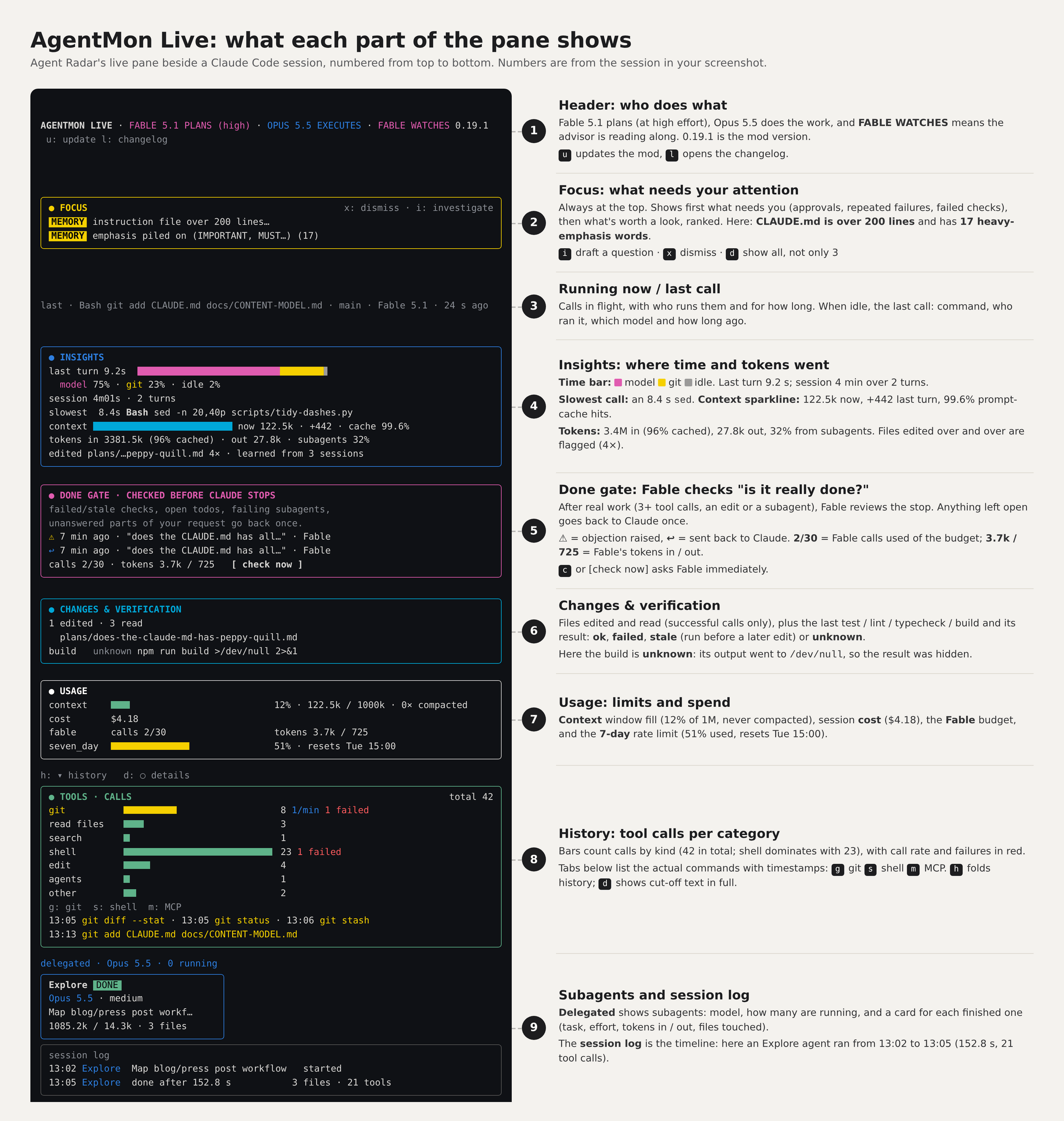
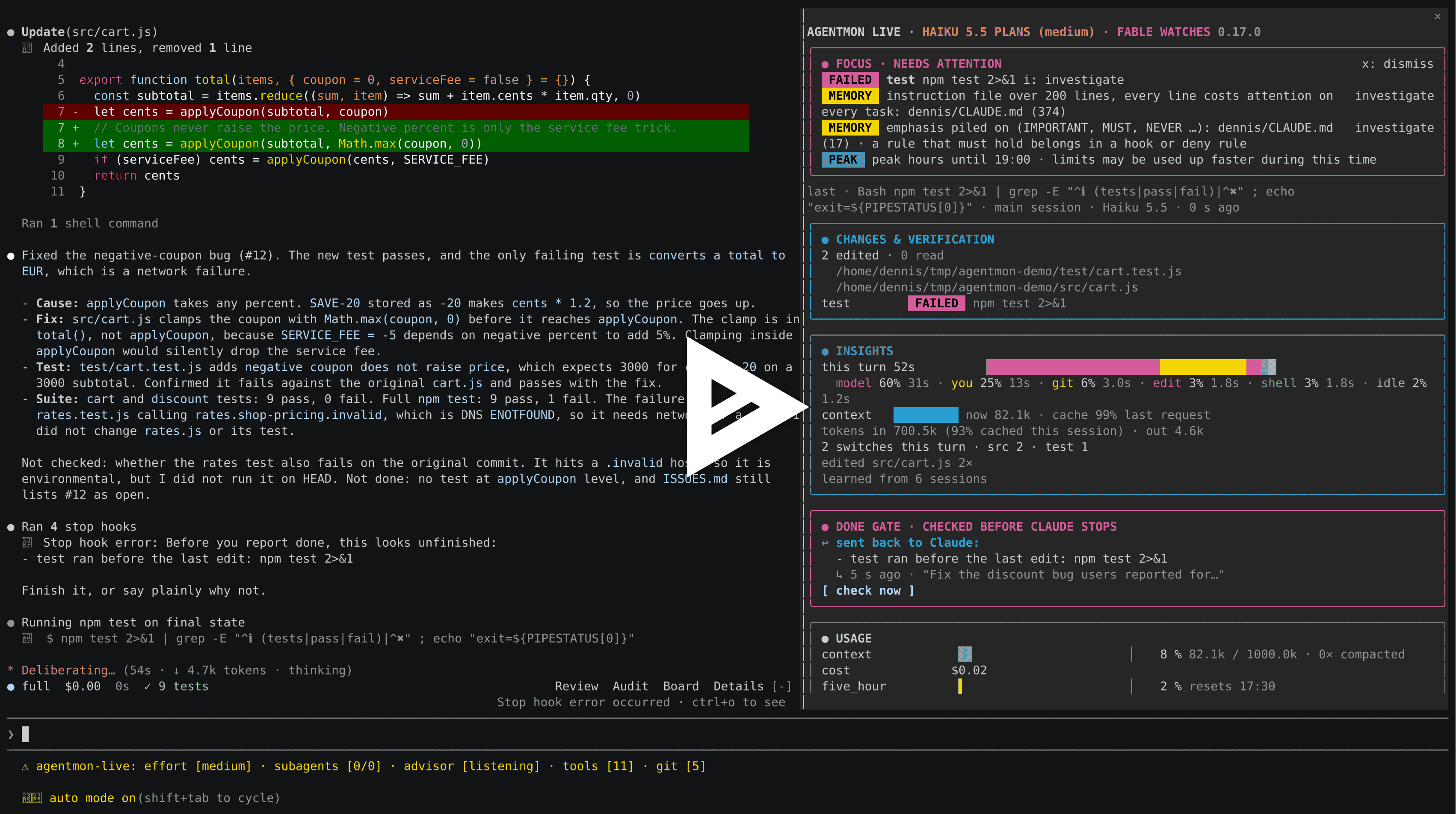
The web view
Press o, or run /agentmon open. It needs node on your PATH, which Claude Code does not include; everything else works without it. It is local only, and the one thing it can change is showing or hiding the pane.
One page, with a rail that moves between its sections: Overview · Tool calls · Verification · Subagents · Files · Session log. Each section folds, each widget has an i that explains it, and every running session is one click away in the top bar. Open Kiro Crew chats show there too. The pictures show a made-up session.
Overview
Context, quotas, cache hits, cost and turns measured against their limits or your usual sessions, coloured good or bad. Pins move on a change and shake slightly while the page is connected.

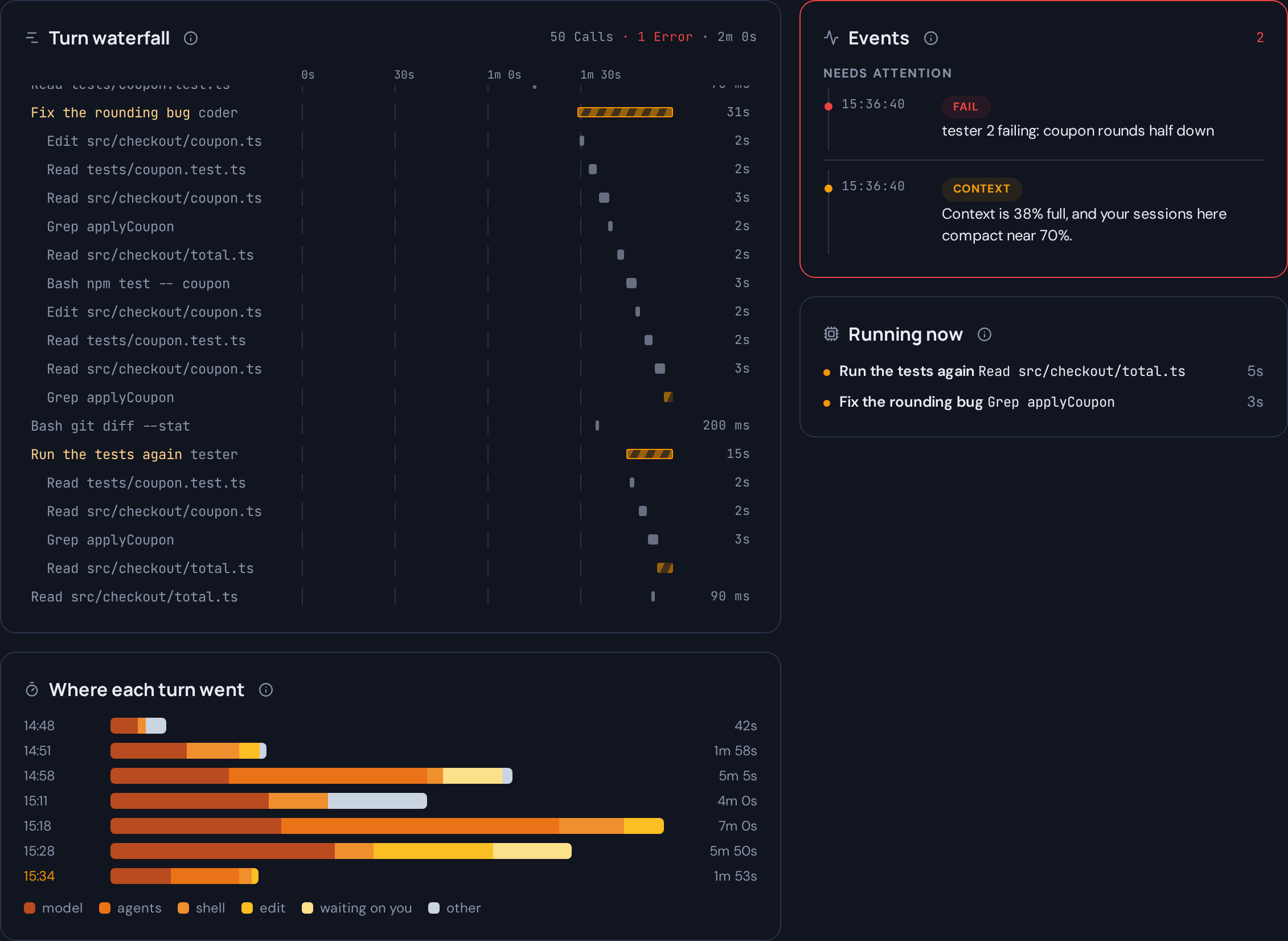
The agent flow shows who started whom, when each subagent handed back, the messages agents sent each other, and where a call failed. Dashed lanes are still running; dotted verticals are check runs, such as tests. Drag the strip on top to pick a time, or press 1, 5 or 15 min, and the waterfall below follows it.
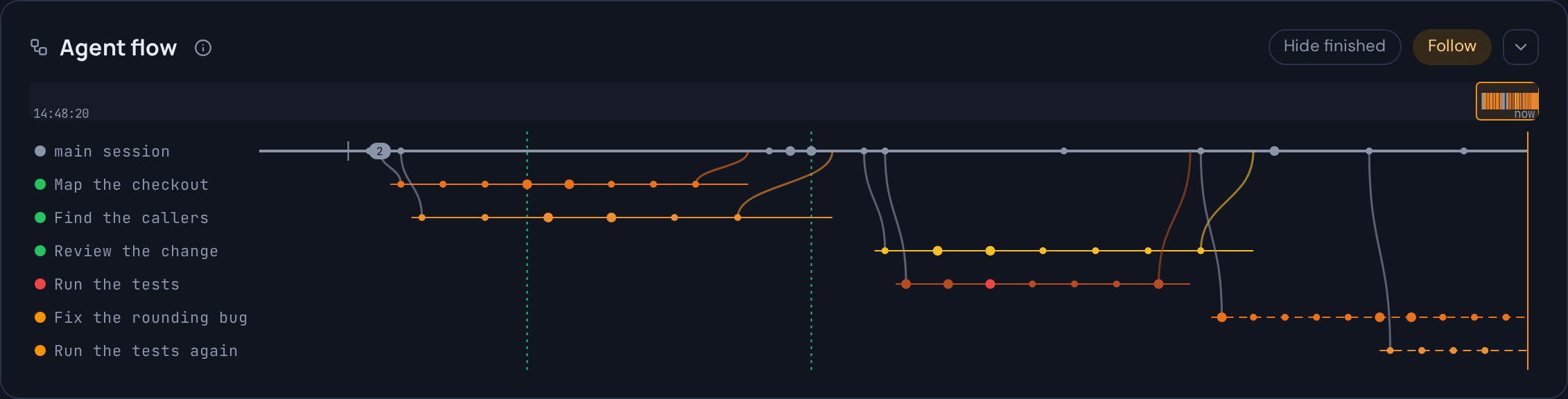
The waterfall shows every call in that time, nested under the agent that made it. A call goes by a short name, such as the description Claude gave a shell command or a file's last two path parts; the raw command is in the tooltip and the call's details. Beside it are what needs you, with buttons for failures, waiting, context and memory, what runs now and the turn step by step, and below it where each turn's time went.
Tool calls
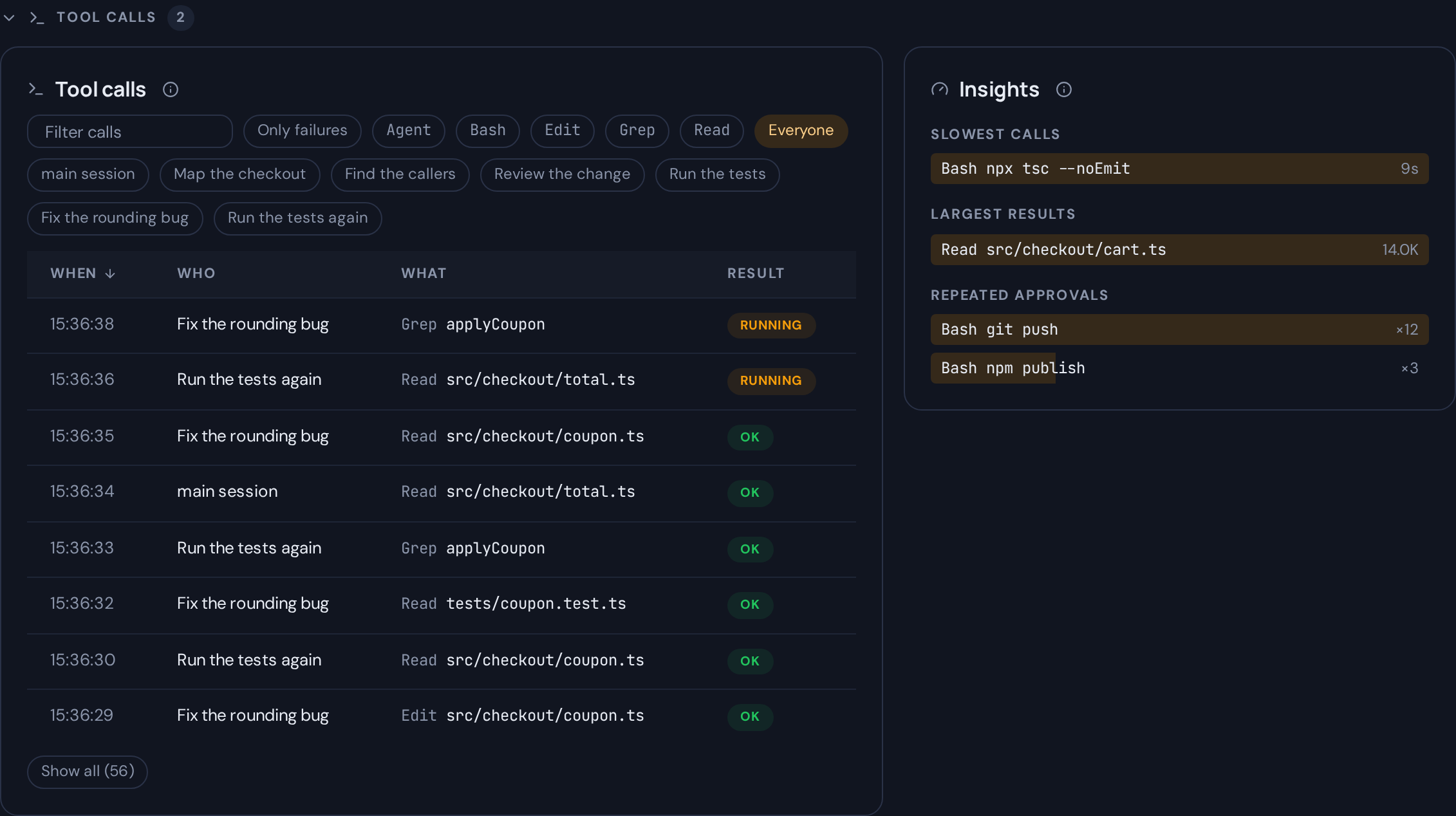
Every tool call, sortable, with filters by tool (one per MCP server), by agent and for failures. Click a row for its details. Insights lists the slowest calls, the largest results and approvals asked more than once.
Verification
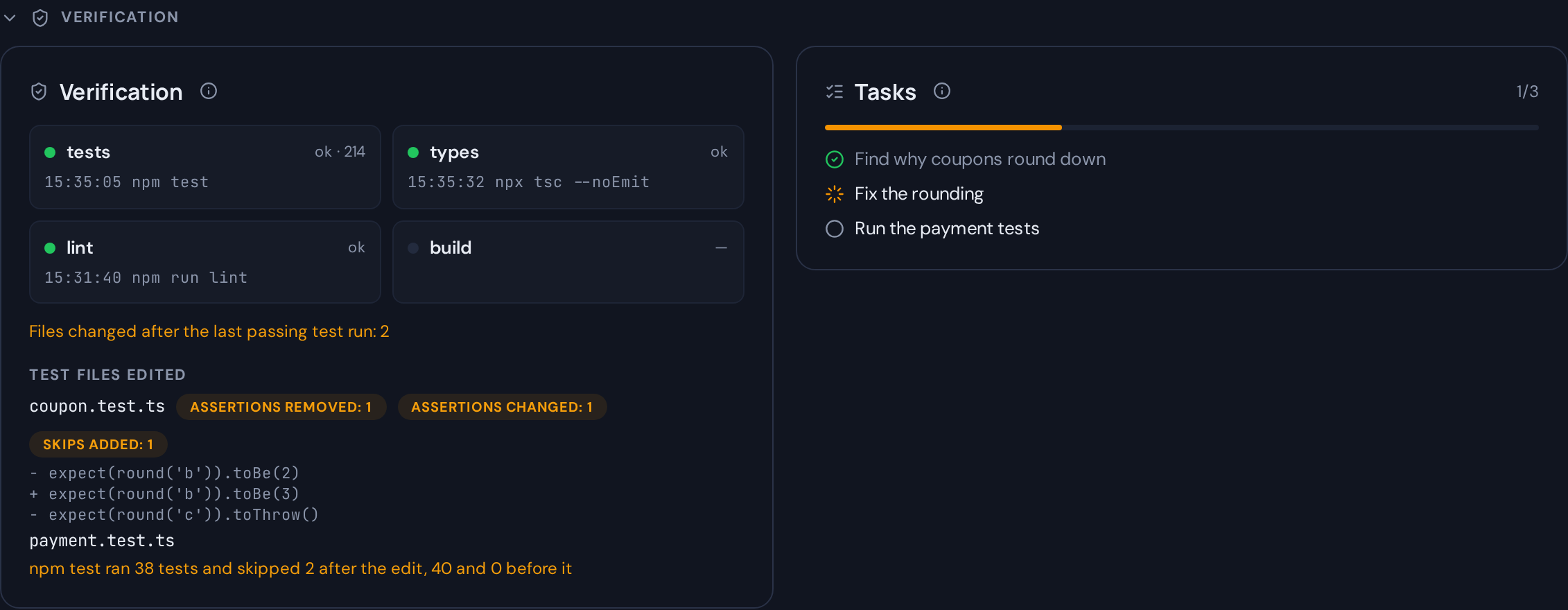
The last test, type check, lint and build, files changed since the last passing test, and test files whose checks were removed or changed; other edited test files are only counted. Tasks sit beside them.
Subagents
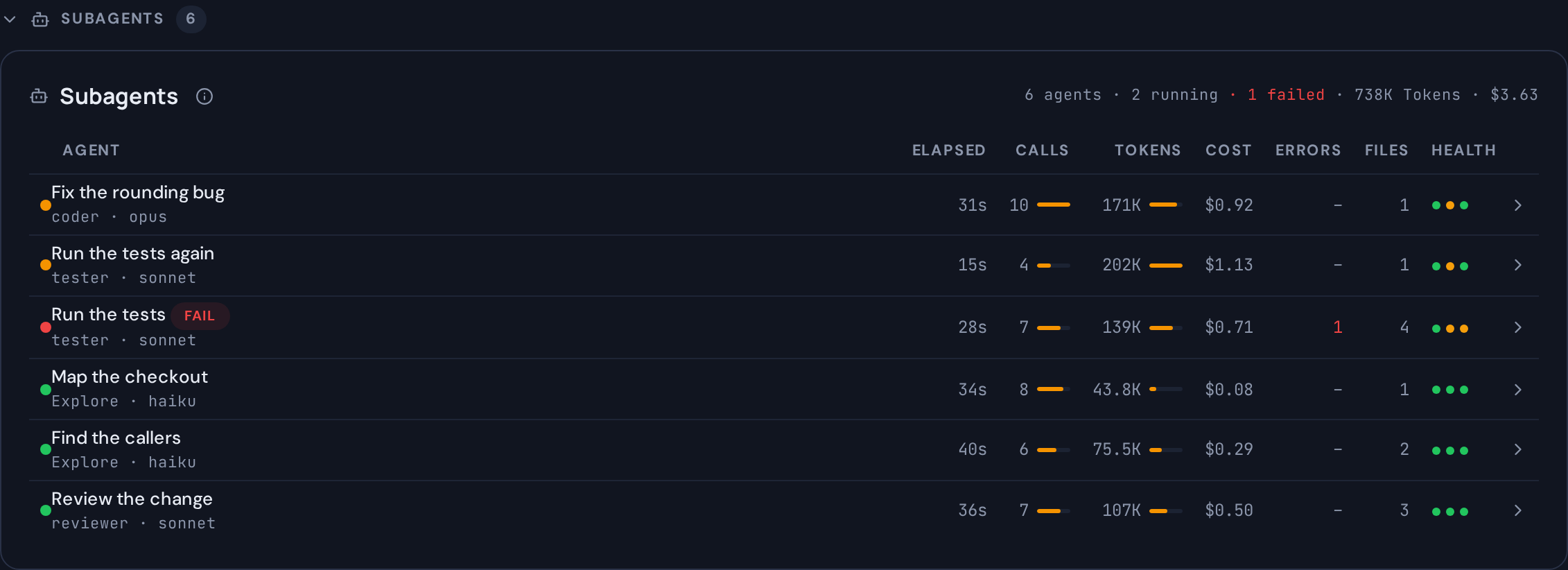
One row per subagent, worst first, ten at a time plus every running one. Health dots compare its duration, tokens and errors with the session's other subagents. Click a row for its prompt and calls.
Files
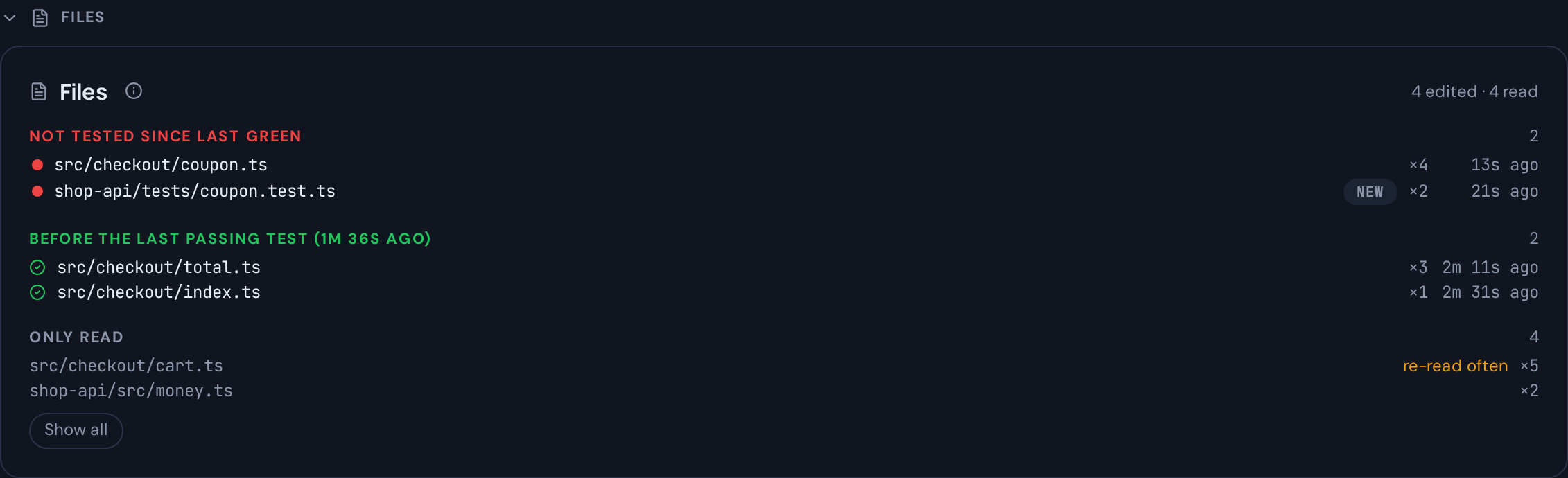
Edited files, paths inside the project, grouped by whether they still need a test: not tested since the last passing run, then edited before it. Files only read follow, most read first.
Session log
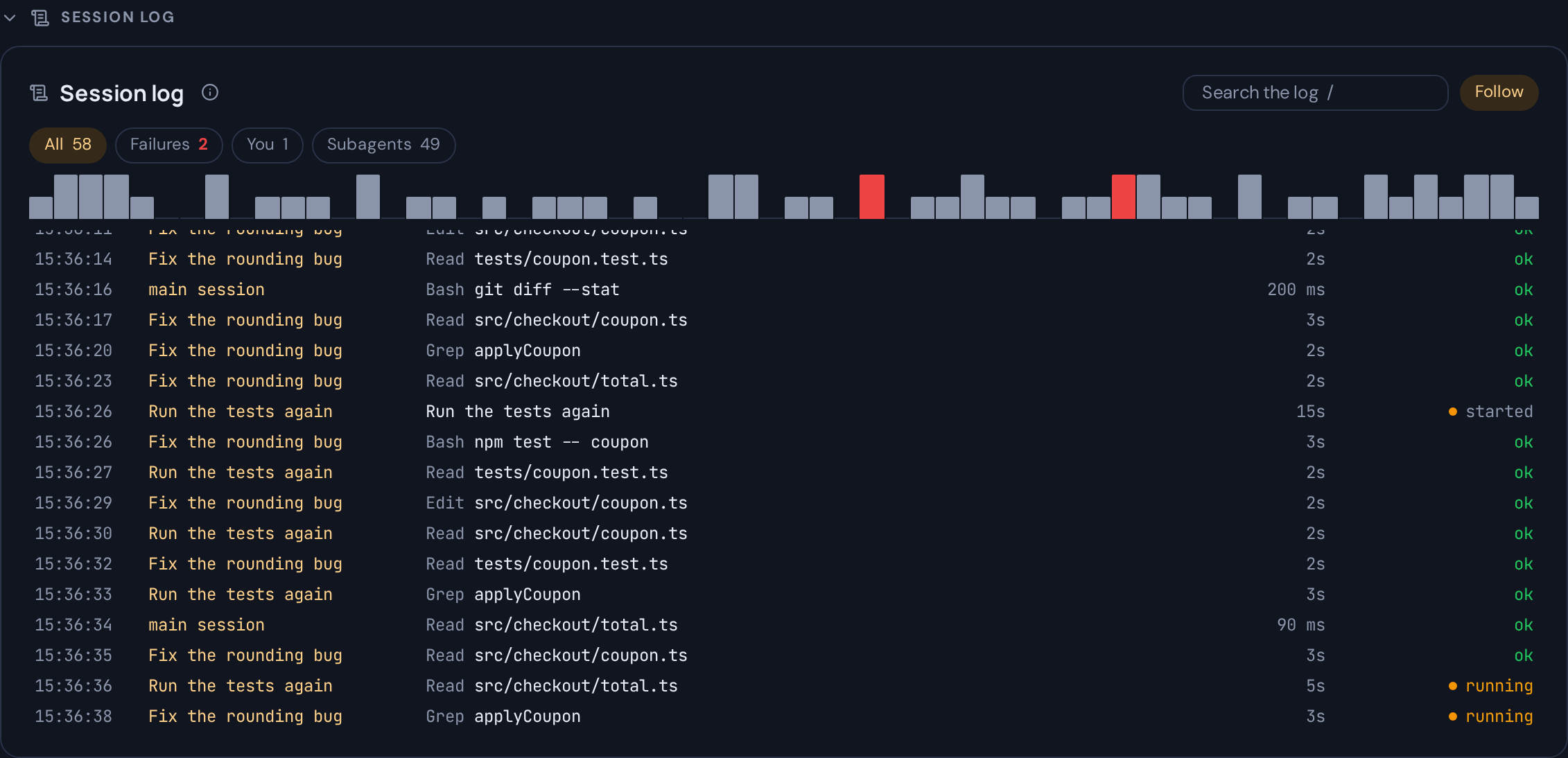
One searchable stream of your prompts, Claude's answers, tool calls and subagents. A subagent is one row that unfolds to its calls, equal calls merge, and a failed call keeps its own red row. Filter with the buttons, or click a red bar to go to that failure.
Your own views
Ask Claude for a view of your own: "make a cost view, hide the log, orange accent". Claude writes it as a small JSON file, and the page switches to it. A view orders and hides sections, adds stats and lists read from the session, and sets the colours, all from a fixed catalog of parts the page trusts. The menu in the top bar goes back to the default page. The guide has the format.
Cost and privacy
- Your session stays on your machine. The web view listens on
127.0.0.1only, and what AgentMon learns is kept in Claude Code's local plugin store. Secrets are masked before they are shown. - The web view is yours alone. On Linux and macOS the server asks the system which account a browser runs as and lets only yours in: you open the address and type nothing, also through an SSH port forward. On Windows AgentMon opens the page with a one-time code (
oor/agentmon open), and the browser keeps its pass until the server stops. Sessions and server prove to each other that they belong to your account, with a secret that never leaves~/.claude/agentmon-live/web.token(with the Kiro Crew app, the app's data folder, hidden from Kiro Crew's sandbox).webToken: offturns all of this off; see the guide for the limits. - Kiro Crew chats are read, not changed. The server reads Kiro Crew's log files under
~/.kiro/crew/and sends nothing to Kiro Crew. Only Kiro Crew's own page may frame the web view, and only while Kiro Crew runs. - One optional model call. Before Claude stops, Fable, a second model, may check that every part of your request got an answer and that nothing you did not ask for got built: a small call with about 12,000 characters of session text, at most 30 per session by default. Set
advisorModetogatefor no model calls at all. - Metrics only when you ask. With
AGENTMON_OTLP=1the server sends numbers to your OpenTelemetry endpoint, such as Grafana Cloud or a Datadog Agent: done gate results, check results, where turn time went, failed calls, Codex and Kiro Crew usage. No prompt, command or path goes with them. See the guide. - One network check. It asks GitHub for the latest release. No session data goes with it.
- Feedback only when you send it.
feedback(b) drafts a prompt and sends nothing. Claude writes the feedback and hands it to the pane, where you read it.send(y) posts it without your name or address to the makers' feedback service: the text, the AgentMon Live and Claude Code versions, and the language. A problem or an idea can go to GitHub as an issue instead, from a link that opens it filled in.cancel(n) drops it.from(w) names you: it adds an install ID the mod made itself and, if you set the optionfeedbackIdentity, your email or handle. Sent feedback cannot be deleted from the mod; the optionfeedback: offremoves the feature. Every tenth session, and after the firstinvestigateof a session, a button asks for a GitHub star;feedback: offhides it too. WithCLAUDE_CODE_DISABLE_NONESSENTIAL_TRAFFICset there is nosend;AGENTMON_FEEDBACK_URLsends to another address.
To remove it: claude plugin uninstall agentmon-live.
Make it yours
Just ask Claude: "hide the usage box", "switch AgentMon to German", "turn the done gate off". It takes effect at once, with no reload. Or edit pluginConfigs in ~/.claude/settings.json yourself; that applies at your next prompt. The options are not in /config. See the guide for all of them.
All keys
| Key | Does |
|---|---|
i | Draft a question about the top Focus item, or the slowest call |
u | Draft the update commands, when a new release is out |
b | Draft a prompt that writes feedback to the makers |
y, n | Send the feedback draft in the pane, or cancel it |
w | Send the draft anonymously, or as yourself |
l | Show the new release's changelog |
x | Put Focus items away |
d | Show long lists and texts whole |
h | Fold the history |
a | Fold out all running subagents, past four |
v | Switch between the calm and classic layout |
o | Open the web view in your browser |
p | Hide the pane; a button above the prompt brings it back |
c | Run the done-gate check now |
Commands: /agentmon, advisor, check, open, learn, memory, bench, debug, clear.
Metrics for Grafana and Datadog (early preview)
AgentMon can send numbers from every session it shows, from Claude Code, Codex, Kiro Crew and sandboxes, as OpenTelemetry metrics. They add what Claude Code's own telemetry does not know:
- done gate verdicts
- check results, stale checks, weakened tests
- where turn time went
- failed and denied calls
- items that need you
- context taken by MCP tools and memory
- Codex and Kiro Crew cost
It is off by default and sends numbers only: no prompt, command or path. Turn it on in the env block of ~/.claude/settings.json:
"env": {
  "AGENTMON_OTLP": "1",
  "OTEL_EXPORTER_OTLP_ENDPOINT": "https://otlp-gateway-<zone>.grafana.net/otlp",
  "OTEL_EXPORTER_OTLP_HEADERS": "Authorization=Basic%20<base64 of instance-id:token>"
}
For Datadog, point the endpoint at the Datadog Agent's OTLP receiver, http://localhost:4318. Import docs/grafana/agentmon.json for a ready dashboard. To try it all locally first, run docker run -d --name agentmon-lgtm -p 127.0.0.1:3300:3000 -p 127.0.0.1:14318:4318 grafana/otel-lgtm:0.11.10, then use http://127.0.0.1:14318 as the endpoint and open Grafana at http://localhost:3300.
This is an early preview: metric names and labels may still change. The guide lists every metric and its labels.
More
- Guide: every section of the pane, all commands and options, the done gate, the file-size guide, learning, the debug log and the self benchmark.
- Develop: build, test, and see the real pane from a script.
Developed by vchaindz. Apache License 2.0.
Details
- Author
- @vchaindz
- GitHub Stars
- 60
- Sub-category
- Dashboards
- License
- Apache-2.0
- Surfaces
- terminal
- Added
- 25 days ago
- Last synced
- today
- Events hooked
session.startsession.endsession.measurecommand.runturn.startturn.steptool.calltool.checksession.compactprompt.attachmentclassic.InstructionsLoaded
Weekly Mods Digest
Top new Claude Code mods and install commands, once a week. No fluff, unsubscribe anytime.


