
Claude Code Tabs
A mod for the Code tab of Claude Desktop that turns your projects into horizontal tabs above the prompt, like browser tabs
claude plugin validate to auditGuide →Writes files, executes local shell processes, or programmatically drives Claude.
Statically scanned from hooks & source. Learn how to audit
Claude Tabs — project tabs for Claude Desktop
English · Русский
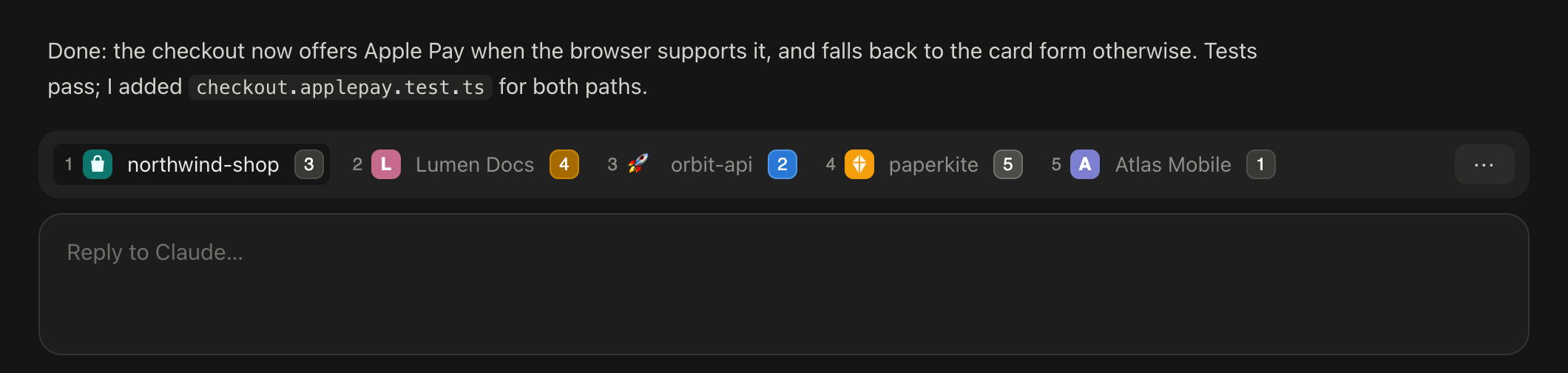
A mod for the Code tab of Claude Desktop (macOS) that turns your projects into horizontal tabs above the prompt, like browser tabs:
- Pinned projects as tabs, each with its icon: the project's own favicon, an emoji, a picture you choose, or a colored letter.
- One click opens the project's last session, the one you were in most recently. A project with no session yet opens a new one in its folder.
- ⌃1…⌃9 (or ⌘1…⌘9) switch tabs while Claude is in front.
- Live session status, colored like the desktop's sidebar dots: the session count on each tab turns amber when a session waits for you (a permission or a question), blue when one finished and is unread, grey while one runs.
- Hover a tab to see its 5 most recent sessions with their status dots, and jump straight to any of them.
- A settings pane (the
⋯button or/tabs): keyboard shortcuts, pin and unpin projects, reorder them, pick icons (file picker, emoji, or automatic), refresh icons. - Speaks your language: English, Deutsch, Français, Italiano, Español, Українська, Русский, following Claude Desktop's own language setting; English for every other language.
It is built on Claude Code's mods (plugins of function hooks), so it does not patch the Claude app: updates of Claude don't break it, and removing the plugin removes it.
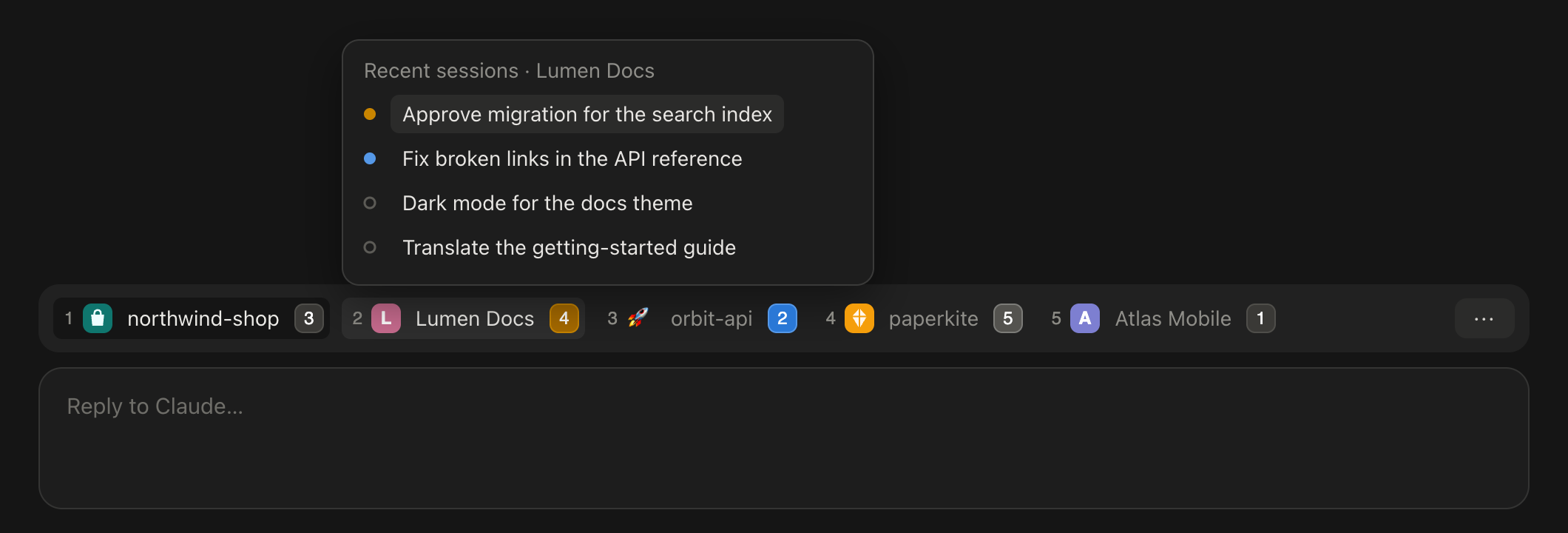
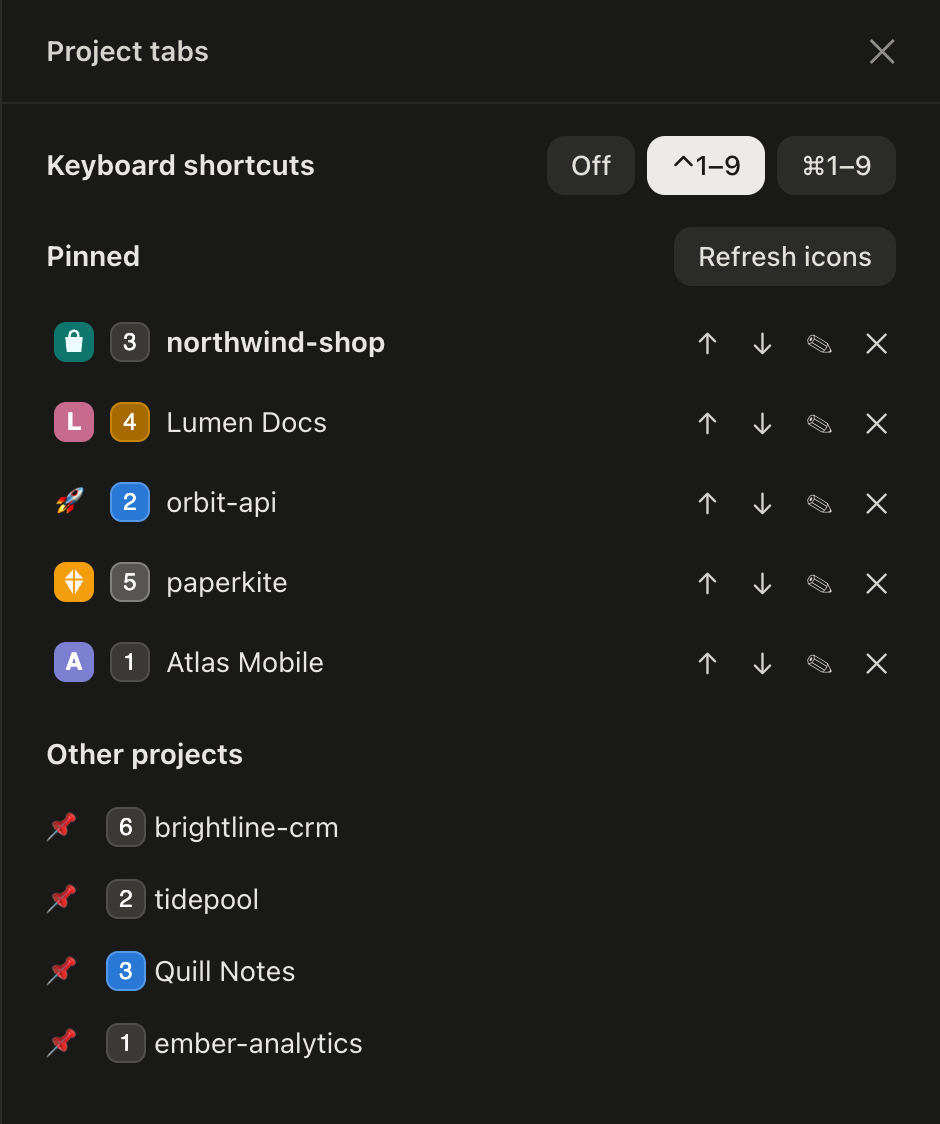
Demo projects. The tabs, icons, counts and dots are drawn by the mod's own code; docs/demo/render.ts renders these pictures.
Requirements
- macOS and Claude Desktop with mods support (Claude Code engine 2.1.289 or later, shipped with Claude Desktop 2.26454 and later).
- For keyboard shortcuts: Xcode Command Line Tools (
xcode-select --install), to build the small helper that listens for the keys. - The mod draws in Claude Desktop's Code tab. It also loads in the terminal
claude, where it draws a simpler text version of the tabs.
Install
From the marketplace (recommended)
claude plugin marketplace add tripolskiydigital/claude-tabs
claude plugin install project-tabs@claude-tabs
Then open a new session in Claude Desktop (or quit Claude with ⌘Q and open it again for sessions that were already open). To update later:
claude plugin update project-tabs@claude-tabs
From a clone
git clone https://github.com/tripolskiydigital/claude-tabs.git ~/claude-tabs
Then add the folder to env in ~/.claude/settings.json:
{
  "env": {
    "CLAUDE_CODE_PLUGIN_DIRS": "/Users/you/claude-tabs"
  }
}
Use one way or the other, not both: with both, the mod loads twice.
Using it
- Click 📌 Pin this project in the band above the prompt, or open the pane with
⋯and pin projects from the list. The list shows every folder that has had a Code session in Claude Desktop. - Click a tab to open that project's last session. Hover it for its recent sessions.
- In the pane, ✎ opens a project's icon editor: Choose file… (PNG, JPG, SVG and the rest; pictures are scaled to 64px and copied, so moving the original is fine), Automatic, or an emoji. Refresh icons looks for favicons again.
The icon is found automatically when the project has one: favicon.svg/png/ico, icon.svg/png, apple-touch-icon.png, in the project root, public/, app/, static/ or assets/, up to four folders deep (monorepos included). To set your own without the pane, put .claude/icon.svg or .claude/icon.png in the project.
Keyboard shortcuts
Shortcuts are off until you switch them on: in the pane, Keyboard shortcuts → ⌃1–9 or ⌘1–9. The tabs then show their number, and ⌃1 opens the first pinned project's last session, ⌃2 the second, up to 9.
A mod can't bind keys in Claude Desktop itself, so switching shortcuts on builds a tiny helper from helper/tabs-hotkeys.swift (about 100 lines, in this repository) with swiftc, and has launchd run it with launchctl submit as com.github.tripolskiydigital.claude-tabs.hotkeys. No launchd file is written: the job lasts until you log out, and the mod submits it again at the next session start while shortcuts are on. The helper holds the keys only while Claude Desktop is the frontmost app; in any other app ⌃1…⌃9 do what they always did. It needs no Accessibility or other permissions and makes no network requests. Off stops it with launchctl remove.
⌘1–⌘3 are Claude Desktop's own shortcuts (new chat, task, code session); the ⌘ variant takes them over while it is on. If ⌃1…⌃9 switch desktops on your Mac (System Settings → Keyboard → Keyboard Shortcuts → Mission Control), use ⌘ or turn those off.
How it works
Everything stays on your Mac; the mod makes no network requests.
| What | Where it comes from |
|---|---|
| Projects and their sessions | ~/Library/Application Support/Claude/claude-code-sessions/**/local_*.json, the desktop's own session records (folder, title, last focus) |
| Live status (running, waiting, finished) | ~/.claude/sessions/*.json, written by every running Claude Code process |
| Interface language | the locale field of ~/Library/Application Support/Claude/config.json, picked out by grep: the mod never reads the file itself, which also holds account data |
| Switching sessions | the desktop's deep link claude://code/continue?session=…, opened with open |
| Pins and chosen icons | the plugin's own store (Claude Code keeps it); a chosen picture is kept there, scaled to 64px |
| Keyboard shortcuts | ~/.claude/project-tabs/hotkeys.json (which tab leads where), read by the helper ~/.claude/project-tabs/tabs-hotkeys |
"Unread" means the session finished after you last looked at it. The mod polls these files every 4 seconds, reading only the ones that changed.
What the mod reads, writes and runs
What the mod sends, and where: nothing leaves your Mac. The mod makes no network requests and runs no network tool. What it reads stays inside the mod, apart from three things handed to programs on the same Mac: a claude://code/… link with a session id or a project folder, opened by Claude Desktop through open; the path of a picture you chose, given to sips to scale it; and the tab links in hotkeys.json, read by the shortcut helper. None of them reach another service.
Reads
- Claude Desktop's session records,
~/Library/Application Support/Claude/claude-code-sessions/**/local_*.json: each session's folder, title, archive flag and times. - Claude Code's running-session files,
~/.claude/sessions/*.json: each running session's status. - Pinned projects' folders, up to four levels deep, for a favicon (
favicon.*,icon.*,apple-touch-icon.*and a project's own.claude/icon.*), skippingnode_modules,.git, build output and the like. - A picture you choose as an icon.
- The environment variables
HOMEandTMPDIR.
Writes one file of its own: ~/.claude/project-tabs/hotkeys.json, the modifier and where each tab 1…9 leads, written only while keyboard shortcuts are on. The shortcut helper reads it and acts on it (it opens those links when you press the keys); nothing else reads it. Pins and chosen icons go to the plugin store that Claude Code keeps for every plugin. Two programs write files when you ask for what they do: swiftc writes the helper to ~/.claude/project-tabs/tabs-hotkeys when you switch shortcuts on, and sips writes a scaled picture to $TMPDIR/claude-tabs-icon.png when you choose one.
Runs, each by name; the arguments shown in angle brackets are paths or text worked out at the call:
| Program | When | Why |
|---|---|---|
open claude://code/… | you click a tab or a recent session, or press a shortcut | switches Claude Desktop to that session |
ps -A -o pid= | every 4 seconds | tells running sessions from files left by sessions that crashed |
grep -o -m 1 "locale"… <home>/Library/Application Support/Claude/config.json | at session start, and when Claude's settings change | picks out the interface language without the mod reading the file, which also holds account data |
osascript <plugin>/helper/choose-icon.applescript "<prompt>" | you press Choose file… | shows the system's file dialog; the script is in this repository |
sips -s format png -Z 64 <picture> --out $TMPDIR/claude-tabs-icon.png | after you choose a picture | scales it to 64px |
swiftc -O -o <home>/.claude/project-tabs/tabs-hotkeys <plugin>/helper/tabs-hotkeys.swift | you switch shortcuts on, or the plugin updates while they are on | builds the shortcut helper; on Command Line Tools that ship a Swift module map twice (a known packaging bug that stops every Swift build) it adds -vfsoverlay <plugin>/helper/build/overlay.yaml, shipped in this repository, which maps the duplicate onto an empty file |
launchctl list / submit / remove com.github.tripolskiydigital.claude-tabs.hotkeys | shortcuts on, at session start, shortcuts off | starts, checks and stops the shortcut helper, with no launchd file |
Hooks and commands
session.start: registers the/tabscommand, starts the 4-second refresh, and restarts the shortcut helper if shortcuts are on.command.runfor/tabsonly: opens the settings pane. No other command is touched.ui.renderfor the band above the prompt and for the mod's own pane: draws the tabs and the pane.
The mod does not hook prompts, tool calls or the conversation, and adds no tools or agents for Claude.
Limits
- Mods can't change the app's own window: the tabs live above the prompt of each session, and the sidebar stays.
- Session status comes from processes running on this Mac; a session whose process has ended shows no status.
- The look follows Claude Desktop's current UI; a large redesign of the app may need an update of the mod.
Uninstall
Switch keyboard shortcuts Off in the pane first (it stops the helper), then:
claude plugin uninstall project-tabs@claude-tabs
The shortcut helper and hotkeys.json are in ~/.claude/project-tabs/; delete the folder to remove them. Pins and chosen icons go with the plugin's store.
Development
claude plugin validate .
claude plugin test .
The module is hooks/register.tsx, helpers are in hooks/lib.ts and hooks/hotkeys.ts, translations in hooks/i18n.ts, the state contract in types/index.d.ts, the shortcut helper in helper/tabs-hotkeys.swift. The types of the mod API are written by Claude Code into .claude-plugin/types/ when it loads the plugin. To iterate with hot reload, ask Claude in a Code session to work on the mod with the plugin-authoring skill, pointing the session's mods folder at your clone.
Issues and pull requests are welcome.
License
Details
- Author
- @tripolskiydigital
- GitHub Stars
- 2
- Sub-category
- Interface
- License
- Apache-2.0
- Surfaces
- terminal
- Added
- 1 months ago
- Last synced
- 3 days ago
- Events hooked
session.startcommand.runui.render
Weekly Mods Digest
Top new Claude Code mods and install commands, once a week. No fluff, unsubscribe anytime.


