
Claude Hooks SDK
PHP/Laravel-style hooks SDK for Claude Code — define, compose, and test hooks with a clean API, middleware chaining, and built-in test helpers.
Claude Hooks SDK



A Laravel-inspired PHP SDK for building Claude Code hook responses with a clean, fluent API. This SDK makes it easy to create structured JSON responses for Claude Code hooks using an expressive, chainable interface.
Claude Code hooks are user-defined shell commands that execute at specific points in Claude Code's lifecycle, providing deterministic control over its behavior. For more details, see the Claude Code Hooks documentation.
Installation
You can install the package via composer:
composer require beyondcode/claude-hooks-sdk
Usage
Creating a Claude Hook
Here's how to create a PHP script that Claude Code can use as a hook:
Step 1: Create your PHP hook script
Create a new PHP file (e.g., validate-code.php) using the SDK:
<?php

require 'vendor/autoload.php';

use BeyondCode\ClaudeHooks\ClaudeHook;

// Read the hook data from stdin.
// This will automatically return the correct Hook instance (for example PreToolUse)
$hook = ClaudeHook::create();

// Example: Validate bash commands
if ($hook->toolName() === 'Bash') {
    $command = $hook->toolInput('command', '');

    // Check for potentially dangerous commands
    if (str_contains($command, 'rm -rf')) {
        // Block the tool call with feedback
        $hook->response()->block('Dangerous command detected. Use caution with rm -rf commands.');
    }
}

// Allow other tool calls to proceed
$hook->success();
Step 2: Register your hook in Claude Code
- Run the
/hookscommand in Claude Code - Select the
PreToolUsehook event (runs before tool execution) - Add a matcher (e.g.,
Bashto match shell commands) - Add your hook command:
php /path/to/your/validate-code.php - Save to user or project settings
Your hook is now active and will validate commands before Claude Code executes them!
Hook Types and Methods
The SDK automatically creates the appropriate hook type based on the input:
use BeyondCode\ClaudeHooks\ClaudeHook;
use BeyondCode\ClaudeHooks\Hooks\{PreToolUse, PostToolUse, Notification, Stop, SubagentStop};

$hook = ClaudeHook::create();

if ($hook instanceof PreToolUse) {
    $toolName = $hook->toolName();           // e.g., "Bash", "Write", "Edit"
    $toolInput = $hook->toolInput();         // Full input array
    $filePath = $hook->toolInput('file_path'); // Specific input value
}

if ($hook instanceof PostToolUse) {
    $toolResponse = $hook->toolResponse();   // Full response array
    $success = $hook->toolResponse('success', true); // With default value
}

if ($hook instanceof Notification) {
    $message = $hook->message();
    $title = $hook->title();
}

if ($hook instanceof Stop || $hook instanceof SubagentStop) {
    $isActive = $hook->stopHookActive();
}
Response Methods
All hooks provide a fluent response API:
// Continue processing (default behavior)
$hook->response()->continue();

// Stop Claude from continuing with a reason
$hook->response()->stop('Reason for stopping');

// For PreToolUse: approve or block tool calls
$hook->response()->approve('Optional approval message')->continue();
$hook->response()->block('Required reason for blocking')->continue();

// Suppress output from transcript mode
$hook->response()->suppressOutput()->continue();
Example Hooks
Code Formatter Hook
Automatically format PHP files after edits:
<?php

require 'vendor/autoload.php';

use BeyondCode\ClaudeHooks\ClaudeHook;
use BeyondCode\ClaudeHooks\Hooks\PostToolUse;

$hook = ClaudeHook::create();

$filePath = $hook->toolInput('file_path', '');

if (str_ends_with($filePath, '.php')) {
    exec("php-cs-fixer fix $filePath", $output, $exitCode);

    if ($exitCode !== 0) {
        $hook->response()
            ->suppressOutput()
            ->merge(['error' => 'Formatting failed'])
            ->continue();
    }
}
Security Validator Hook
Prevent modifications to sensitive files:
#!/usr/bin/env php
<?php

require 'vendor/autoload.php';

use BeyondCode\ClaudeHooks\ClaudeHook;
use BeyondCode\ClaudeHooks\Hooks\PreToolUse;

$hook = ClaudeHook::fromStdin(file_get_contents('php://stdin'));

if ($hook instanceof PreToolUse) {
    // Check file-modifying tools
    if (in_array($hook->toolName(), ['Write', 'Edit', 'MultiEdit'])) {
        $filePath = $hook->toolInput('file_path', '');

        $sensitivePatterns = [
            '.env',
            'config/database.php',
            'storage/oauth-private.key',
        ];

        foreach ($sensitivePatterns as $pattern) {
            if (str_contains($filePath, $pattern)) {
                $hook->response()->block("Cannot modify sensitive file: $filePath");
            }
        }
    }
}

// Allow all other operations
$hook->response()->continue();
Notification Handler Hook
Custom notification handling:
<?php

require 'vendor/autoload.php';

use BeyondCode\ClaudeHooks\ClaudeHook;
use BeyondCode\ClaudeHooks\Hooks\Notification;

$hook = ClaudeHook::create();

// Send to custom notification system
$notificationData = [
    'title' => $hook->title(),
    'message' => $hook->message(),
    'session' => $hook->sessionId(),
    'timestamp' => time()
];

// Send notification to Slack, Discord, etc.

$hook->success();
Testing
composer test
Changelog
Please see CHANGELOG for more information on what has changed recently.
Security Vulnerabilities
Please review our security policy on how to report security vulnerabilities.
Credits
License
The MIT License (MIT). Please see License File for more information.
More Hooks
johnlindquist Claude Hooks
Script Kit-style Claude Code hooks by John Lindquist — quick-launch automations, editor integrations, and interactive prompts triggered by Claude events.
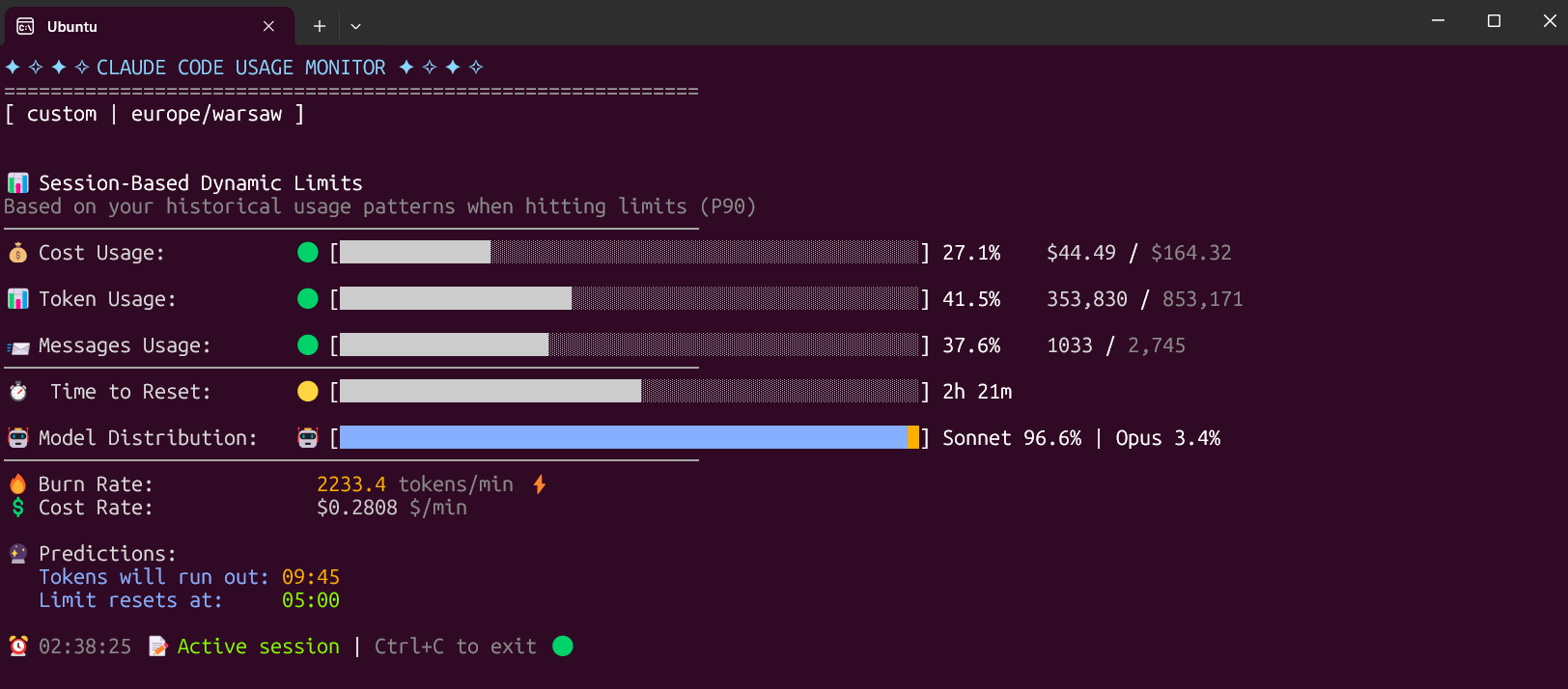
Claude Code Usage Monitor
Hooks that monitor and enforce Claude Code API usage limits — track daily token spend, set budget alerts, and auto-pause when limits are reached.
CCHooks
A collection of practical Claude Code hooks — auto-lint on save, run tests after edits, validate commit messages, and send desktop notifications on task completion.