
Claudex
Claude and Codex, working together from Claude Code. Reviews and second opinions, tasks in their own worktree, build loops, shared jobs and pictures: Codex on your ChatGPT plan, brought into Claude Code, live in the chat.
claude plugin validate to auditGuide →Writes files, executes local shell processes, or programmatically drives Claude.
Statically scanned from hooks & source. Learn how to audit
Claudex
Claude, Codex and Gemini, working together from Claude Code.
Reviews and second opinions, councils that score the work until it's ready, tasks in their own worktree, build loops, shared jobs and pictures:
Codex on your ChatGPT plan and Gemini on your Google plan, one or both at once, brought into Claude Code, live in the chat.








What it does · Conversations · Examples · Install · Settings · FAQ

[!NOTE] Claudex is an unofficial community mod. It isn't made by, endorsed by, or affiliated with Anthropic, OpenAI or Google. "Claude" and "Clawd" belong to Anthropic; "Codex" and "ChatGPT" belong to OpenAI; "Gemini" and "Antigravity" belong to Google.
What it does
You talk to Claude as usual. When you want a second pair of eyes or a second pair of hands, ask Claude to bring in Codex, Gemini, or both. You can watch them work together on a little stage above the prompt.
✨ Gemini, tooSay "ask Gemini", "have both review it" or "GPT and Gemini, build it side by side". Gemini (Google's, on your own Google plan) runs through Antigravity's own agent, which Claudex starts by itself: sign in to Antigravity once, and its window never needs to be open. Gemini works everywhere Codex does: reviews, questions, plans, tasks in their own worktree, councils, notes and side questions mid-run. With both, all three share the stage: one card, one row and one page for a pair (each side's answer a tap away), a joint review of three looks, a task each builds in its own worktree (Claude keeps the better), and one board for a council of three. Both, where it fits, is the default once Gemini is ready; pick who works, and each one's model and effort, right in the New panel, and your picks are saved (Gemini 4 Neon, high, to start). Gemini has a companion of its own on the stage: Gem. | |
⚖️ CouncilsSay "council this until you both give it 9/10". Claude and Codex each review the work on their own and give it a score out of 10, to one decimal (8.8, say), sealed until both are in, then revealed together. Below your bar, Claude fixes what's in scope, runs the checks, and they score it again, round after round, until both reach it. Ideas beyond the brief are parked, not taken on, so the scope stays where it is. For UI work, give it a page: Claudex screenshots it at desktop and phone size every round for both of them, and Claude can add its own screenshots of what a page load won't show. At the end you get a scoreboard, ready for your pull request. | |
🔍 Reviews and second opinionsCodex reviews your uncommitted changes, a branch, a commit or specific files, with a focus on correctness, security, performance, tests, simplicity or UX. Claude checks each finding and marks whether it agrees, disagrees or is unsure, and you see both views side by side. |
🤝 Joint reviewsClaude and Codex each review on their own, without seeing the other's findings. Then they compare notes, argue out where they disagree, and agree on one solution. |
🛠️ Tasks in their own worktreeCodex builds in its own copy of the repo, so nothing touches your files until Claude has reviewed the diff and applies it, in whole or file by file. Every apply can be undone in one click. A fix task starts from its review's own conversation, so Codex already knows what it found, and Try another way has Codex take a second, different run at a task beside the first. |
🔁 Build loops and shared jobsClaude builds, Codex reviews, Claude fixes, Codex rechecks, until Codex approves. For bigger jobs, Claude splits the work between them and tracks it on one board. |
💬 A two-way lineWhile Codex works, you or Claude can steer it now or queue notes for its next round. Codex can tell Claude what it finds, or ask a question and either wait or carry on. Claude can also ask how it's going without interrupting it: Codex answers from its work so far. |
🎨 PicturesCodex's image model paints PNGs, up to four variations at once. Cut-outs come with a real transparent background (an alpha channel) straight from Codex; if its image tool can't do that, it paints on flat magenta and Claudex keys it out for you. It also paints empty backdrops ("plates") and edits pictures you give it. |
✅ Fixes checked, not assumedApplying a fix leaves its findings open, marked fix applied, until Claude or a Codex recheck confirms them. One tap closes them if you checked yourself. Rechecks run a step lighter than their review, so they cost less. |
🧭 Plans, bugs, visual reviews and Codex's browserCodex checks plans before you build, hunts bugs from a log, and reviews desktop and phone screenshots of a page. When it wants to open a site in its own browser, you choose Allow once, Always allow or Deny. |
Codex only runs when you ask for it. Claude never calls it on its own initiative.
See it

Always there, never in the way. At rest, the band sits above the prompt with your Codex usage and a way into the pane. Nothing runs until you start it.
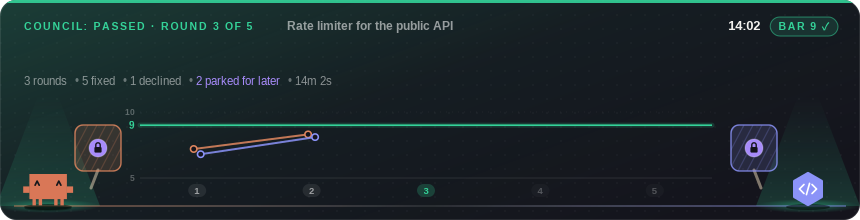
A council. Each seat's score stays face down until both are in, then both paddles flip at once. Round by round, the scores climb toward your bar; when both clear it, it turns green.

A question mid-run. Codex asks Claude something. It either waits for the answer or carries on with what doesn't depend on it.

A review lands. Codex's findings drop onto the stage in their severity colours, and the two trade a line about them.

Claude's turn. Codex built the task in its own worktree; Claude checks the diff before anything reaches your files.

Approved. The recheck closes the loop.
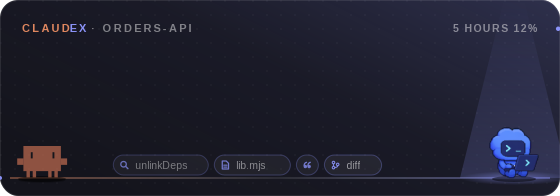
The Claudex pane (/claudex): every conversation, task, job and picture, plus your Codex usage, with the stage on top.
The same scenes show up as live cards in the chat. Motion is up to you: Calm (the default) moves when something happens and then rests, Full keeps moving, and Still stops all motion except the clocks.
Every conversation, in full
Open any conversation in the pane (/claudex, then a row under Talk or Tasks) to see
the whole thing: what was asked, what each side found, how they argued, and what they settled on.
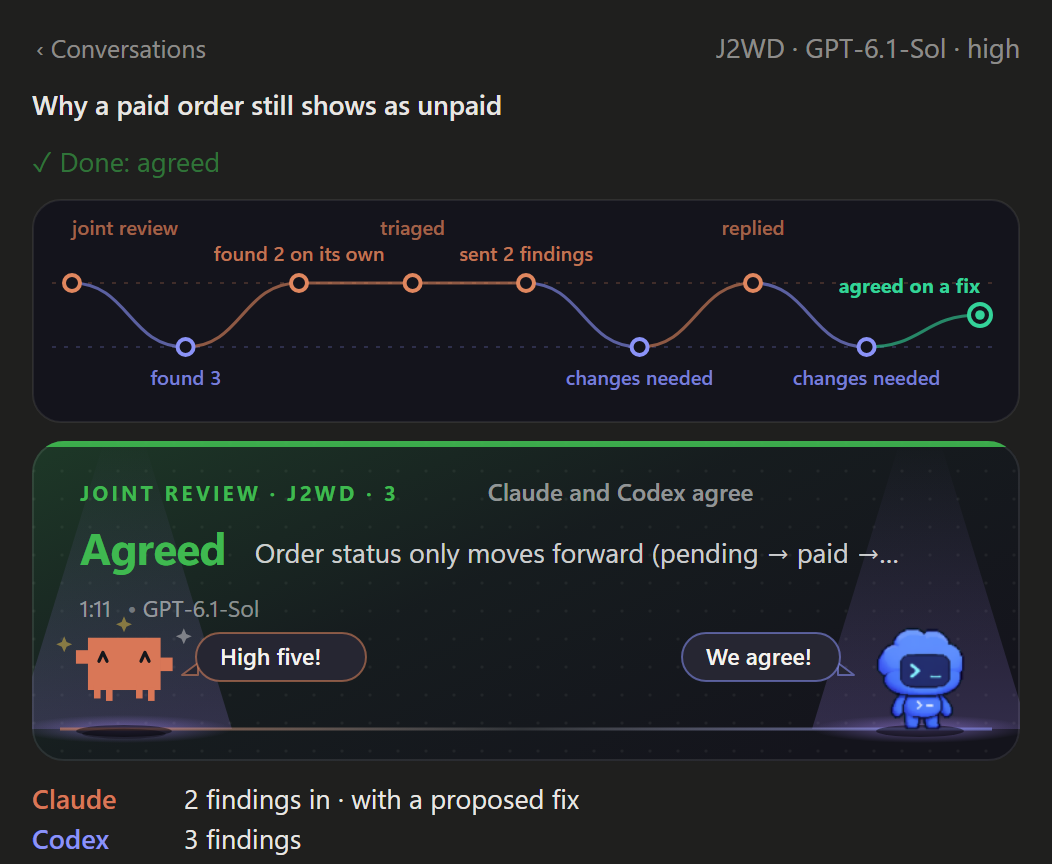
See the whole conversation (a tall picture)
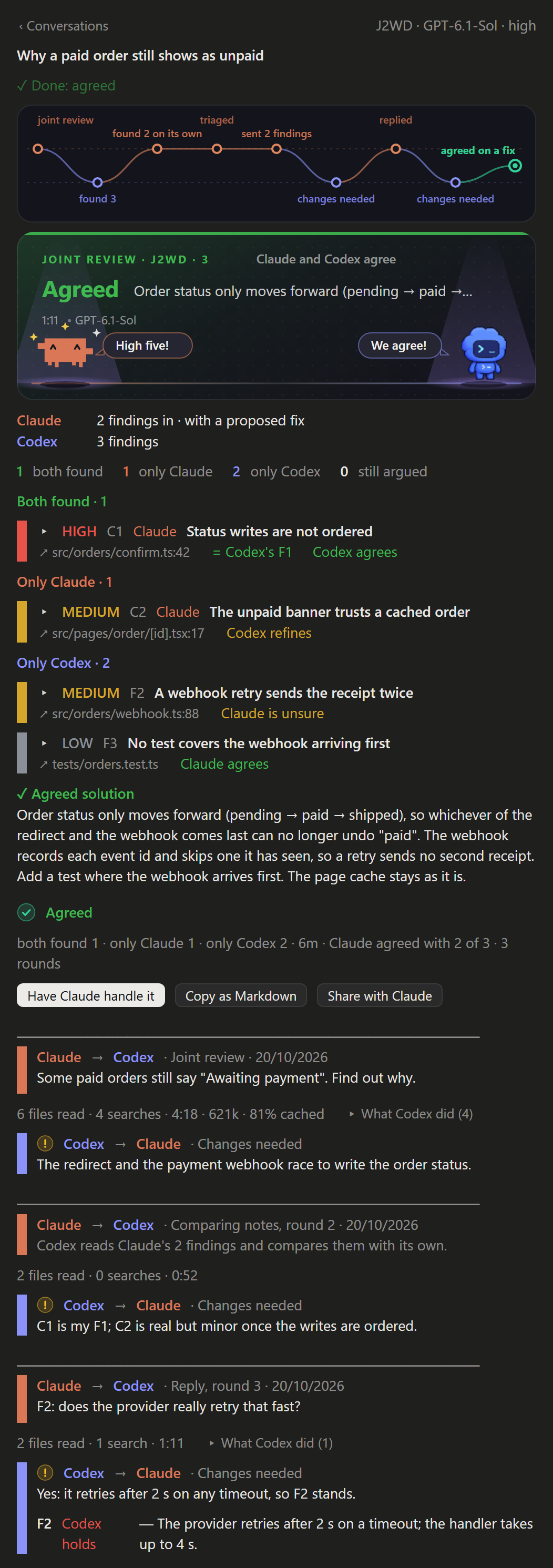
From top to bottom:
- The timeline. Every move, drawn as a path between two lanes: Claude's on top, Codex's below. You see who did what, in order: found 3, triaged, sent 2 findings, replied, agreed on a fix.
- How it ended, on the stage: approved, changes needed or, in a joint review, agreed.
- The findings. A joint review groups them by who found them: both found, only Claude, only Codex and still argued. Each one shows its severity, a link that opens the file at the line, and what the other side made of it (agrees, refines, is unsure). Tap ▸ to open one: its detail, the suggested fix, the replies from each round, and buttons to have Claude or Codex fix it, or to dismiss it.
- The agreed solution in full, and what to do next: Have Claude handle it, Copy as Markdown or Share with Claude.
- Every round, in order. What Claude sent and what Codex answered, the files it read, the
searches it ran, how long it took, and its tokens (and how many were cached). What Codex did
lists each step, with how long each command took by Codex's own clock. Where Codex gives an
estimate, the result also says what the conversation used (
~3.4 credits, or dollars on a dollar plan). Where Claude disputed a finding, Codex's answer says whether it holds, concedes or refines it.
While a round runs, the same page shows it live: send Codex a note now, queue one for its next round, or answer a question it asked. A task's page shows each file it changed with its diff, and an Undo once it's applied.
Examples
There are no commands to learn. You just tell Claude what you want, in your own words.
A second opinion before you commit
Ask Codex to review my uncommitted changes, especially for security.
Codex returns findings (F1, F2, …). Claude checks each one against the code and marks it
agree, disagree or unsure with a note. Then it fixes what's real, and Codex rechecks.
Let them argue it out
Do a joint review of this branch against main with Codex.
Claude writes its own findings while Codex writes its own. Neither sees the other's until both are done. Then they compare, debate the points they disagree on, and agree on one solution.
Check a plan before building it
Before you start, have Codex look over the plan.
Claude weighs each of Codex's points and gives you the revised plan with a short "Codex review" section.
Hand off a piece of work
Have Codex add pagination to the orders API. Done means the tests pass
and the page size is configurable.
Codex works in its own git worktree, so your files stay untouched. When it finishes, Claude reviews the patch like a colleague's. It then applies the patch, applies only some files, sends it back with notes, or throws it away. Not happy with the approach? Try another way on the task's page has Codex start again in a fresh copy, knowing its first attempt, and you compare the two.
Fix what a review found
Have Codex fix F1 and F3 from that review.
The task starts from the review's own Codex conversation, so Codex already knows the code it read and why it flagged each finding. The findings stay open until a recheck or Claude confirms them.
Bring in Gemini, or both
Ask Gemini to review my uncommitted changes.
Have both GPT and Gemini review it, and tell me where they agree.
Let Codex and Gemini each build the retry logic, then keep the better version.
Council this with both of them until all three of you give it 9/10.
Claude picks who by your words; without a word for it, your pick in the pane does the work. Until you pick, that's both, where it fits while Gemini is ready: reviews, questions and plans go to both side by side, tasks and councils take both when you name both, and a loop takes Codex. The pane's New panel and Usage & settings offer Who (Codex, Gemini or both) and each one's model and effort, and remember them. Gemini needs the Antigravity app installed and signed in once; it doesn't need to be open.
Hold a council
Council this until you both give it 9/10, at most four rounds.
Claude first fixes what it already knows is wrong and runs the checks. Then Claude and Codex each score the work on their own, against what it set out to do. Below the bar, Claude fixes the findings it agrees with that are in scope, says which it declined and why, and calls the next round. You can also start one from the pane: New › Convene a council, where you pick what it judges, the bar and the most rounds.
For a UI, point it at the page:
Council the pricing page at http://localhost:3000/pricing until you both give it 9/10.
Every round, Claudex screenshots the page at desktop and phone size for both seats, so each round judges the page as it looks after Claude's latest changes; a second URL (the live site, say) is screenshotted beside it to compare. Claude can add screenshots of its own, such as a menu open, a signed-in view or an error state, and takes them again each round. It works before you've changed any code, too.
Build until it's approved
Build the settings page, and loop with Codex reviewing until it approves.
Find a bug
Codex, why does `npm test` fail on CI but pass locally? Here's the log: …
Check how a page looks
Have Codex do a visual review of http://localhost:3000/pricing compared with the live site.
Steer it mid-run
Tell Codex the API moved to src/api/v2, and that it should use that.
When it's done, queue up a note for Codex to also add tests.
Claude also asks Codex side questions on its own while a review or task runs ("what have you found so far?", "have you looked at the cache yet?"). Codex answers from a copy of its work in a few seconds, its run carries on untouched, and the question and answer show on its card. Councils and joint reviews take none, so each side's look stays its own.
Paint a picture
Ask Codex for three variations of a cosy pixel-art kitchen, wide format.
Then paint the chef as a cut-out on a transparent background.
Stop everything
Stop Codex.
Requirements
| Needs | Details |
|---|---|
| Claude Code | The desktop app or the terminal |
| Codex | Signed in with your ChatGPT account. The Codex desktop app works best, because Claudex uses its CLI. The CLI on its own also works: npm i -g @openai/codex, then codex login. Claudex 3.0 is checked with Codex 0.164 to 0.171 |
| Antigravity (for Gemini) | Optional: Google's Antigravity app, signed in once with your Google account. It doesn't need to be open: Claudex starts its agent itself. Claudex 3.0 is checked with Antigravity's agent 2.34 |
| Node.js | 20 or newer |
| git | Any recent version |
Optional, per project: Playwright (npm i -D playwright) plus Chrome or Edge for visual
reviews and councils on a page, and sharp for WebP copies of pictures. Cut-outs need nothing extra.
Install
1. Clone the repo into your Claude Code mods folder:
git clone https://github.com/viscolex/claudex.git ~/.claude/mods/claudex
2. Load it. Add this to ~/.claude/settings.json, merging it into any env block you already have:
{
  "env": {
    "CLAUDE_CODE_PLUGIN_DIRS": "/Users/YOUR-NAME/.claude/mods/claudex"
  }
}
On Windows, use C:\\Users\\YOUR-NAME\\.claude\\mods\\claudex.
3. Restart Claude Code and start a new chat. The Claudex band appears above the prompt after
your first message, and /claudex opens the pane.
4. Check that it can reach your Codex:
node ~/.claude/mods/claudex/scripts/smoke.mjs
Each check prints PASS or FAIL, and a NOTE when your Codex is newer than the one Claudex
was checked with. No model runs, so it costs nothing. Add --turn to also run one tiny real turn.
[!TIP] To update later, run
git pullin~/.claude/mods/claudexand restart Claude Code. INSTALL.md covers upgrading from the older Codex mod and where Claudex keeps its files.
Settings
Open Usage & settings in the Claudex pane, or the mod's settings in Claude Code:
| Setting | Options | Default |
|---|---|---|
| Codex model | Any model your Codex offers | gpt-6.1-sol |
| Reasoning effort | low · medium · high · xhigh · max · ultra | high |
| Motion | Calm · Full · Still | Calm |
A recheck runs one step lighter than its conversation (xhigh becomes high, never below
medium). When you reply or recheck from the pane, the confirm step lets you pick another effort.
Codex runs use your own Codex quota. Claudex shows your usage, and warns you before starting work once you're above 90%. If your account has a free usage reset, the board shows it with its expiry; Use it… asks you to confirm before anything is reset. Claudex never uses it by itself.
FAQ
Does Codex ever change my files on its own?
No. In a conversation, Codex's shell is read-only. Tasks run in a separate git worktree, and nothing reaches your files until Claude reviews the diff and applies it. Every apply can be undone.
How does a council score, and when does it stop?
Both seats score on one scale: 10 nothing left worth changing for what it set out to do, 9 ready to ship, 8 good with a few minor issues, 7 works but needs fixes before it ships, 5–6 significant problems, 4 or less major problems. Scores carry one decimal place, which says where the work sits between those: 8.8 is nearly ready to ship, 8.2 only just good. Your bar can too, like 9.5, and a tenth short of it doesn't pass. They score the work as it stands against its brief, and park ideas that go beyond it.
Claude's seat is best taken by a fresh, read-only Claude subagent, so it doesn't score work Claude just wrote. Codex keeps its own context from round to round, so it sees what changed.
A council stops when every seat reaches your bar. If it runs out of rounds, or the lower score gains no more than 0.1 a round for two rounds, Claude asks you before going on; Sit 2 more rounds in the pane or on the band says yes. End the council stops it at any time. Each round is one Codex run.
What does it cost?
Claudex is free. Codex runs on your own ChatGPT plan's Codex quota, and the smoke test uses none. Where Codex gives an estimate, each result says what its conversation used. Not every plan or Codex version gives one yet; then nothing is shown.
How does Gemini work with Claudex?
Through the Antigravity app you already have: Claudex talks to Antigravity's own agent on your computer (the one its window drives), so Gemini runs on your Google plan with the models Antigravity offers you. When the window is open, Claudex uses its agent; when it's closed, Claudex starts the same agent by itself, without a window, and stops it again when Gemini is done. That uses the sign-in Antigravity saved, so sign in to the app once; if you never have, or Antigravity isn't installed, Claudex says so and starts nothing. Reviews run in Antigravity's research-only mode and sandbox, and tasks in a worktree of their own, so nothing reaches your files until Claude applies it, as with Codex. Gemini's conversations are kept by Antigravity, titled "Claudex: …".
A side question to a running Gemini round is answered by the same model from a snapshot of Gemini's work so far, because Antigravity can't copy a conversation mid-turn; Codex answers its own from a copy of its live conversation. Gemini's quota shows in the pane's Usage & settings.
Where is the Codex mascot from?
The Codex companion on the stage is cut from the Codex desktop app's own artwork on your computer, so it always matches your installed version. The mod doesn't ship that artwork itself (it appears here only in the README pictures). With only the Codex CLI installed, everything still works; the stage just shows Claude's side without the mascot.
Something's off after a Codex update
Claudex finds the updated Codex app by itself, with no restart needed. If something still
fails, run node scripts/smoke.mjs from the mod folder; the FAIL lines say what changed. See
INSTALL.md for more fixes.
What do Codex's error messages mean?
Claudex turns Codex's failures into what to do next: a model your account doesn't have (pick another on the board), a usage limit (and when it resets, or that you have a free reset), busy servers (try again in a few minutes), an expired sign-in (sign in again in the Codex app) and a lost connection. Codex's own words follow in brackets.
If Codex can't reopen a conversation (you switched model provider since, or its session is gone), the next round starts a fresh Codex conversation with a summary of the old one instead of failing.
Does it work with a Google Cloud Codex account?
Yes, for conversations and tasks. Codex has no image generation or web search there, so Claudex says so instead of starting a picture, and the board shows no usage meters.
"Codex is ignoring 1 unrecognized configuration setting"
That warning is about your own Codex settings, not Claudex: a key in ~/.codex/config.toml, or
in the project's .codex/config.toml, that your Codex version no longer reads. The warning names
the file and the key. Remove or rename the key and the warning goes away. Claudex shows it so you
know, and the run carries on either way.
Project layout
.claude-plugin/plugin.json   mod manifest and settings
hooks/register.tsx           the mod: tools, cards, band, pane
hooks/art.ts, duet.ts        the stage and its drawings
hooks/council.ts             the council's board: the paddles and the climb
hooks/gemini-art.ts          Gem, Gemini's companion on the stage
scripts/                     Node helpers: Codex app server, tasks, worktrees, images, smoke test
scripts/antigravity*.mjs     Gemini: the bridge to Antigravity's agent, and its probe
schemas/                     JSON schemas for Codex's structured replies
types/index.d.ts             the mod API types
tests/                       tests, run with Claude Code's mod test runner
docs/images/                 README images: the SVGs are drawn by hooks/duet.ts and council.ts, the PNGs are the pane
License
MIT © Andrej Safranovic
Details
- Author
- @viscolex
- GitHub Stars
- 3
- Sub-category
- Automation
- License
- MIT
- Added
- 1 months ago
- Last synced
- 3 days ago
Weekly Mods Digest
Top new Claude Code mods and install commands, once a week. No fluff, unsubscribe anytime.


