
Cockpit
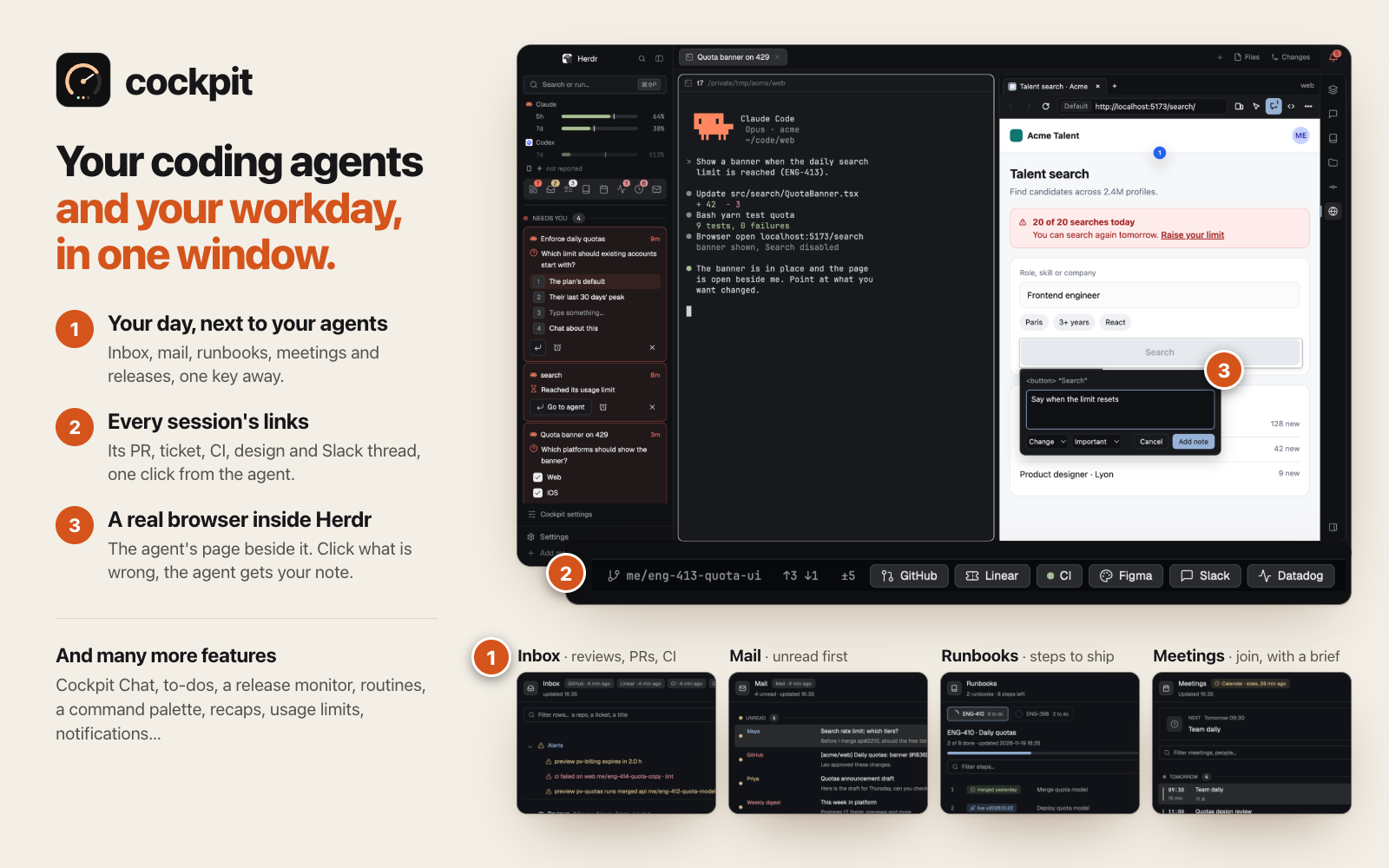
See every coding agent you are running, and what it is working on: Claude Code, Codex and the other agents Herdr runs, each with its ticket, PR, CI run and deploy.
claude plugin validate to auditGuide →Makes outbound network requests, calls MCP servers, or requests auth handles.
Statically scanned from hooks & source. Learn how to audit

cockpit
See every coding agent you are running, and what it is working on.
Claude Code, Codex and the other agents Herdr runs, each shown with its ticket, pull request, CI run and deploy,
and which of them are waiting for an answer. Your reviews, mail, runbooks, meetings and releases are one key away.
Website · Herdr APP · Herdr TUI · Changelog
Install
You need macOS or Linux, herdr 0.9+ or the Herdr app, gh signed in, and jq.
In Claude Code
/plugin install cockpit --marketplace quaresc/cockpit
/cockpit:setup
With any other agent, in a shell
curl -fsSL https://raw.githubusercontent.com/quaresc/cockpit/main/install.sh | sh
cockpit setup
[!NOTE] In the Herdr app, the gallery installs the layout in
app/. It shows cockpit's data, so install cockpit as above too.
cockpit update updates every part later; cockpit also tells you when a new version is out, and after an update asks
once about the options it brought (cockpit options lists them all). In the Herdr app, Cockpit settings at the
foot of the sidebar has every option, the version you run and the published one, and a button that checks for a new one.
Questions
- Do I need API tokens? No. cockpit reads what your agents already reach through MCP, and GitHub through
gh. - What does it cost? Nothing. Work it asks an agent to do (recaps, routines, briefs) is billed to that agent.
- Herdr app or herdr? Either, or both. Setup asks.
- Is my data sent anywhere? No. It stays on your machine.
Agents and tools
- Works with every agent Herdr runs.
- Tickets, CI, meetings, mail and deploys come from MCP servers you already use. Setup knows Linear, Jira, GitHub, GitLab, CircleCI, Datadog, Sentry, Gmail and Google Calendar, and your agent maps any other.
- Agents draw charts, tables and diagrams beside their session with the
showtool. - Agents check pages in a browser beside them: terminal-browser in a pane, or in the Herdr app on macOS a Chromium window in the side panel, with a browser per agent session, DevTools, and elements you point at for that agent.
More
Getting started · Configuration · Show blocks · The Chromium side browser · Troubleshooting · Changelog · Contributing · MIT (notices)
Details
- Author
- @quaresc
- GitHub Stars
- 64
- Sub-category
- Dashboards
- License
- MIT
- Surfaces
- terminal
- Added
- 1 months ago
- Last synced
- today
- Events hooked
command.runui.rendersession.starttool.calltool.check
Weekly Mods Digest
Top new Claude Code mods and install commands, once a week. No fluff, unsubscribe anytime.


