
Claude Image View
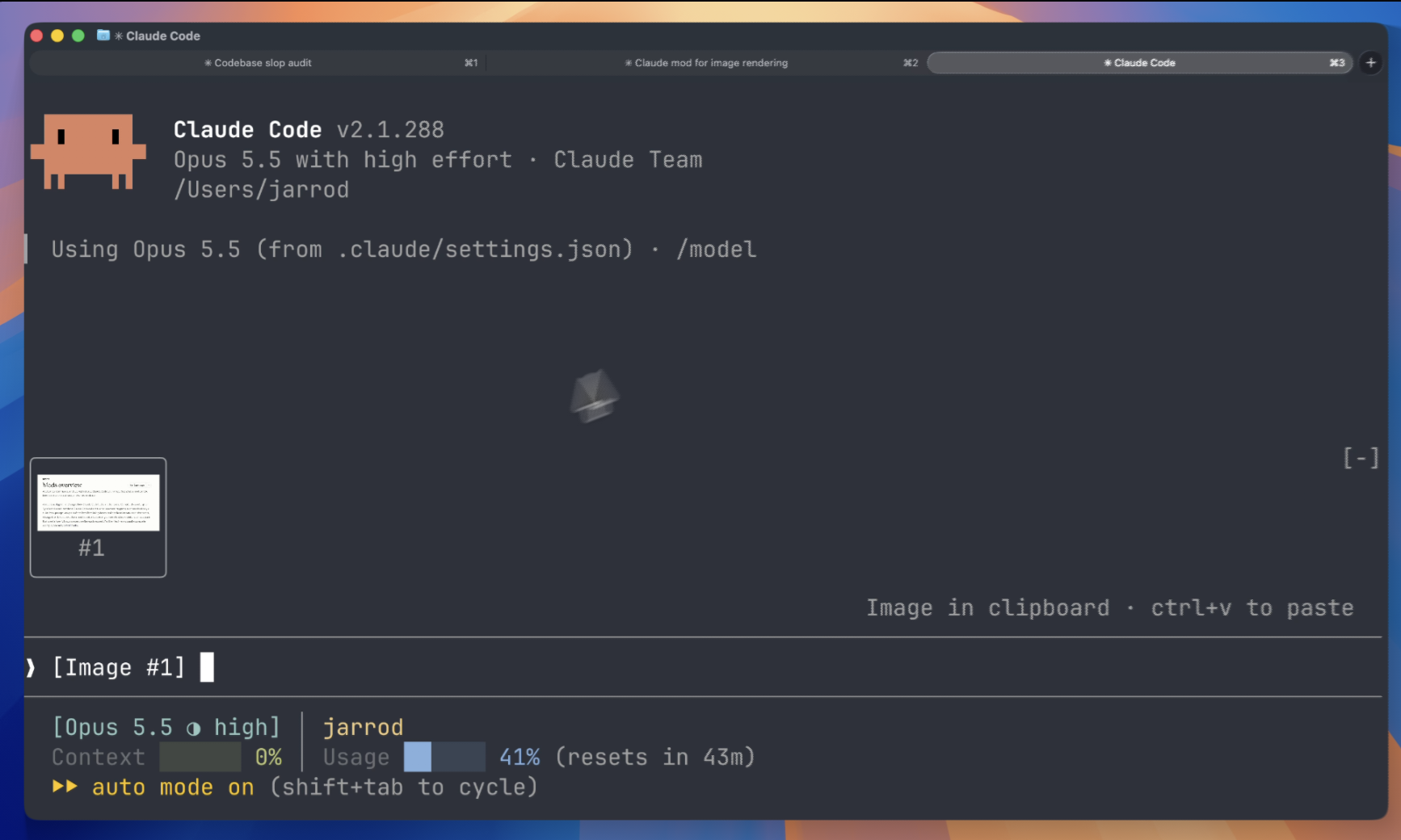
See the images you paste into Claude Code: thumbnails above the prompt instead of bare [Image #1] tags
claude plugin validate to auditGuide →Writes files, executes local shell processes, or programmatically drives Claude.
Statically scanned from hooks & source. Learn how to audit
Claude Image View
A Claude Code mod that shows the images you paste, so you see thumbnails above your prompt instead of bare [Image #1] tags.


Install
Inside Claude Code, run:
/plugin marketplace add jarrodwatts/claude-image-view
/plugin install image-view
/reload-plugins
That's it. Paste an image into the prompt and its thumbnail appears above the input.
Prefer the terminal?
claude plugin marketplace add jarrodwatts/claude-image-view
claude plugin install image-view@claude-image-view
Then run /reload-plugins inside a session, or start a new one.
What You See
Paste one or more images and a row of thumbnails sits above the prompt, each labelled with the number of its tag:
╭────────────────────────╮ ╭────────────╮
│                        │ │            │
│      (screenshot)      │ │  (photo)   │
│                        │ │            │
│           #1           │ │     #2     │
╰────────────────────────╯ ╰────────────╯
❯ why is the header misaligned here [Image #1] vs [Image #2]
- Thumbnails appear as soon as you paste. You don't have to type another key first.
- Thumbnails keep their shape. Wide screenshots stay wide and phone shots stay tall.
- Always fits on screen. Tiles shrink to fit the space above the prompt, so the row never scrolls or gets cut off. If there are too many, the row ends with
+Nfor the rest. - Clears on send. Once the prompt is sent (or the tags are deleted), the row goes away.
How It Works
Claude Code saves every pasted image to a cache folder for the session, as <tmp>/<project>/<session>/images/<n>.<ext> in the format it was pasted (.png, .webp, .jpg, ...), and puts an [Image #n] tag in the prompt. Claude Image View is a mod:
- Every 200ms it reads the prompt box and looks for
[Image #n]tags. It checks on a timer because pasting an image doesn't raise an edit event. - For each tag it finds the cached file. Kitty graphics only draws PNG from a file, so on macOS anything else (WebP, JPEG, HEIC, GIF, TIFF) is converted once with
sipsto<session>/image-view-<n>.png. It reads the size from the PNG header. - It draws the thumbnails in the band above the prompt. Where Claude Code draws pictures (see Terminal Support) it uses Claude Code's
Imageelement, and the terminal reads the file itself, so the image data never passes through the mod. - Anywhere else it decodes the PNG itself, averages it down to a small thumbnail, and draws it in colored half blocks (
▀) with Claude Code'sRasterelement. It's lower resolution than a real picture, but it's the picture.
Terminal Support
Claude Code, not the mod, decides whether a terminal gets real pictures. It draws them in kitty (0.28+) and Ghostty, and turns them off inside tmux and screen and in background sessions. Every other terminal gets half-block thumbnails.
| Terminal | Thumbnail |
|---|---|
| Ghostty, kitty | Real picture |
| iTerm2, Terminal.app, WezTerm, VS Code, Windows Terminal, Orca, most others | Half blocks |
| Inside tmux or screen, even in Ghostty or kitty | Half blocks |
| Agent view and background sessions | Half blocks, or real pictures with CLAUDE_CODE_FORCE_TERMINAL_IMAGES (below) |
Some terminals speak the kitty graphics protocol but still get half blocks, because Claude Code trusts terminals by name (anthropics/claude-code#99566), or because it doesn't wrap images for tmux passthrough yet (anthropics/claude-code#100146). Those are Claude Code limits, so a fix there brings real pictures to the mod with no change here.
CLAUDE_CODE_FORCE_TERMINAL_IMAGES=1 makes Claude Code draw pictures in any terminal. Only set it if your terminal supports the kitty protocol's Unicode placeholders. VS Code's terminal, for one, doesn't yet, and shows a grid of colored squares instead (xtermjs/xterm.js#5711).
Security
Claude Image View is local-only. It makes no network requests. It reads the prompt box, lists Claude Code's temp folder to find the current session's image cache, and reads each pasted image (up to Claude Code's 4 MiB read limit). For a non-PNG paste it runs sips and writes one PNG thumbnail into that session's temp folder. On macOS and Linux it runs id -u once to find that temp folder. It also reads a few terminal variables (TERM, TERM_PROGRAM, TMUX and similar) to tell which kind of thumbnail Claude Code can draw.
Run claude plugin validate on the repo to see every event it hooks and every call it makes.
Requirements
- Claude Code v2.1.287 or later (mods support)
- macOS or Linux. Windows finds pastes too, but it's less tested and only previews PNG pastes.
- For full-resolution thumbnails, Ghostty or kitty. Any other terminal gets half-block thumbnails (best with truecolor).
The Claude Desktop app already previews pasted images, so the mod draws nothing there.
Troubleshooting
Nothing appears when I paste. Run /plugin and check the dim line under the tabs lists image-view as an active mod. If it isn't listed, run /reload-plugins. If it still isn't, look for an image-view: hooks module did not load line above the first prompt of a new session: that means your Claude Code is too old for the mod, so update it.
The tile says "no preview". The mod couldn't find the cached file, or the paste isn't a PNG and you're not on macOS, where sips converts it. Claude Code may have moved where it stores pasted images. Please open an issue with your Claude Code version.
The tile is blocky. Claude Code doesn't draw pictures in your terminal, so the mod draws the picture in colored half blocks. See Terminal Support.
The tile shows [Image #1] text instead of the picture. The mod expected Claude Code to draw a picture, but it didn't. That happens in terminals that look like Ghostty or kitty but aren't, such as Herdr (anthropics/claude-code#101306), or in kitty older than 0.28. Set CLAUDE_IMAGE_VIEW_RENDERER=blocks in the environment you start Claude Code from. CLAUDE_IMAGE_VIEW_RENDERER=image forces real pictures the other way.
The tile is a grid of colored squares. CLAUDE_CODE_FORCE_TERMINAL_IMAGES is set in a terminal that can't draw Unicode placeholders, such as VS Code's. Unset it to get half-block thumbnails.
I want real pictures in agent view or a background session. Claude Code turns terminal images off there. If you attach from Ghostty or kitty, turn them back on in the env block of ~/.claude/settings.json, then start a new session:
"env": { "CLAUDE_CODE_FORCE_TERMINAL_IMAGES": "1" }
Development
git clone https://github.com/jarrodwatts/claude-image-view
cd claude-image-view

# Load it for one session without installing
claude --plugin-dir .

# Check it and run the tests
claude plugin validate .
claude plugin test .
Claude Code writes the API types into .claude-plugin/types/ the first time it loads the mod, and tsc -p . type-checks it from then on.
License
MIT. See LICENSE.
Star History
Details
- Author
- @jarrodwatts
- GitHub Stars
- 299
- Sub-category
- Interface
- License
- MIT
- Surfaces
- terminal
- Added
- 1 months ago
- Last synced
- today
- Events hooked
session.startui.render
Weekly Mods Digest
Top new Claude Code mods and install commands, once a week. No fluff, unsubscribe anytime.


