
Last Turn Diff
See what Claude's last turn changed in one pane: a net diff per file, including files changed by shell commands and builds (git, Plastic SCM), with earlier turns a pick away. For reviewing each turn before you move on. Terminal and Desktop Code tab.
claude plugin validate to auditGuide →Writes files, executes local shell processes, or programmatically drives Claude.
Statically scanned from hooks & source. Learn how to audit

last-turn-diff



A Claude Code mod that shows what the last turn changed: every file, one net diff each, in a pane, like the turn diff in Codex. A file edited five times shows once, before the turn against after it, not as five patches to step through. Inside a git repository or a Plastic SCM workspace it also shows files that shell commands, scripts and builds changed, and earlier turns are a pick away. It works in the terminal and in the Claude Desktop Code tab.
Install · Use · If the pane doesn't show · What you see · What counts as a change · What it can reach · Compared with /diff · Options · Notes and limitations · Develop
Install
Needs Claude Code 2.1.289 or later. In a Claude Code session, add this repository as a plugin marketplace, then install the mod and start a new session:
/plugin marketplace add vampy/claude-last-turn-diff
/plugin install last-turn-diff@last-turn-diff
A mod runs with your permissions: What it can reach lists what this one does, and how to check that yourself before you install it.
Update or remove
To update, run these and start a new session:
claude plugin marketplace update last-turn-diff
claude plugin update last-turn-diff@last-turn-diff
Or, in a session, run /plugin, open Marketplaces, select last-turn-diff and select Update marketplace: it
refreshes the marketplace and updates the mod in one step. To stop doing this by hand, select Enable auto-update
there instead, which is off by default for a marketplace like this one: Claude Code then updates the mod in the
background, up to ten minutes after your first message in a session. Either way the new version loads in your next
session.
To remove it, run claude plugin uninstall last-turn-diff@last-turn-diff, then
claude plugin marketplace remove last-turn-diff.
Use
-
Ask Claude for a change that edits files, for example "add due dates to the todos, with a test".
-
When the turn ends, the Last turn pane opens (turn this off with
autoOpen), and a line above the prompt, the band, reads:Last turn: 4 files +68 −14 [ View ] [ x ]View opens the pane again. x hides the band until the next turn with changes.
-
Type
/turn-diffto open the pane, or to close it if it is on screen. It also replies with a one-line summary, which is all you get on mobile. -
To see an earlier turn, pick it from the Turn picker at the top of the pane.
/turn-diffand View go back to the last turn with changes.
In a terminal the pane docks beside the transcript in the fullscreen layout from 110 columns, and sits above the prompt otherwise. In Desktop, click. In a terminal, press ctrl+x, then Tab, to give the keyboard to the band or the pane: Tab moves between its buttons, Enter presses one, the arrows and Enter work the picker, and Escape gives the keyboard back to the prompt.
If the pane doesn't show
- Claude Code's diff panel is in front. In the terminal's fullscreen layout, Claude Code's own diff panel
(
/diff) can come up after a turn and take the pane's place./turn-diffand View then say so rather than close the pane: type/diffto hide that panel, or turn it off with"diff@builtin": falseunderenabledPluginsin~/.claude/settings.json. - The turn changed no files. A question, or a notice that a background task finished, leaves the pane and the band as they were.
- The terminal is narrow. Below 144 columns the pane doesn't open by itself: it waits until the terminal is
wider, or until you type
/turn-diff. - Desktop split view. Desktop draws no mod UI for a session shown in the second half of a split view, though
/turn-diffstill answers. Show the session on its own. - Mobile. There is no pane or band:
/turn-diffreplies with the summary only. - You just changed
~/.claude/settings.json. Start a new session.
What you see
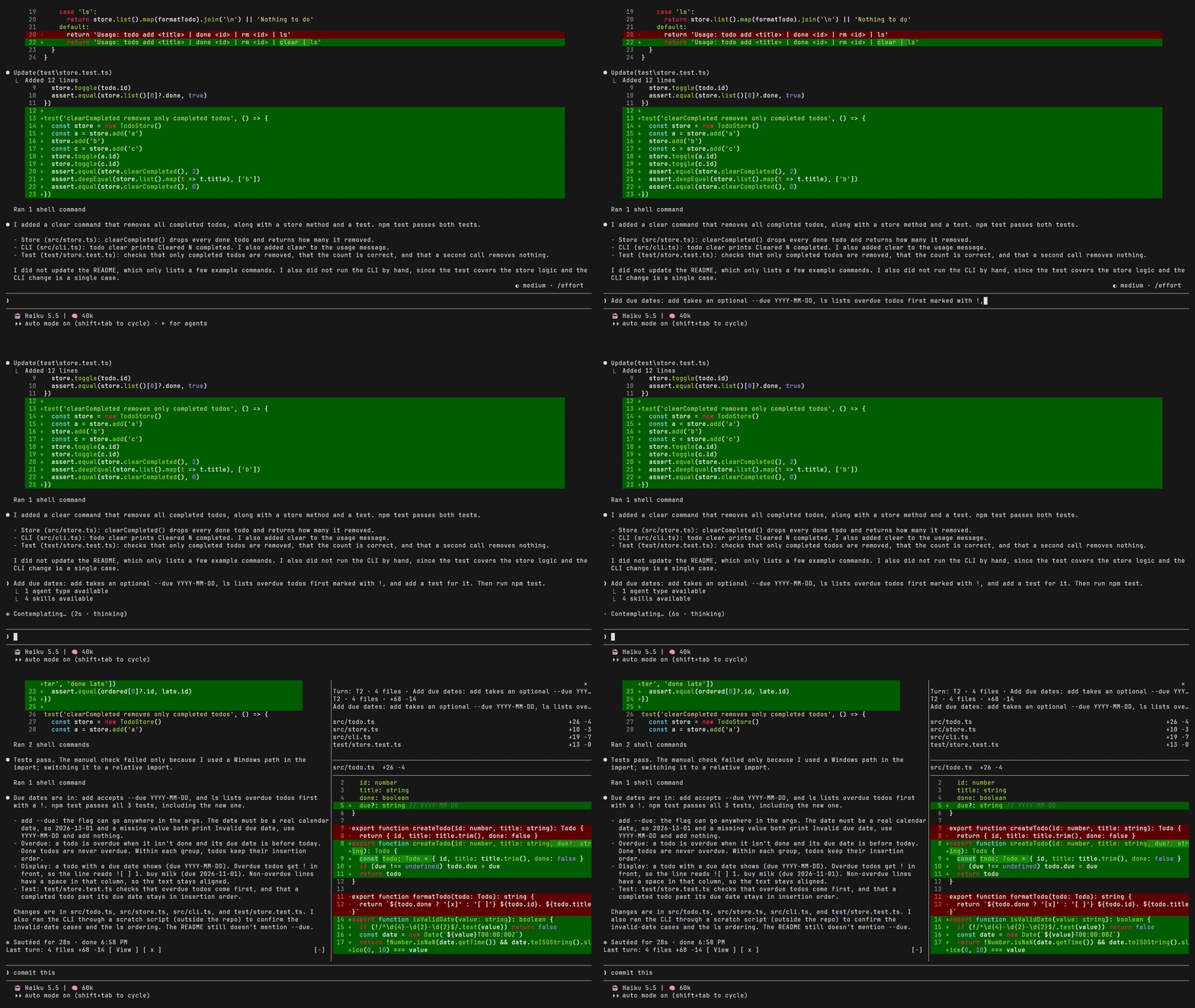
The recording at the top is a real turn in a terminal: Claude adds due dates to a small todo app, and when the turn ends the pane opens with its four files. (Recorded with Claude Code's own diff panel turned off: see If the pane doesn't show.)
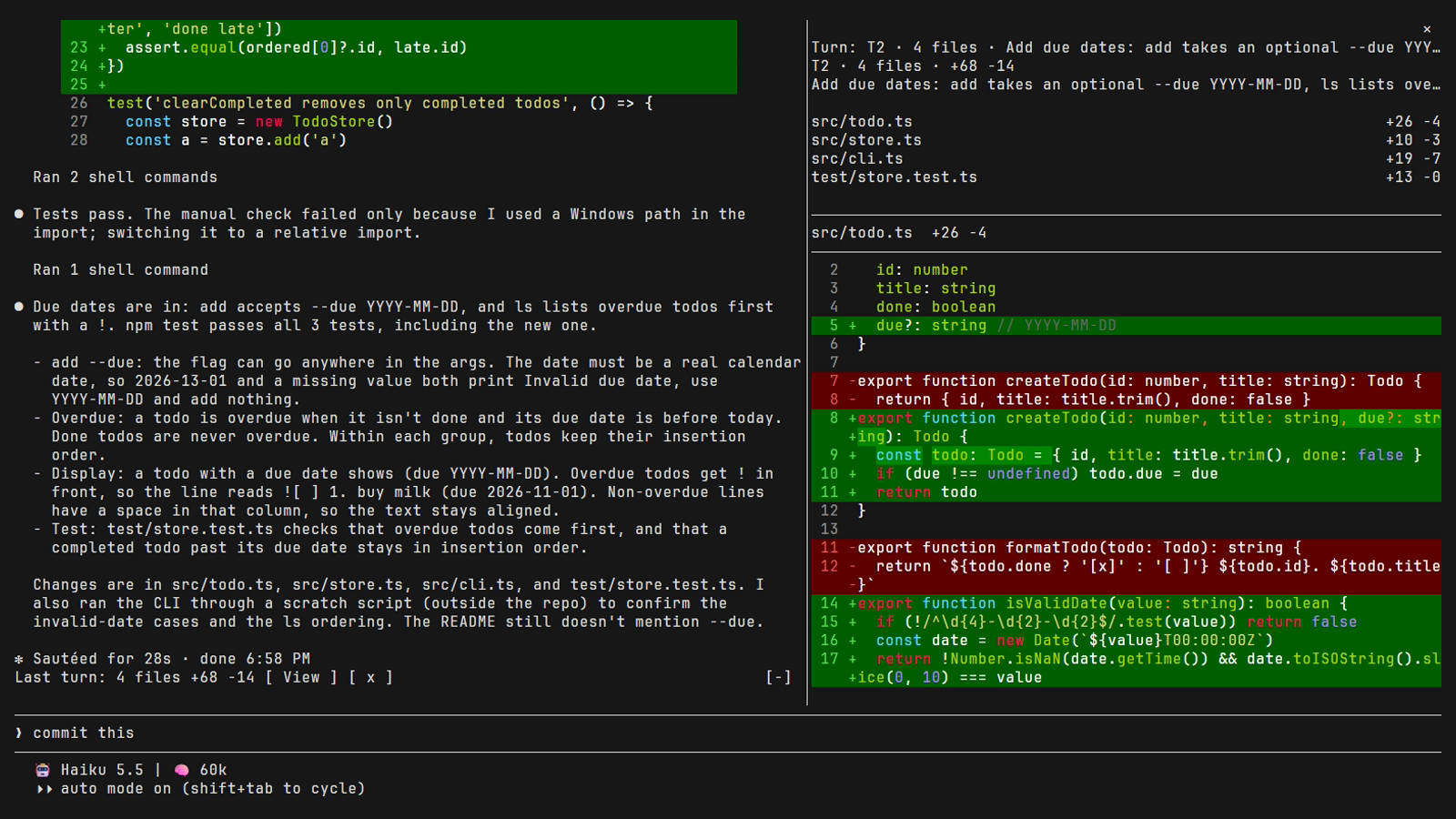
The pane after that turn, docked beside the transcript, with the band above the prompt:
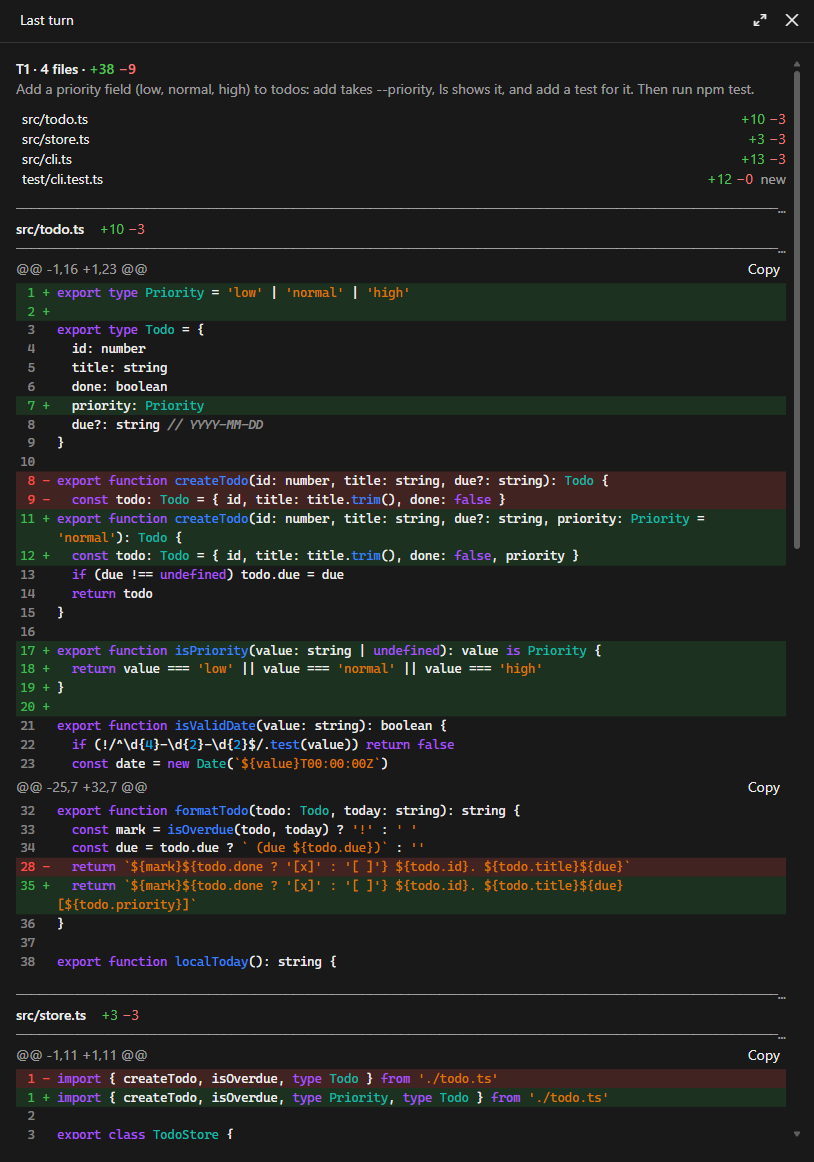
The pane in the Desktop Code tab after a turn that adds a priority field, where each hunk is an image with line numbers, syntax colors and a Copy button:
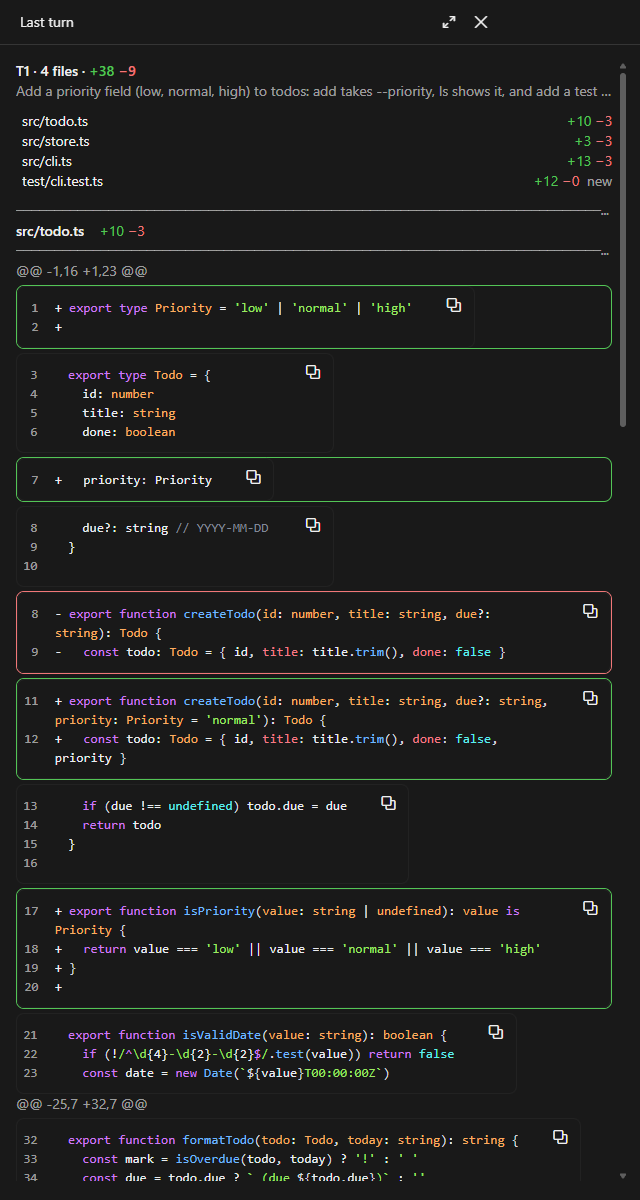
The same turn with selectableDiffs on, where each hunk is numbered code you can select, removed lines framed in
red and added lines in green:
- Header: the turn's number, file count and line counts, the prompt's first line, a note when shell changes could not be read, and a line saying so when the turn was rebuilt from the transcript.
- File rows: one per file, with its counts and badges:
new,deleted,binary,too large, or a line-ending change such asCRLF→LF(EOLwhen only the line endings moved). Pressing a row jumps to that file: its page always switches, and the pane scrolls to it where the surface supports that. - Hunks: in a terminal,
diffcode blocks. In the Desktop Code tab, images with red and green lines, line numbers and syntax colors, each hunk under its@@line with a Copy button (seesvgDiffs), or selectable numbered code blocks with removed and added lines framed (seeselectableDiffs). - Pages: a large turn is split into pages with Prev and Next.
- Turn picker: shown once more than one turn has changes. It lists the newest 64 turns that changed files, each with its prompt and the number of files it edited, and shows the last one by default.
What counts as a change
- Claude's edits: every file Claude's file tools (
Edit,Write,NotebookEdit) changed during the turn, under any version control or none, including those of the subagents it runs during the turn. Denied and failed calls are left out. - Shell edits: inside the git repository or Plastic SCM workspace the session runs in, files changed by
shell commands, scripts and builds too, read from the version control's status before and after the turn. Files
it ignores (
.gitignore, Plastic'signore.conf) don't show. A git commit during the turn still shows its files. SeeshellEdits. - One net diff per file: the file before the turn against the file after it, so a file edited five times shows once, and a file changed and changed back doesn't show.
- Not Claude Code's own files: its scratchpad, memory and plan files are left out. See
hideClaudeFiles. - Mostly not other writers: a file only the version control's status lists, which another session or your editor wrote between the turn's tool calls, stays out. What lands while a call runs, or in a file Claude edited, counts: see Shell edits under Notes.
- Earlier turns: picking one rebuilds its changes from the transcript, so the history survives
--resumeand--continue. A rebuilt turn shows only Claude's own file-tool calls of the main conversation, and usually shows each call's patch in turn rather than one diff per file: see Earlier turns.
What it can reach
A mod runs inside Claude Code with your permissions. This one:
- Watches turns starting and ending and Claude's tool calls, and only looks: it never blocks, changes or reruns a call.
- Reads the files a turn changes, before and after it, and, with
turnHistoryon, the conversation's transcript, to rebuild earlier turns. - Runs only read-only
gitandcmcommands, and only withshellEditson. - Writes only temporary files for
cm's output, and the clipboard when you press a Copy button. - Reads these environment variables, to find Claude Code's temporary and config folders:
CLAUDE_CODE_TMPDIR,CLAUDE_CONFIG_DIR,HOME,TEMP,TMP,TMPDIR,USERPROFILEandXDG_RUNTIME_DIR. - Sends nothing anywhere: it makes no network requests and calls no model.
To check this yourself before you install it, run this after /plugin marketplace add. It lists the hooks the mod
registers, the engine calls it makes and the environment variables it reads, from the copy the marketplace fetched:
claude plugin validate ~/.claude/plugins/marketplaces/last-turn-diff
Compared with /diff
Claude Code 2.1.318 has a diff panel of its own, /diff. It shows the uncommitted changes (git diff HEAD), and
its source picker (Current, T1, T2, …) shows one turn. On the same turns, side by side:
/diff | last-turn-diff | |
|---|---|---|
| Shows by default | Every uncommitted change: any turn's, and your own | The last turn's changes |
| A turn's files | Those Claude's Edit and Write calls changed | Those too, and files shell commands, scripts and builds changed |
| A file edited twice in one turn | Each call's patch added up: +2 −1 for a line added, then reworded | One net diff: +1 −0 |
| Version control | git | git, Plastic SCM or none (shell edits need git or Plastic) |
That is the last turn, which the mod records live. An earlier turn it rebuilds from the transcript has much the same
limits as /diff's: Claude's own calls only, often shown call by call (see Earlier turns).
Options
| Option | Default | What it does |
|---|---|---|
autoOpen | on | Opens the pane by itself when a turn ends with file changes. |
shellEdits | on | Also shows files changed by shell commands, scripts and builds, from git or Plastic SCM status. |
turnHistory | on | Lists the conversation's turns in the pane, so an earlier one can be picked and rebuilt. |
hideClaudeFiles | on | Leaves out Claude Code's own temporary, memory and plan files. |
showMemoryAndPlans | off | With hideClaudeFiles on, shows Claude's memory and plan edits again. |
svgDiffs | on | In the Desktop Code tab, draws the hunks as images with line numbers and syntax colors. |
selectableDiffs | off | In the Desktop Code tab, draws the hunks as numbered code blocks you can select, removed and added lines marked and framed. |
To change them in a terminal, use /config. The Desktop Code tab has no /config: add this to
~/.claude/settings.json, keeping only the options you change, and start a new session. Project settings are not
read for plugin options. The full id works too, last-turn-diff@last-turn-diff (last-turn-diff@inline for a copy loaded
from a folder); it is the one claude plugin configure writes.
"pluginConfigs": {
  "last-turn-diff": {
    "options": {
      "autoOpen": false,
      "shellEdits": false,
      "turnHistory": false,
      "showMemoryAndPlans": true,
      "selectableDiffs": true
    }
  }
}
More on each:
-
autoOpen: like any pane opened unasked, it is shown only in a terminal at least 144 columns wide (110 once you have opened it yourself, until you close it by hand); below that it waits, and/turn-diffshows it. -
shellEdits: off, the mod runs no process at all and sees onlyEdit,WriteandNotebookEditcalls. Turn it off if a status is slow in your repository or workspace: in a large Plastic workspace eachcm statustakes a few seconds (2.3 s on a big Unreal project), and each base revision fetched from a cloud repository about a second. -
turnHistory: off, the mod never reads the transcript. The pane shows only the last turn with changes the mod recorded, numbered from when it loaded (slash commands don't count), and after a restart or--resumenothing until a turn ends. Turn it off if reading the transcript after each turn is slow in a long session. -
hideClaudeFilesleaves these out, live and in rebuilt turns:- its temporary folder, such as the scratchpad where it writes notes and commit messages:
claudeunderCLAUDE_CODE_TMPDIR, or else under each ofTEMP,TMPandTMPDIRthe environment names, and/tmp; - its memory and plans:
projects,agent-memoryandplansin its config folder,CLAUDE_CONFIG_DIRor else.claudein the home folder (HOMEorUSERPROFILE). The rest of that folder (settings,CLAUDE.md, skills) still shows, and so does memory or a plan a setting moved elsewhere.
Each folder is matched under its parent as spelled and where that lands (a symlink or junction's target; macOS's
/private/var). On Windows a parent spelled from/(such as/tmp) is skipped: it would land on the session's drive. A turn that changed only such files counts as changing nothing. A session run inside one of those folders still sees the files under its own cwd. - its temporary folder, such as the scratchpad where it writes notes and commit messages:
-
showMemoryAndPlans: its temporary files stay hidden. It is listed in/configonly whilehideClaudeFilesis on: off, nothing is hidden. -
svgDiffs: Desktop (app 4.23118) draws aCodeelement'sformat: 'diff'as plaindifftext, with no line numbers, line backgrounds or language colors, so the mod draws them itself. An image's text can't be selected, so each hunk has a Copy button that puts its lines as they are now (unchanged and added, no markers) on the clipboard. Turn it off if the images ever draw wrong. -
selectableDiffs: Desktop draws numbered code (aCodewith astartLine) with its own highlighter, theme and line numbers, and that text can be selected, unlike plaindifftext and images. So each hunk shows under its@@line as runs of numbered code: unchanged lines numbered as they are now, removed lines as they were, marked-in a red frame, and added lines marked+in a green one. A mod can't put the marks in Desktop's gutter or shade the lines, so the marks are part of the code and a copy takes them too. Each block has Desktop's own copy button. It takes precedence oversvgDiffs.With both off, Desktop shows the plain
diffcode blocks the terminal gets.
Notes and limitations
Shell edits
- Shell changes are seen only inside the git repository or Plastic workspace the session runs in at turn start, and
not in files it ignores (
.gitignore, Plastic'signore.conf). Outside both, onlyEdit,WriteandNotebookEditcalls are seen. A session that moves (/cd, a worktree, a Desktop session started from a pre-warmed process) is looked up again at its next turn. - Another session's writes, or your editor's, count as the turn's when they land while one of the turn's calls
runs (a long build, a background server, a question or a permission prompt waiting for you: a call is timed from
before its prompt, and one you refuse still counts), when they land in a file the turn's
Edit,WriteorNotebookEditcalls changed, or as a deletion or a dated copy in a folder whose entries one of the turn's calls changed. The other way round, a change the turn made through the shell drops out when something else writes the file later in the turn, when a process a command left running (Start-Process,&) writes after the command returned, when a deletion or dated copy shares its folder with something added or removed later, when a dated copy replaces a file already there, or when the file system's clock is more than 2 s off (a network share). A background command still writing in a later turn shows there only what lands during one of that turn's calls. - Snapshot caps: content is recorded for files dirty at turn start up to 16 MiB in all; past that (or past 2 MiB, or binary) a file is recorded by size and mtime and shows without hunks if those change. Past 1,000 dirty files the rest are left out. At turn end at most 1,000 newly listed files are shown, with a note for the rest.
- A hot reload while the turn-start status is still running loses shell changes for that turn.
- A tool call waits for the turn-start status at most 5 s (Claude's own
Edit,WriteandNotebookEditdon't wait at all, and show in full however slow it is). Past that the call runs beside the status, so what it writes through the shell may not show. A turn that ends before the status does shows no shell changes, with a note. - Plastic: a turn that runs
cm update,switchormerge, or moves the loaded changeset (a check-in), shows only Claude's own edits and the files dirty at turn start, with a note. One started in the background in an earlier turn and still running at the next turn's start is not detected: that turn's read-onlycm statusruns beside it. - Plastic: moves made by a shell
mv(notcm mv) show as a deleted file and a new one: the mod leaves out--localmoved, a slow similarity search. - Plastic: Gluon (partial) workspaces are neither handled nor tested.
Earlier turns
- Only the last turn is recorded live. Older turns are rebuilt from the transcript when picked, and show only
Edit,WriteandNotebookEditcalls of the main conversation: no shell changes, no subagent edits, and no line-ending changes (the tools hand backoriginalFilewith LF). A turn that changed a file and changed it back shows nothing, unless the transcript kept no copy of the file: then both calls' patches show. - Claude Code doesn't keep every
Edit's andWrite'soriginalFile. A headless (-p) run strips them all; a resumed transcript keeps them only for files under about 10 KB; and, as 2.1.292's code reads, a session strips the bulk of all but about its newest 200 messages. Without it, a rebuilt file shows each call's own patch in turn, with its own line numbers, so older turns usually show that way. - The picker reads only the newest 4,096 transcript entries, and a compaction drops the turns before it. Turns
number from the oldest one left, so in a long session the numbers shift as old turns drop out. It lists only the
newest 64 turns, the most a
Selecttakes. A/clearor a resume inside a session starts a new list and clears the last turn. - An older turn's file count is the number of files its calls edited, so it can differ from the files its rebuilt diff shows, for example when a turn edits a file back to how it was. A turn that changed files only through shell commands or subagents is listed while it is the last turn with changes, and drops out of the list after the next one.
- A turn with no prompt row in the transcript (a continuation, a message from another session) is recorded live as the turn after the one before it. Once rebuilt, its calls count toward the turn before it. A prompt with no text (an image alone) can't be told from a continuation: a continuation without changes right after such prompts can take one's place and give the turn shown the wrong number.
Recording
- A background subagent that edits after the main turn ended is not recorded, or lands in the next turn.
- The before-content is read when the tool call starts, before any permission prompt. If you change the file yourself while the prompt is up, your change shows in the diff too.
Large and binary files
- Files are read as UTF-8 text. A file holding a NUL byte shows as
binary, with no hunks: UTF-16 files do too. - Files over 2 MiB show as "too large to diff", with counts from the tools'
structuredPatchwhere it has any. - Past 2M LCS cells, a file's changed middle (from its first changed line to its last) shows as one delete block and one insert block when it has more than 4,000 changed lines (added and removed: a moved section counts twice), or when its lines repeat so much that the diff passes 20M steps. Each file shows at most about 60,000 characters of diff, and the rest is counted in a note.
Claude Code's diff panel
- In the terminal's fullscreen layout, Claude Code 2.1.318's own diff panel (
/diff) can come up after a turn and take the dock's place.$.ui.panes()still calls the Last turn pane shown, but nothing draws it, and no open brings it back: only/diffhiding the panel does. So the mod counts the pane as on screen only once it has drawn since it opened or its turn changed. Shown but not drawn,/turn-diffkeeps it open and says why, and View shows a toast. A pane that drew before the panel came up (a/difftyped later) still counts as on screen: the first/turn-diffcloses it unseen, and the next one opens it and says where it is.
Desktop
- Only
selectableDiffs' numbered code can be selected; plaindiffcode blocks, other text and images can't. Long lines wrap, and nothing scrolls inside a pane on its own. Desktop refuses a draw past 2,000 elements or 262,144 characters. Each code block holds at most 10,000 characters and each page about 90,000; withselectableDiffseach file draws at most 600 runs and@@lines, and each page about as many (the rest counted in a note); withsvgDiffseach file draws at most about 150,000 characters of SVG (roughly 800 to 2,000 lines, the rest counted in a note) and each page about 160,000. A turn touching several hundred files could still go past the limit. - With
svgDiffs, the colors come from a small lexer inhooks/svg.ts(comments, strings, numbers, one shared keyword list), not from Desktop's highlighter or theme, so they are approximate. Multi-line strings aren't tracked. Wide characters (CJK, emoji) can push a row past its wrap width. The image is laid out for the pane's width when drawn, and scales down if the pane gets narrower. Selectable text would need interactiveSvgs, each a sandboxed frame, but Desktop rebuilds the pane on every redraw, a scroll included, and every frame flashes white as it reloads. A Copy takes the whole hunk, including lines past the drawing's cap; a line cut at 2,000 characters for display is copied cut.
How it works
How the mod records a turn, rebuilds earlier ones and reads shell edits from git and Plastic status: docs/how-it-works.md.
Develop
From the mod's folder:
claude plugin validate .
claude plugin test .
tsc -p . type-checks once the engine has loaded the mod and written .claude-plugin/types/ (ignored by
git; the engine rewrites it on every load).
To run a clone instead of the installed copy, uninstall that, then start claude --plugin-dir . for one
session, or load it in every session, the Desktop Code tab included, from the env block of
~/.claude/settings.json (on Windows, double the backslashes in the path). The second line reloads the mod
when its files change:
"CLAUDE_CODE_PLUGIN_DIRS": "/path/to/claude-last-turn-diff",
"CLAUDE_CODE_PLUGIN_DIR_WATCH": "1"
Releasing
Bump version in .claude-plugin/plugin.json, commit and push, then tag the commit
last-turn-diff--v<version> and push the tag:
claude plugin tag --push
Installs follow the default branch, so users get the new version on their next update.
Details
Weekly Mods Digest
Top new Claude Code mods and install commands, once a week. No fluff, unsubscribe anytime.


