
Neuro Path
A live pipeline map for Claude Code. See which stage your session is in (explore, plan, code, test, review, commit, push, CI and more), where it goes next, and how long and how many tokens each step took. Failed tests and CI runs loop back to Debug, GitHub Actions are tracked job by job, and a usage meter forecasts whether you will hit the 5-hour or weekly limit before it resets. Includes daily totals.
claude plugin validate to auditGuide →Writes files, executes local shell processes, or programmatically drives Claude.
Statically scanned from hooks & source. Learn how to audit
Neuro Path
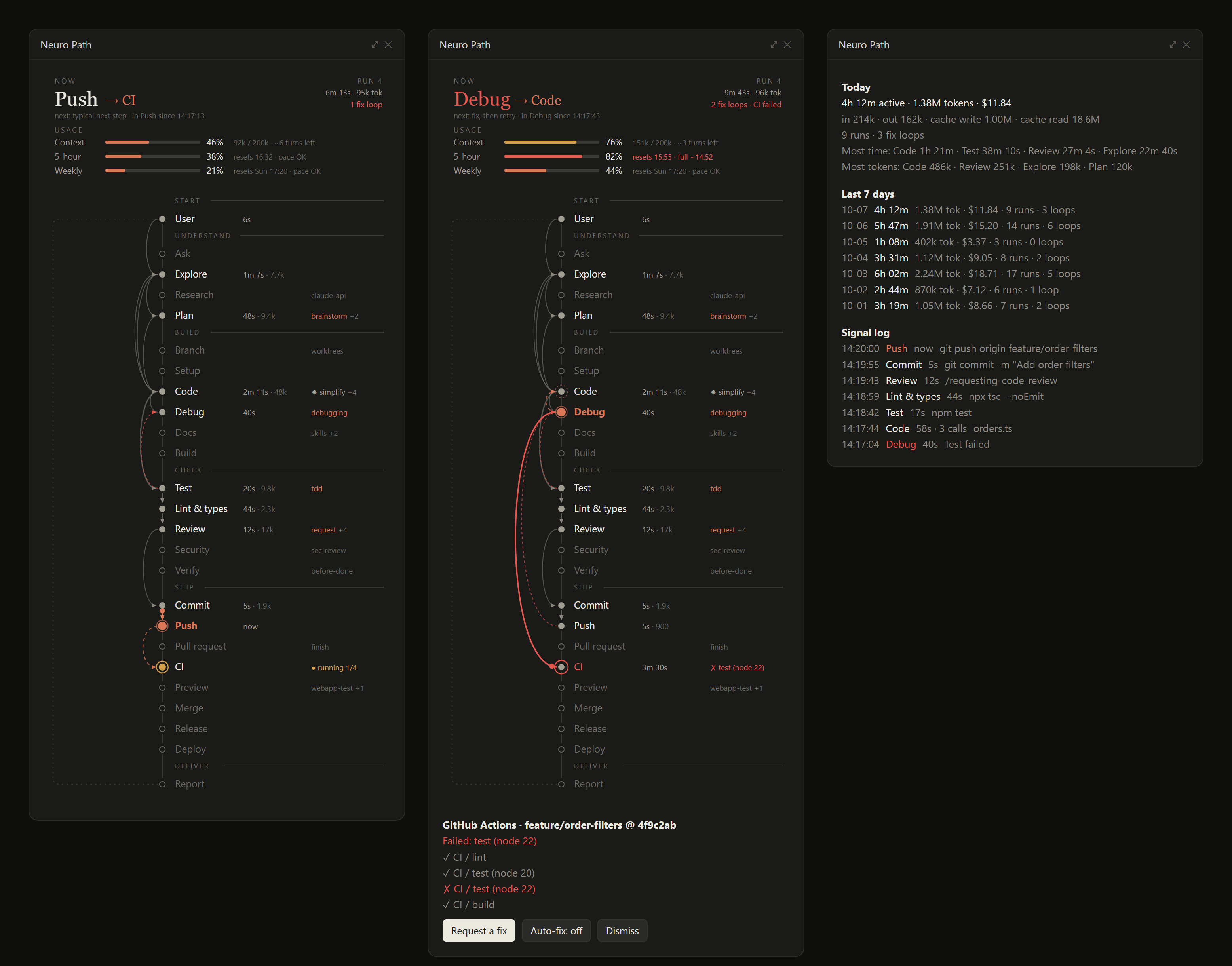
A live pipeline map for Claude Code. See which stage your session is in, where it goes next, what each step cost, when CI breaks, and how close you are to your usage limits.



Why
A long coding session moves through a lot of steps: reading the code, planning, editing, running tests, fixing what broke, reviewing, committing, pushing, waiting on CI. From the transcript alone it is hard to tell where you are, how many times a step had to be redone, or what a run actually cost.
Neuro Path draws that as a map in a side pane. Each stage is a node, every move between stages is a line with an arrow, and lines that skip stages or loop back for a fix show up exactly as they happened.
What you get
The pipeline, live. 25 stages in five phases, from the prompt to the report that comes back to you:
| Phase | Stages |
|---|---|
| Understand | Ask, Explore, Research, Plan |
| Build | Branch, Setup, Code, Debug, Docs, Build |
| Check | Test, Lint & types, Review, Security, Verify |
| Ship | Commit, Push, Pull request, CI, Preview, Merge, Release, Deploy |
| Deliver | Report, then back to User |
- A live strip above the map runs at frame rate without ever reloading: the current stage breathes, a clock counts the time in it, and a signal travels in from the previous stage at a speed set by how long that stage really took.
- A dashed arrow points at the stage that most likely comes next, based on the routes this session has already taken.
- Stages light up the moment the step is decided, not after it finishes, so a question waiting for your answer or a command waiting for approval shows as the current stage.
- A failed test, build, lint, push or CI run draws a red dashed line back to Debug, then on to Code, and the next arrow points at the step to retry.
- Every row shows the real time spent and the tokens used in that stage.
Usage, with a forecast. Context window fill, the 5-hour and weekly limits, when each one resets, and whether your current pace runs out before the reset (full ~14:52 in red) or not (pace OK).
GitHub Actions without watching the tab. After a push or a new pull request the pane follows the workflow runs for that commit, job by job. When a job fails you get a toast, the map bounces to Debug, and one button asks the session to read that job's log and fix the cause. An optional auto-fix switch does that without waiting for you. The request carries only the run id, branch, commit and job name; the log itself is read as a tool result and treated as data, and nothing is committed or pushed unless you asked for it.
Daily totals. Active time, tokens split into input, output and cache, cost, runs, fix loops, and the stages that took the most time and tokens. The last 30 days are kept on your machine; the pane shows the last 7.
Skills at every stage. Each stage has skills assigned to it: brainstorming and writing-plans for Plan, test-driven-development for Test, systematic-debugging for Debug, code review for Review, verification-before-completion for Verify, webapp-testing for Preview, and more. With Stage skills: on, every coding task is told which installed skill to use at which point, and a failed step asks for systematic debugging before any fix. The map lights each skill as it is used. You can also pin any other skill to a stage, for example /simplify after Code.
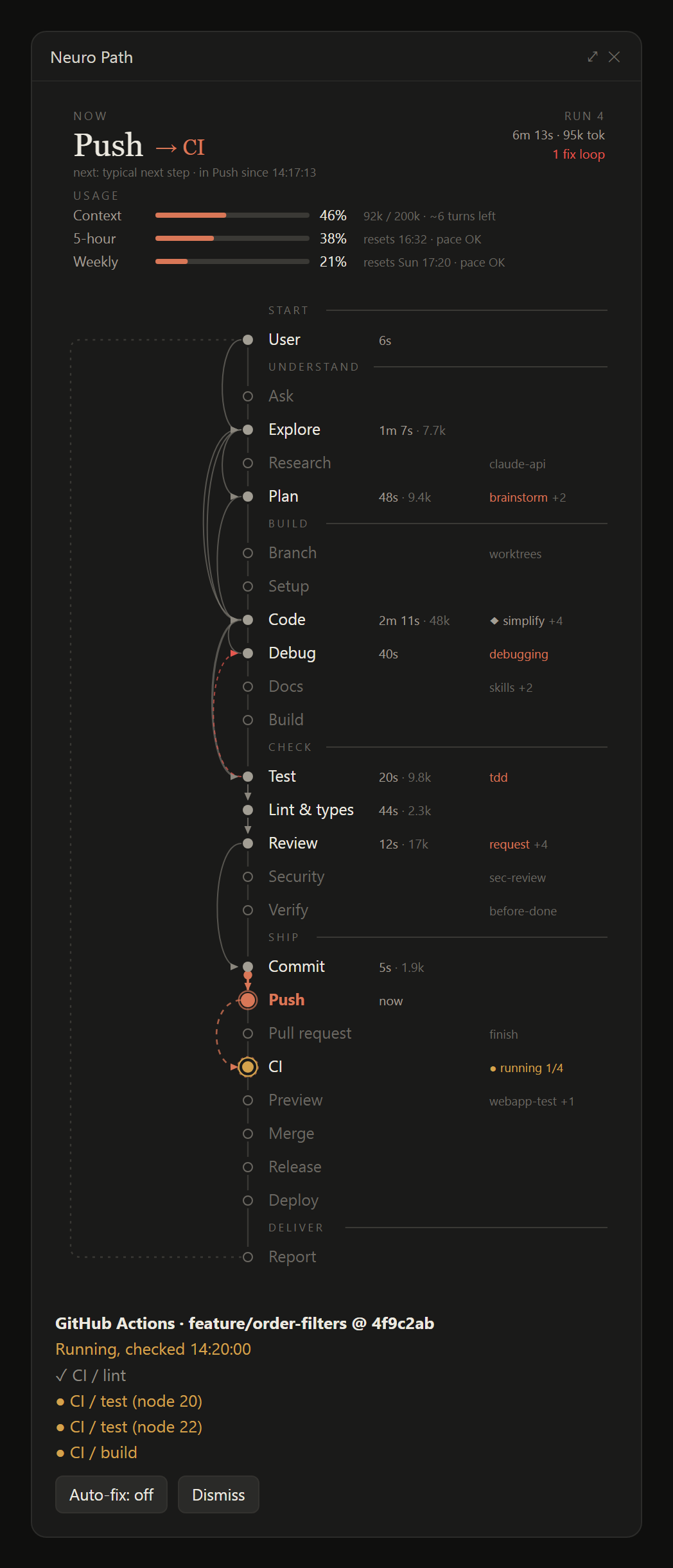 | 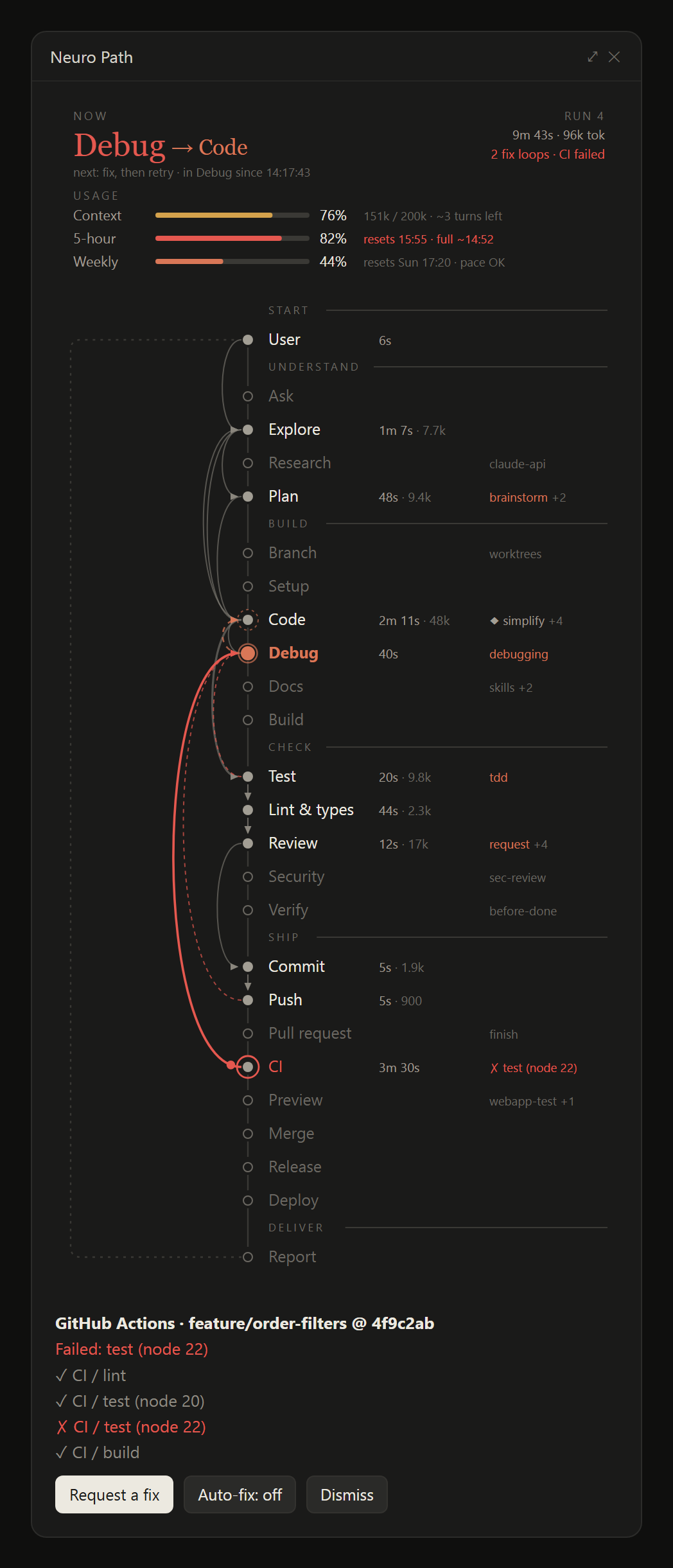 |
| A run in progress, CI checking the push | A failed CI job sends the run back to Debug |
Install
Neuro Path is a Claude Code plugin, published from this repository as a plugin marketplace.
/plugin marketplace add raven-clown/neuro-path
/plugin install neuro-path@neuro-path
The same marketplace carries the skill packs the stages use, so everything works right away:
/plugin install superpowers@neuro-path
/plugin install pr-review-toolkit@neuro-path
/plugin install security-guidance@neuro-path
/plugin install webapp-testing@neuro-path
| Pack | Stages | Source |
|---|---|---|
| superpowers | Plan, Branch, Code, Test, Debug, Review, Verify, Pull request | obra/superpowers |
| pr-review-toolkit | Review | anthropics/claude-plugins-official |
| security-guidance | Security | anthropics/claude-plugins-official |
| webapp-testing | Preview | anthropics/skills |
The packs are installed straight from their own repositories, pinned to a reviewed commit. Neuro Path works without them; the stages simply have no skill to ask for.
Restart the session, then open the pane any time with:
/neuro
Requirements
- Claude Code 2.1.286 or newer (the plugin uses function hooks and pane rendering from that release). Check with
claude --version. - The desktop app draws the full map. The terminal shows a compact text version.
- For CI tracking: the GitHub CLI signed in (
gh auth status) and a repository whoseoriginis on GitHub.
How stages are detected
Detection is based on the tools a session calls and the commands it runs. A few examples:
| Stage | Triggered by |
|---|---|
| Explore | Read, Grep, Glob, read-only shell commands such as ls, cat, git status |
| Plan | plan mode, early task lists, brainstorming, writing-plans |
| Code / Docs | Edit and Write; Markdown and docs/ files count as Docs |
| Test | pytest, jest, vitest, npm test, go test, cargo test and similar |
| Lint & types | eslint, tsc, ruff, mypy, clippy, plugin validate |
| Commit / Push / PR | git commit, git push, gh pr create |
| CI | gh run, gh pr checks, and the built-in GitHub tracker |
| Preview | browser pane actions, curl to localhost |
The full rules, including what counts as a failure and what is ignored, are in docs/how-it-works.md. If a step lands in the wrong stage, please open a stage detection issue.
Privacy
Everything stays on your machine. The plugin reads session events through the plugin API, keeps its numbers in Claude Code's local plugin store, and only runs git and gh locally for CI tracking. Nothing is sent anywhere else.
Roadmap
- GitLab pipelines through
glab - Custom stage rules per project
- Export of daily totals to CSV
- A compact band above the prompt for people who keep the pane closed
Ideas and votes are welcome in Discussions.
Contributing
Bug reports, detection fixes and new ideas are all useful. Start with CONTRIBUTING.md; it covers running the plugin from a local clone with hot reload, validating it, and the pull request flow.
License
Details
- Author
- @raven-clown
- Sub-category
- Dashboards
- License
- MIT
- Surfaces
- hooks/live.tsx
- Added
- 1 months ago
- Last synced
- 1 day ago
- Events hooked
session.startcommand.runsession.measureturn.stepprompt.submittool.callturn.completeui.render
Weekly Mods Digest
Top new Claude Code mods and install commands, once a week. No fluff, unsubscribe anytime.


