
Payback
Counts what Claude finished for you, sorts it, reads your git and test activity, and estimates the hours and money it saved.
claude plugin validate to auditGuide →Writes files, executes local shell processes, or programmatically drives Claude.
Statically scanned from hooks & source. Learn how to audit




Payback is a Claude Code mod that counts what Claude finished for you, sorts it, reads your git and test activity, and estimates the hours and money it saved.
Install · What you get · How it counts · Import history · Commands
Install
/plugin install payback --marketplace michaelSelbertinger/payback
Then type /payback. Want your past sessions in the report too? Run /payback import once. A mod installs like any plugin, through the normal marketplace flow; if you install from a shell while a session is open, run /reload-plugins there to load it.
From a shell, or in the desktop app
From a shell, with Claude Code 2.1.292 or later:
claude plugin install payback --marketplace michaelSelbertinger/payback
On an older version, add the marketplace first and then install:
claude plugin marketplace add michaelSelbertinger/payback
claude plugin install payback@payback
In the desktop app, where /plugin does not run: click + next to the prompt box, then Plugins, Add marketplace with michaelSelbertinger/payback, then Add plugin.
[!NOTE] Payback is a mod: a plugin that changes how Claude Code looks and behaves. Mods need Claude Code 2.1.287 or later in the terminal (2.1.286 in the desktop app). Payback was built and tested on 2.1.299, and the mods API is young enough to change between releases.
Try it
Three things to type once it is installed:
/paybackopens the pane. Pick Today, Week, Month or Year, or switch between $ and €./payback settings currency eurshows money in euro;/payback settings rate 75sets your hourly rate./payback import 30dpreviews the last 30 days of your past sessions, and imports them when you press Import.
See it
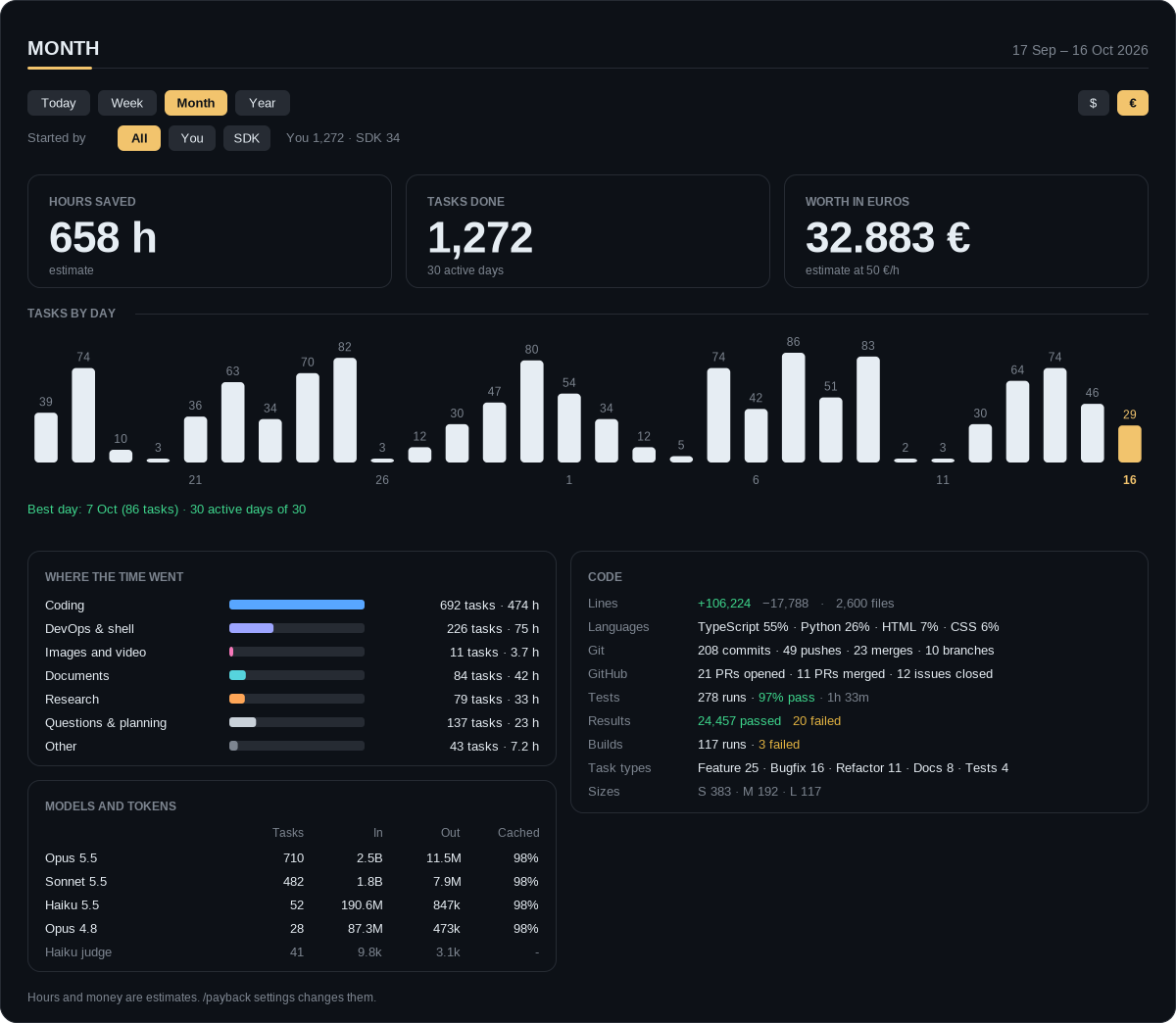
The pane on the Month tab, in euro, with invented sample data. Above it: Today · Week · Month · Year, a $ / € switch and an All · You · SDK filter. The tiles, chart and cards are drawn by the mod itself.
What you get
| 📈 Tasks, counted honestly | One request you typed and Claude finished is one task. Slash commands, helper agents and interrupted requests are not. Tabs for today, the week, the month and the year, with streaks and your best day. |
| 🧑💻 Real developer stats | Lines added and removed, files touched, languages, commits, pushes, merges, rebases, branches, pull requests and issues, read straight from what Claude ran. |
| ✅ Tests and builds | Runs, pass rate, total and average runtime, and passed and failed counts for pytest, jest, vitest, go, cargo, dotnet, npm and more. |
| 🪙 Tokens per model | Input, output and the share served from cache, for every model that did the work. |
| ⏱️ Time and money | Minutes saved per kind of task, times your hourly rate, in dollars or euro. Always labelled as an estimate. |
| 🕰️ Your past, imported | Replays the session transcripts Claude Code already keeps. Preview first, import on one button, undo any time. |
| 🤖 SDK-aware | Work done by an assistant or script you run through the Agent SDK is kept apart, with an All · You · SDK filter. |
How it counts
flowchart LR
    A["You type a request"] --> B["Claude works<br/>edits · shell · web · tools"]
    B --> C{"Finished with<br/>an answer?"}
    C -- "interrupted" --> N["Not counted"]
    C -- "yes" --> D["Sorted by the tools it used<br/>Coding · DevOps · Research · Docs …"]
    D --> F["Coding tasks sized<br/>by lines changed"]
    F -. "optional" .-> G["Haiku 5.5 judge:<br/>type and size"]
    F --> H[("Daily record in<br/>the mod's store")]
    G --> H
    H --> I["/payback pane"]
Each task gets one kind, from the tools it used:
| Kind | When | Minutes saved (default) |
|---|---|---|
| Coding | It edited code, ran git, gh, tests or a build, or used a code tool such as Unity or GitHub | by size: 15 / 45 / 120 |
| DevOps & shell | It ran shell commands without editing code, or used Docker, Kubernetes or cloud tools | 20 |
| Emails | It used a mail tool | 10 |
| Images and video | It used an image or video tool, or wrote an image or video file | 20 |
| Documents | It used a document, slide or spreadsheet tool, or wrote a document file | 30 |
| Research | It searched or read the web | 25 |
| Questions & planning | It used no tools, or only read and searched files | 10 |
| Other | Anything else | 10 |
The size of a coding task comes from the lines it changed (under 40 small, under 250 medium, larger is large) until the Haiku judge says otherwise.
What is counted, and how (all plain code, no model involved)
- Code: lines added and removed, files touched, top languages.
- Git: commits, pushes, merges, rebases and new branches, read from Bash and PowerShell commands that succeeded.
git -C, chained commands and PowerShell'sif ($?)work; quoted messages and here-strings are ignored, as are dry runs and aborted merges. - GitHub: pull requests opened and merged, issues opened and closed (
gh pr …,gh issue …). - Tests: runs of pytest, jest, vitest, go test, cargo test, dotnet test, npm/pnpm/yarn/bun test and others, with pass rate, runtime and passed and failed counts. A command only counts when the runner is the command itself, so
pip install pytestis not a test run. - Builds: runs and failures.
- Tokens: input, output and cache share per model, helper agents included.
A helper agent's lines, commits, test runs and tokens count, but it never makes a task of its own. Payback counts what Claude did through its own tools, not commits you make yourself in a terminal.
Started by you or by the SDK
Sessions started through the Claude Agent SDK (an assistant of your own, a script) are counted apart. The pane shows a Started by row with an All / You / SDK filter. SDK sessions run from a temp folder are treated as tests and left out, as are requests that only ask Claude to summarise an earlier session.
The Haiku judge
[!NOTE] Off by default. It is the only part of Payback that calls a model. Turn it on with
/payback settings judge on, and off again with/payback settings judge off.
When the judge is on, each finished coding task gets one small call to Claude Haiku 5.5. It labels the task's type (feature, bugfix, refactor, tests, debug, docs, devops, review) and its size. The call is sent the first 1,500 characters of your request, the names and counts of the tools it used and the number of lines changed, and it uses your own Claude account or API key. Its tokens are shown in the pane under Haiku judge. With the judge off, which is how Payback starts, sizes come from the lines changed alone and the pane's Task types row says the judge is off.
Importing your history
/payback import reads the session transcripts Claude Code keeps in ~/.claude/projects/ and replays them by the same rules as live tracking.
[!TIP] Nothing is saved until you press Import. The pane first shows what it found: tasks, days, sessions, kinds and the estimate.
- No double counting. It reads only what happened before Payback's first live record, and an import replaces its whole date range, so running it twice counts once. History that a fork or a resume copied into another file is counted once.
- Undo with
/payback import undo. - Imported coding tasks are sized by lines changed; the Haiku judge is not run on them.
[!IMPORTANT] Claude Code deletes transcripts after 30 days by default, so that is as far back as an import can go. Raise
cleanupPeriodDaysin your settings to keep more from now on.
Where it runs
| Where | What you get |
|---|---|
| Desktop app, Code tab | The pane, the hint-line button and every command. This is where Payback was developed and used. |
| Terminal | The same pane in a text layout. Covered by automated tests, not yet by daily use. |
| VS Code extension | Mods draw there from extension version 2.1.299. Payback has not been tried in it. |
claude -p and the Agent SDK | Counting runs, nothing is drawn. |
| WSL sessions in the desktop app | Mods do not run there. |
Commands
| Command | What it does |
|---|---|
/payback | Opens the pane. There is also a Payback button in the hint line under the prompt. |
/payback settings | Lists the hourly rate, currency, minutes per kind of task and whether the Haiku judge is on. |
/payback settings rate 75 | Sets the hourly rate. |
/payback settings currency eur | Shows money in euro (usd for dollars). Nothing is converted: the rate is read in the chosen currency. The pane has a $ / € switch too. |
/payback settings <kind> 15 | Minutes saved per task of a kind: devops, emails, images, documents, research, questions, other. |
/payback settings small|medium|large 45 | Minutes saved per coding task of that size. |
/payback settings judge on|off | Turns the Haiku judge on or off. |
/payback import | Reads your past sessions into the report. Also /payback import 30d or /payback import 2026-09-20 2026-10-10. |
/payback import undo | Removes everything imported. Live data is untouched. |
Trust and privacy
A mod runs inside Claude Code with your permissions, so here is exactly what Payback touches:
- Your session transcripts in
~/.claude/projects, read only when you run/payback import, and only to count. Large ones are read withcmd /c type(Windows) orcat; on Windows, a path containing& | < > ^ % !or a quote is skipped rather than handed tocmd. - A few environment variables:
CLAUDE_CODE_ENTRYPOINT,CLAUDE_CONFIG_DIR,HOME,USERPROFILEandOS. - Claude Haiku 5.5, for the judge described above. It is the only model call, and it stays off unless you turn it on.
- The mod's own store, where the counts live. Payback makes no network requests of its own.
What Payback sends, and where. One thing only, and only if you turn it on: the Haiku judge's request to Anthropic through your own Claude Code session (described above). The files and transcripts Payback reads are never sent anywhere.
Programs it runs. At most one, and only during /payback import: cmd /c type <file> on Windows or cat <file> elsewhere, to print a session transcript larger than 4 MB, because the file API reads at most 4 MiB at a time. It runs on files under ~/.claude/projects only, takes no other arguments, and prints to Payback and nowhere else.
What it changes. Nothing outside its own store. Its hooks watch tool calls, prompts and turns and pass them on unchanged: they never block, rewrite or approve anything, and Payback does not touch permissions, agents, settings or files. It answers its own /payback command, and it draws its pane and one button in the hint line under the prompt.
Run claude plugin validate on a clone of this repository to see for yourself: its hooks: and calls: lines list the events Payback handles and what it asks Claude Code to do.
[!NOTE] All counts stay on your machine. Out of the box nothing is sent anywhere. If you turn the Haiku judge on, its calls go to Anthropic through your own Claude Code session. Payback sees your prompts and tool calls in order to count them, and keeps none of their text. Read the privacy policy.
Support
Bug reports, questions and ideas: open an issue. For security concerns, write to michael.selbertinger@web.de. The full privacy policy is a short read.
Development
claude plugin validate .
claude plugin test .
The logic lives in hooks/stats.ts (counting, sorting, dates) and hooks/history.ts (the transcript replay), both free of Claude Code's runtime so the tests reach them directly. hooks/register.tsx holds the hooks, the commands and the pane.
To run your working copy in every session, add its folder to CLAUDE_CODE_PLUGIN_DIRS in the env block of ~/.claude/settings.json, and set CLAUDE_CODE_PLUGIN_DIR_WATCH to 1 there so desktop sessions reload it when you save.
The pictures in this README are generated, with no hosted services involved, from the mod's own drawing code (hooks/dashboard.ts) and invented sample data. The generator scripts are kept outside this repository, so that everything in it is the mod itself.
License
Copyright (C) 2026 Michael Selbertinger.
Payback is free software: you can redistribute it and/or modify it under the terms of the GNU General Public License as published by the Free Software Foundation, either version 3 of the License, or (at your option) any later version. It is distributed in the hope that it will be useful, but WITHOUT ANY WARRANTY; without even the implied warranty of MERCHANTABILITY or FITNESS FOR A PARTICULAR PURPOSE. See LICENSE for the full text.
Details
- Author
- @michaelSelbertinger
- GitHub Stars
- 1
- Sub-category
- Dashboards
- License
- GPL-3.0
- Surfaces
- terminal
- Added
- 1 months ago
- Last synced
- today
- Events hooked
session.startcommand.runprompt.submitturn.starttool.callturn.completeui.render
Weekly Mods Digest
Top new Claude Code mods and install commands, once a week. No fluff, unsubscribe anytime.

