
Progress Ring
A friendly progress ring for Claude Code's long plans: %, current step and what's next above the prompt, plus a panel with every plan across chats.
claude plugin validate to auditGuide →Writes files, executes local shell processes, or programmatically drives Claude.
Statically scanned from hooks & source. Learn how to audit
Progress Ring
English · Español
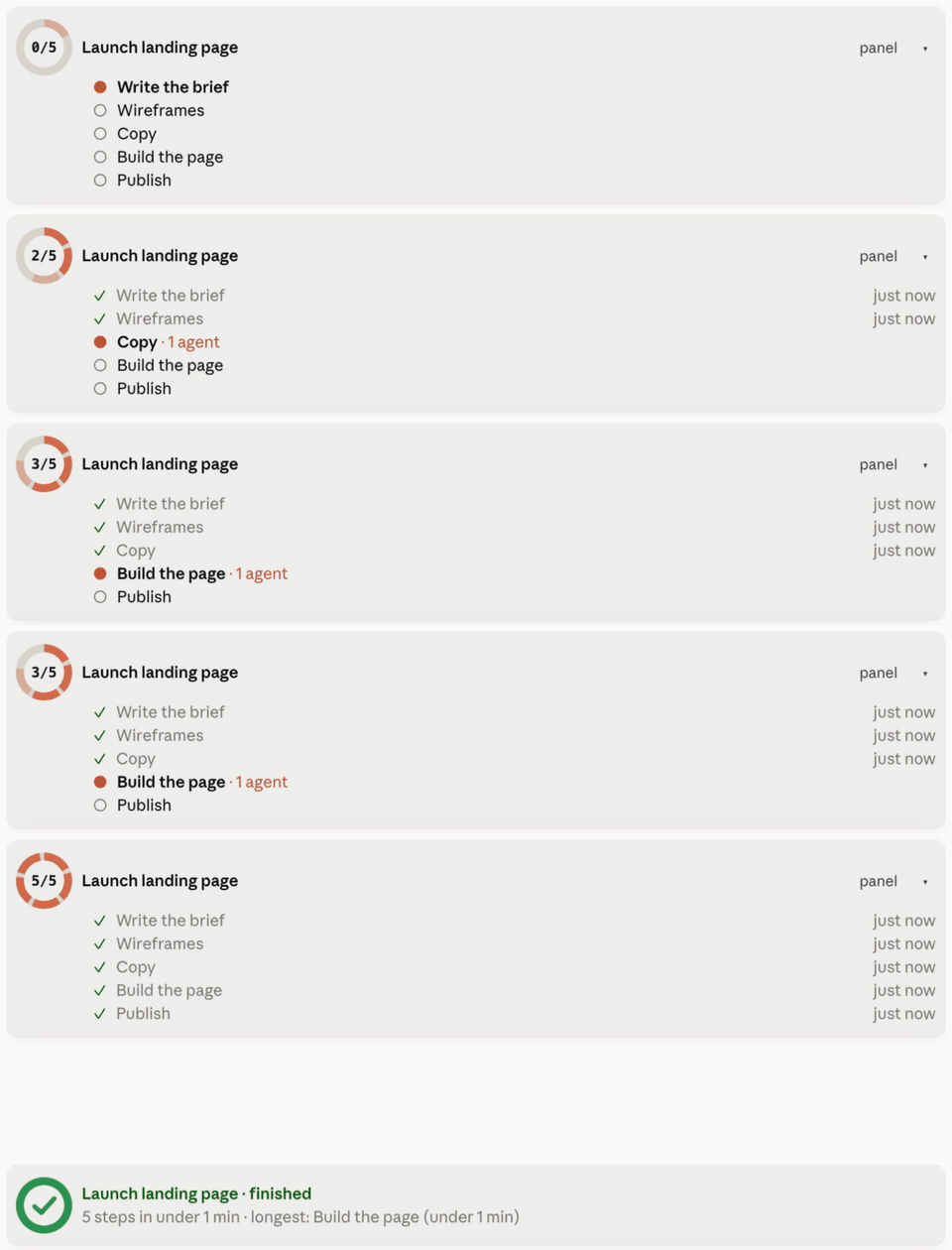
See how far along Claude Code is in a long plan, without reading the transcript. When Claude starts a plan with three or more steps, it opens a progress card and closes each step as it finishes. You see it:
- Band above the prompt (terminal and desktop): a ring with the percentage, the current step, the plan, and whether Claude is working, waiting for you or stalled.
/progresspanel: every plan in this chat and in other chats, with their steps, subagents waiting for review, and a button to jump to the chat that owns each plan.- Milestones in the conversation: the command that closes a step is drawn as «Now: X · ✓ what was closed · N/M».
You don't have to tell Claude to use it: the plugin teaches it when to open a card, close steps, accept subagent work and finish.
In the Claude desktop app, Claude already keeps a task list under its last message. Progress Ring follows that list instead of asking Claude to keep a second one: a list of three or more steps opens a card, each step Claude completes closes there, and the card finishes with the turn. One card is one objective: when Claude moves on to something else, that card closes and a new one opens, titled with the new objective. Claude uses the progress command only for what the list doesn't carry: iterations, accepting subagent work, cancelling or pausing, and a clearer title. In the terminal, nothing changes.
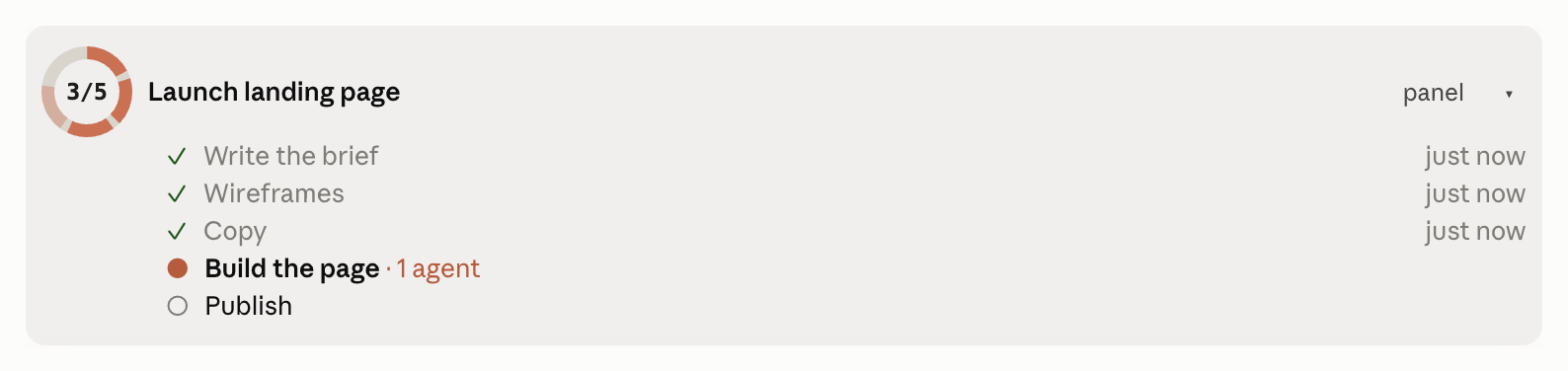
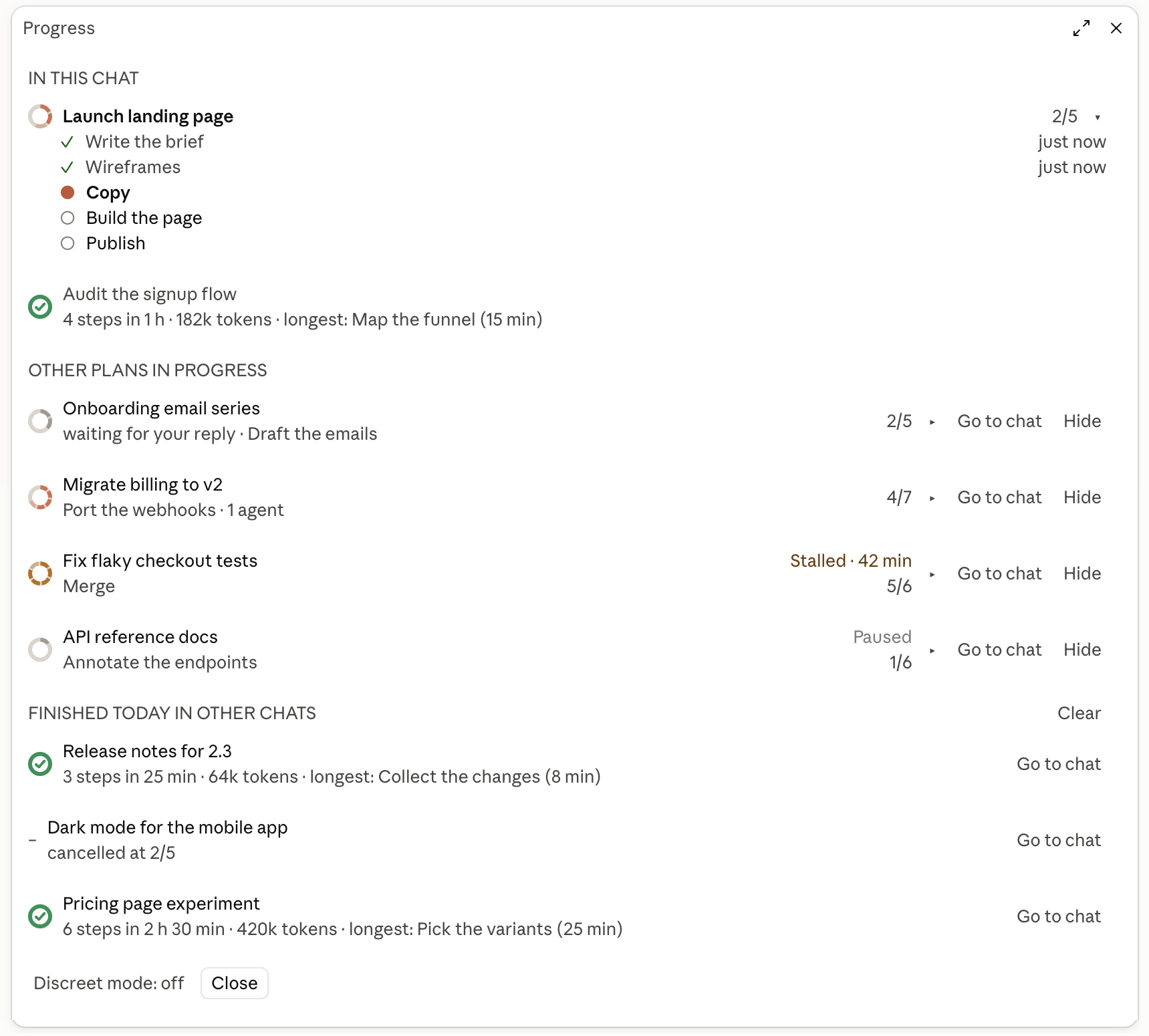
Screenshots use demo data (scripts/demo.py).
Install
At the prompt of a Claude Code session:
/plugin install progress-ring --marketplace alvaro-hi/progress-ring
Answer y to add the marketplace and pick the user scope. Or from a shell:
claude plugin marketplace add alvaro-hi/progress-ring
claude plugin install progress-ring@progress-ring --scope user
Start a new session afterwards. Uninstall with claude plugin uninstall progress-ring@progress-ring.
Requirements: a Claude Code build with mods (hooks modules), tested on 2.1.287; macOS or Linux; python3 3.9 or later on the PATH.
Language: the interface follows your system language (Spanish or English). To force one, set the plugin's language option to en or es in /plugin → progress → configure.
How it works
| Piece | Where | What it does |
|---|---|---|
| CLI | bin/progress, bin/progresslib.py | Creates and updates the cards in ~/.claude/progress/<id>.json, with a lock per card |
| Hook | bin/progress_hook.py | Injects the active card's state into each prompt; registers subagents as rows; records turn start and end, the owning chat and tokens per step; closes a plan with every step done when the turn ends |
| Mod | hooks/register.tsx and the rest of hooks/ | Draws the band, the panel and the milestones; passes Claude Code's hook events to the Python hook; adds the usage rule to the system prompt |
The mod only reads cards: every write goes through the CLI. The hook never blocks a session: any error is logged to ~/.claude/progress/_hook-errors.log and the session goes on. Nothing leaves your machine.
What it runs, reads and sends
- Runs two local Python scripts from the plugin's own folder, always as
python3 bin/progress_hook.pyandpython3 bin/progress: the first on Claude Code's hook events (prompt sent, turn end, tool use, subagent start and stop, an Agent call about to run), and the second when you press Hide, Clear, Discreet mode or Go to chat. To open a chat,progress chatrunsopen(macOS) orxdg-open(Linux) with aclaude://link. - Reads the cards in
~/.claude/progress, the session's id and folder, the hook events' data (the transcript path included: the hook reads the transcript to add up the tokens spent per step) It reads no credentials and no data from the Claude app. - Sends nothing over the network. Everything stays in local JSON files under
~/.claude/progress. - Changes in Claude Code: adds one section to the system prompt (when to track a plan and how; in the desktop app, how the card follows the task list), adds one context line with the active card's state to your prompts and, when the task list opens a card, one line telling Claude its id, registers
/progress, draws the band, the panel and the milestone rows, and hides the result row ofprogresscommands, which the milestone row already shows. It never allows, denies or asks for a permission.
Rules the cards follow
- The percentage only counts closed steps. A subagent that delivers shows as «to review» and only counts once Claude accepts it.
- Activity moves the state: a new step reopens a paused, closed or cancelled card; a plan with every step closed closes itself at the end of the turn.
- A card is stalled after 30 minutes without progress (15 if one or two steps are left), never while a turn or a subagent is running.
- The session that touches a card owns it. Other chats see it under «Other plans in progress» and don't touch it unless you ask.
- Finished cards stay visible until midnight. «Clear» moves finished and cancelled cards to
~/.claude/progress/_done/; nothing is deleted.
Using the CLI yourself
Claude calls the CLI with its full path. To use it from your own shell:
alias progress="$(ls -dt ~/.claude/plugins/cache/progress-ring/progress-ring/*/ | head -1)bin/progress"
progress start release "Release 2.0" --total 5          # new card
progress plan release build="Build" qa="QA" ship="Ship"  # planned steps (the total follows the plan)
progress step release "Build is green" --key build       # close a step
progress plan release --add docs="Docs" --after qa       # replan
progress child accept release <cid>                      # accept a subagent's delivery
progress done release                                    # finish (or: cancel, pause)
progress hide release                                    # out of the list until it moves again
progress clear                                           # finished and cancelled → _done/
progress chat release                                    # open its last chat, or print `claude --resume <id>`
progress discreet toggle                                 # hide titles while sharing your screen
CLAUDE_PROGRESS_DIR moves the cards somewhere other than ~/.claude/progress.
Development
python3 -m unittest discover tests
claude plugin test .
claude plugin validate .claude-plugin/plugin.json
scripts/demo.py runs a demo plan that moves on its own (for screenshots); --clean removes it.
To try local changes, add the repo folder as a marketplace (claude plugin marketplace add .) and install from it: Claude Code then reads the plugin straight from the folder and /reload-plugins picks up edits.
Credits
Designed by Álvaro del Pozo. MIT license. Not affiliated with Anthropic; "Claude" and "Claude Code" are trademarks of Anthropic.
Details
- Author
- @alvaro-hi
- Sub-category
- Dashboards
- License
- MIT
- Surfaces
- terminal
- Added
- 1 months ago
- Last synced
- today
- Events hooked
session.startprompt.composeclassic.UserPromptSubmitclassic.Stoptool.callclassic.PostToolUseclassic.SubagentStartclassic.SubagentStopprompt.submitcommand.runui.render
Weekly Mods Digest
Top new Claude Code mods and install commands, once a week. No fluff, unsubscribe anytime.

