
Project Sentinel
Mission control for long Claude Code runs: context and run progress at a glance, Autopilot handoffs, guardrails and a calm activity view, in the terminal and Claude Desktop.
claude plugin validate to auditGuide →Writes files, executes local shell processes, or programmatically drives Claude.
Statically scanned from hooks & source. Learn how to audit
Project Sentinel
Mission control for long Claude Code runs: context, run progress and the prompt cache at a glance, Autopilot handoffs before the context fills up, guardrails, and a calm view of what Claude did. For the terminal CLI and for local sessions in Claude Desktop's Code tab.
Project Sentinel was called Control Room until 1.4.0; its panel still is, and /cr still
opens it. An existing install moves over by itself (see Coming from Control Room).



One plugin gives you:
- a calm status bar above the prompt, a mission HUD: what the run is doing or waiting for, in words, and only what needs a look; below it the run's instruments (work, context, the prompt cache, the plan's five-hour usage), each its own shape; above it, while subagents run, one line per agent
- the Control Room panel, docked beside the conversation
- Autopilot (Context Autopilot): Claude writes handoff notes, the context is cleared, and Claude carries on in a fresh one, before this one fills up; then Project Sentinel checks what the handoff left and what the fresh context picked up
- Cache Guardian: the prompt cache in view, why each rebuild happened and how to avoid the next, model switches confirmed before they throw a large cache away, and Keep warm, which holds the cache while you are away
- run progress that survives those handoffs, with evidence for each verified milestone (it says when a later change made a verification stale), and an Activity view that leads with what needs a look, with its own views: Summary, Operations, Agents and Tool calls
- Operations, the run over time: work you queue for Claude for later, decisions Claude leaves for you instead of stopping, watchers that park the run until a result is due and then wake it, a Cold Resume Guard that asks before a large conversation whose cache has lapsed is re-read, the agents actually running, and an optional run budget
- answer styles: brief, Simplified Technical English, mission-control status calls, or a quest log with XP for verified progress
- policies for effort, finishing the job, subagents and their models, machine load and risky actions, with profiles that set everything at once. A fresh install starts opinionated (Autopilot at 70%, Frontier Max at Extra High, permissions left to Claude Code) and says so once; an existing install keeps what it had. The main conversation's model is never switched
- Kit, if you like: a small Claude-orange creature above the status bar that shows what Claude is doing, and answers a click
Status: 1.8.0. Project Sentinel is built on Claude Code's function-hooks plugin API ("mods"), which is still early access and may change between Claude Code releases. It is verified on Claude Code 2.1.289 (the minimum), 2.1.293, 2.1.295, 2.1.296 and 2.1.325 on Windows 11, and in CI on Linux and macOS. See Compatibility.

Contents
- Screenshots
- Features
- Requirements
- Install
- Using Project Sentinel
- Profiles
- How the systems interact
- Security and privacy
- Compatibility
- Limitations
- Development
- License
Further reading: Configuration · Troubleshooting · Design · Architecture · Security · Changelog · Contributing
Screenshots
In the terminal
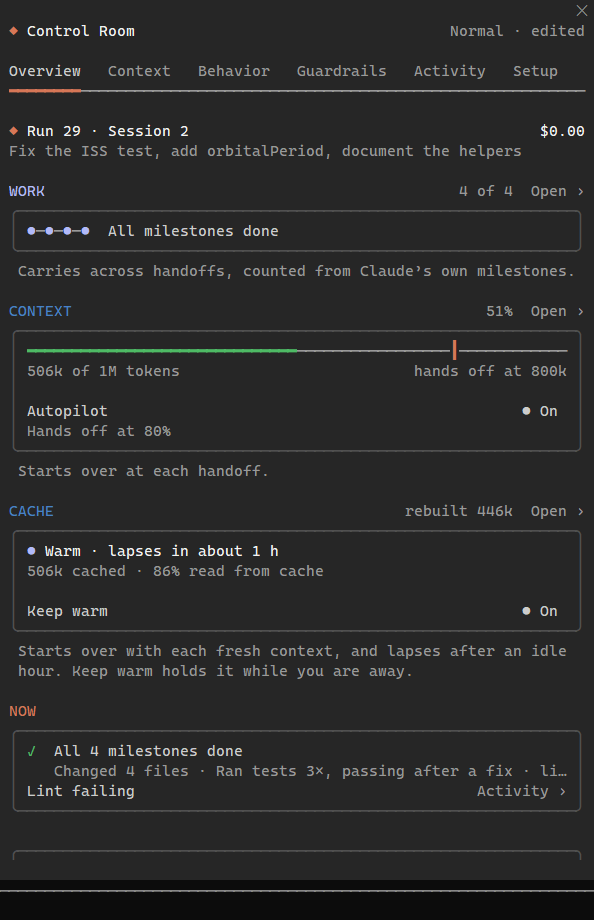 | 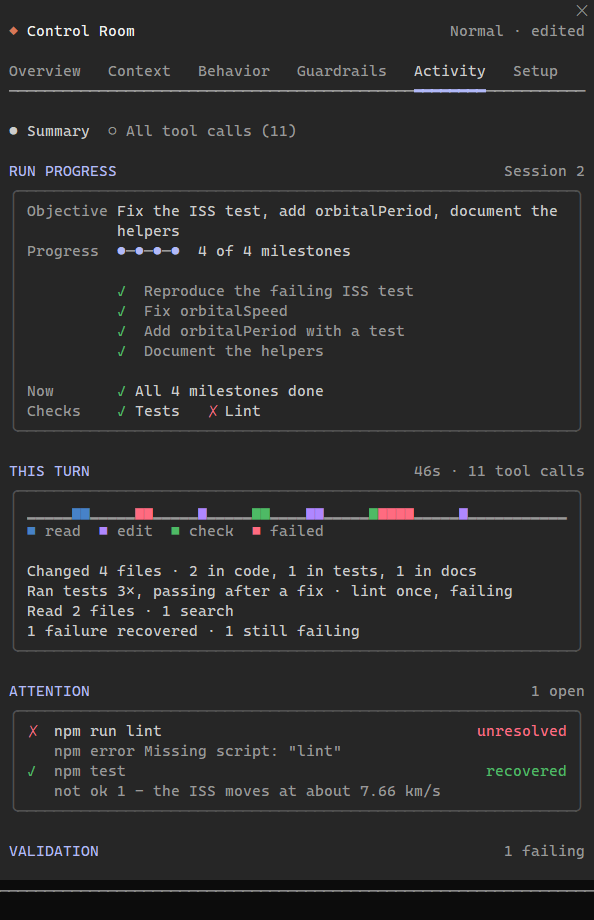 |
| Overview: the run, then its three lifecycles (work, context and the prompt cache), each with how it starts over. | Activity leads with the run: its milestones, where the turn's time went, and what needs a look, with the line of output that says why. |
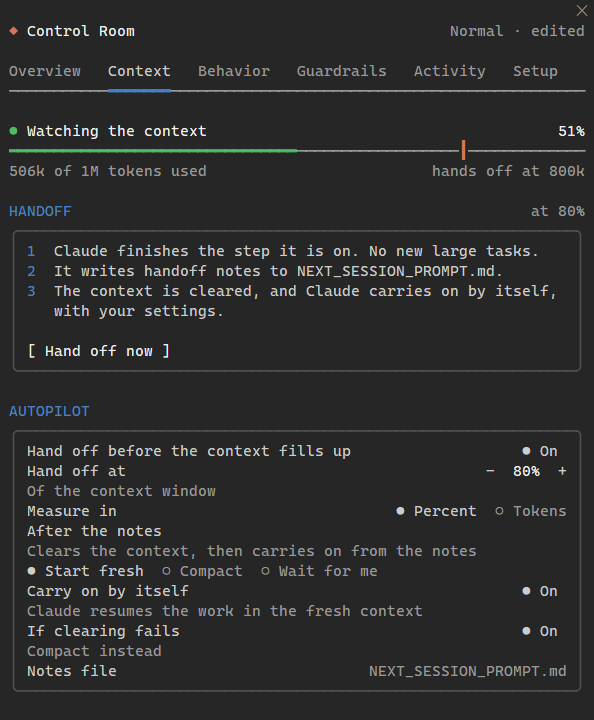 | 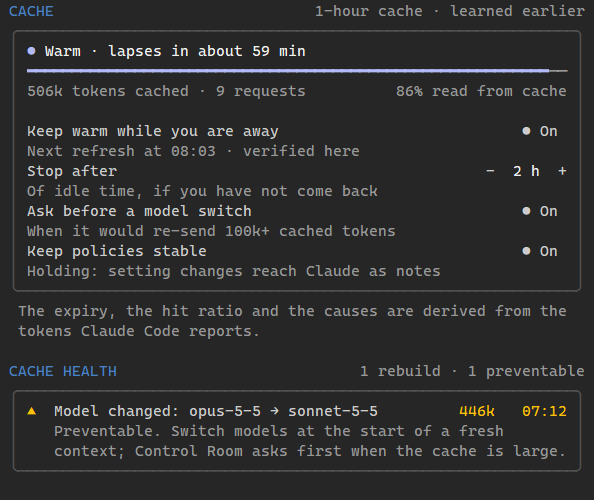 |
| Context: when Claude hands off, and what happens when it does. | Further down Context, the prompt cache: what it holds and for how long, Keep warm, and each rebuild with what would have avoided it. |
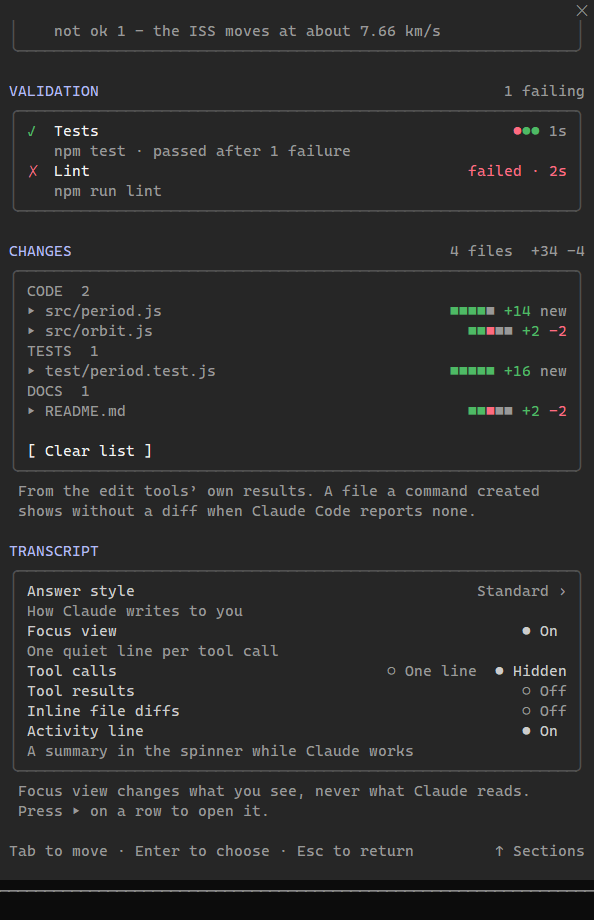 | 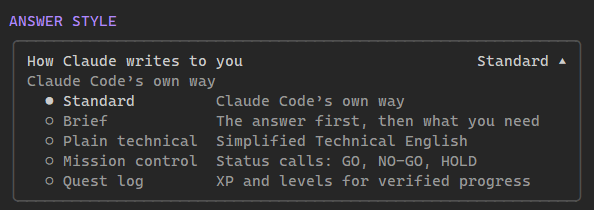 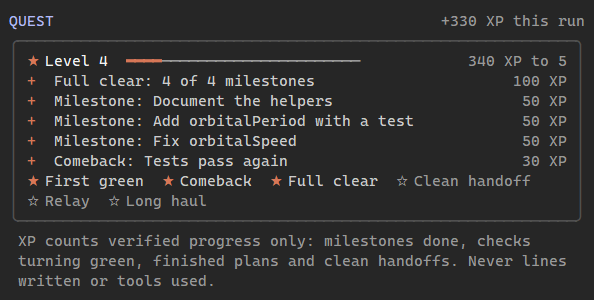 |
| Further down Activity: each check's runs as dots, and every changed file by kind with its diffstat, each opening its diff in place. | Answer styles: how Claude writes to you, each with a line on what it means. The Quest log: XP only for progress Project Sentinel can count, never for lines or tool calls. |

Control Room 1.3.0 in a 150-column Windows console (Claude Code 2.1.293), with the panel
docked beside the conversation (the Answer style and Quest cards are from 1.1.0; they did not
change). The work is a scripted turn played by the development-only
demo driver: Claude Code ran every tool call in it for real (a test that
fails and is fixed, new code with its test, a lint script that does not exist), but no model wrote
the words, and the token counts are scripted, a model switch halfway through included. Claude
Code reports no cost for them, so the cost reads $0.00 (with a + after a cleared session whose
cost was not reported).
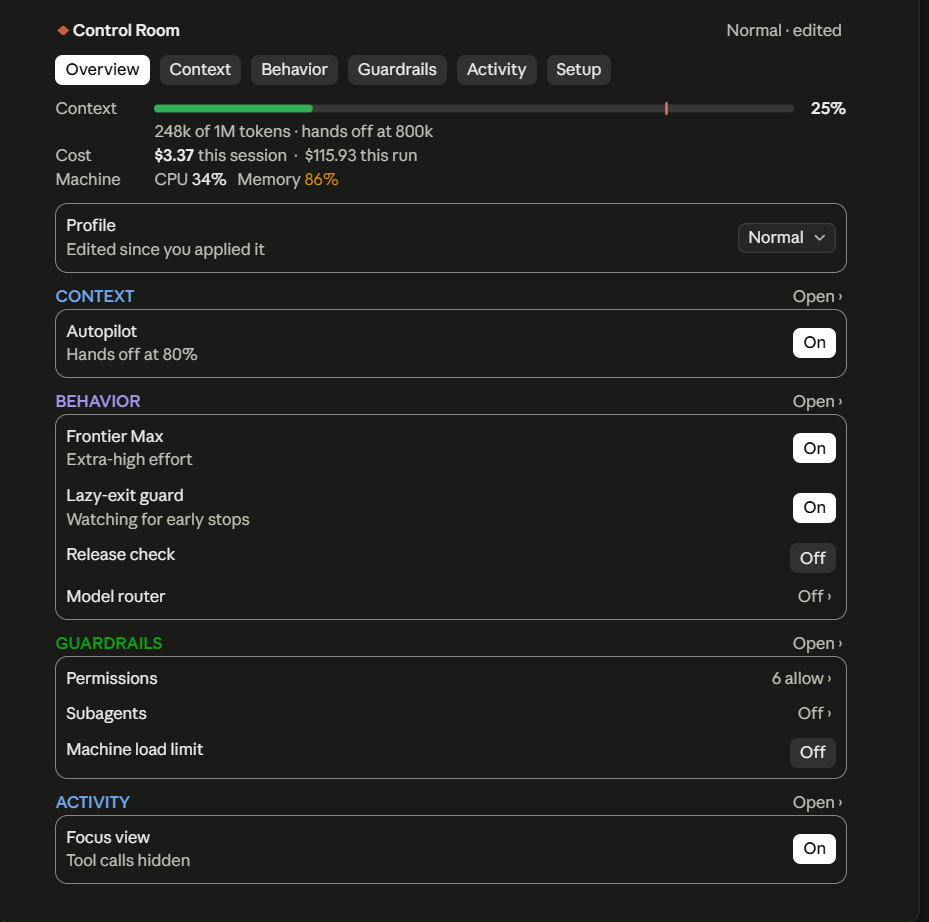
In Claude Desktop
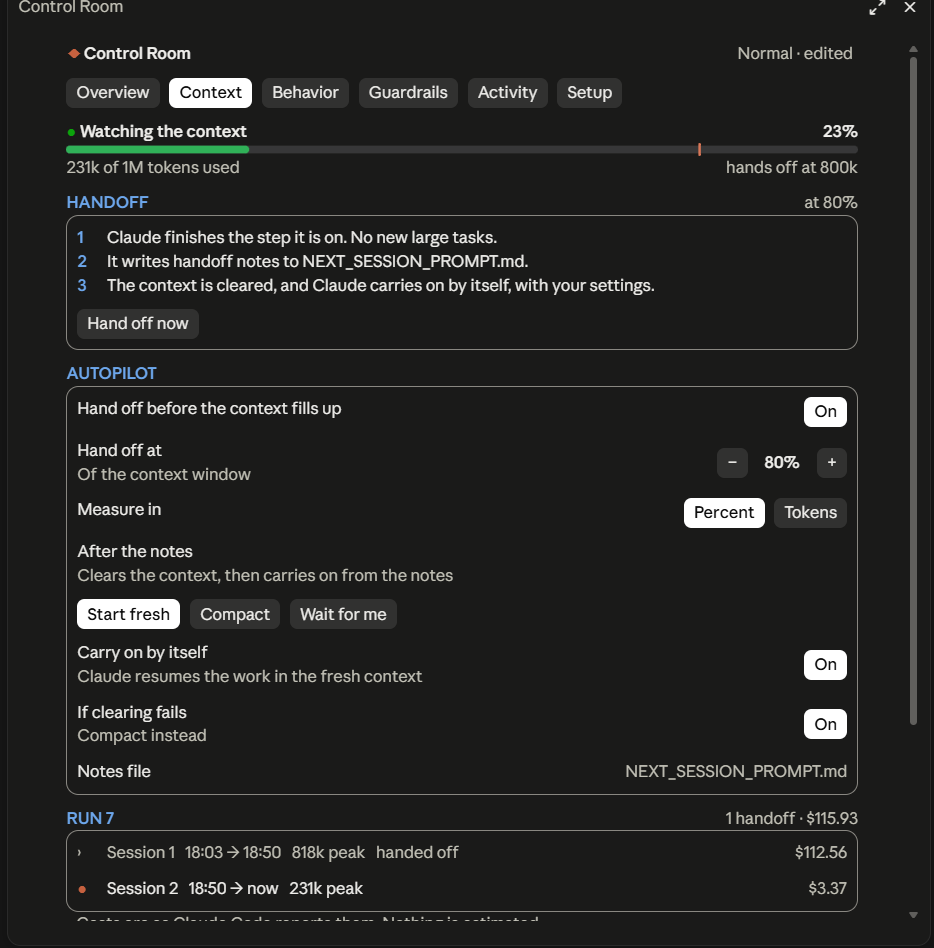 | 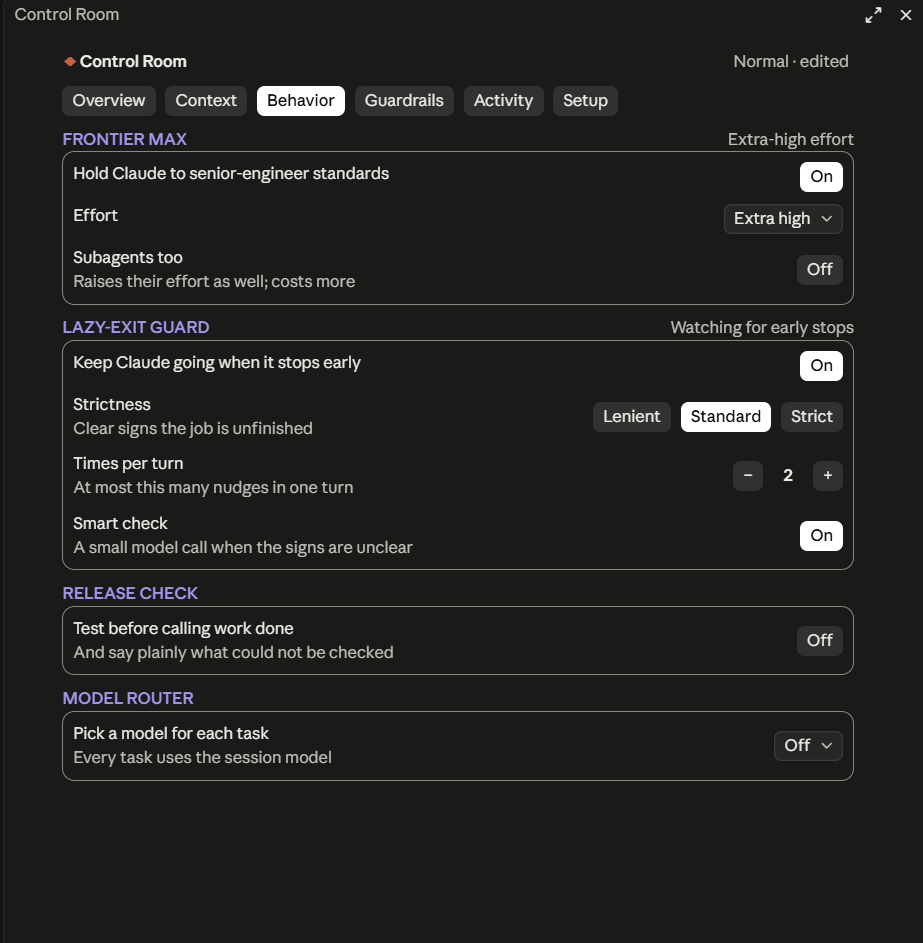 | 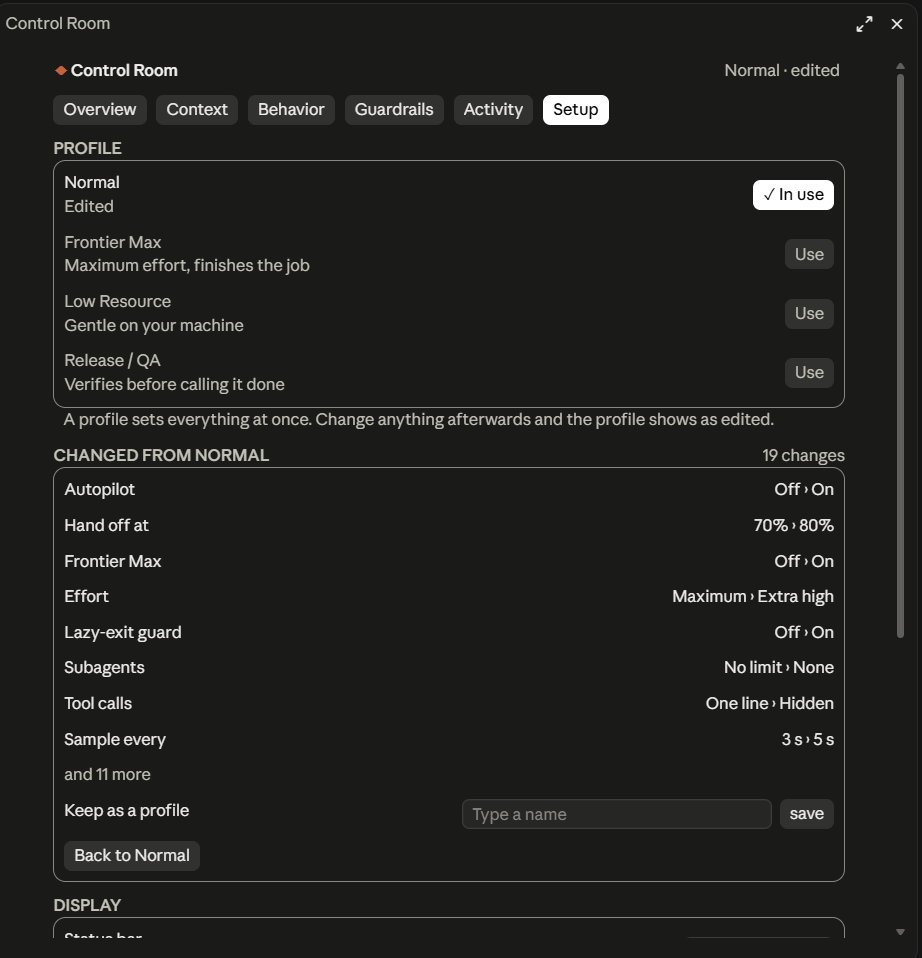 |
| Context, mid-run: one handoff behind it, $115.93 so far. | Behavior: each system on its own card. | Setup: exactly what changed since the profile. |
Control Room 1.0.1 in Claude Desktop's Code tab, from real sessions. On Desktop the controls are native buttons and popups and the meters are drawn as graphics. What came after (the two-line status bar, Activity's charts, the answer styles, the Cache card and Kit) has not been photographed on Desktop yet.
Operations
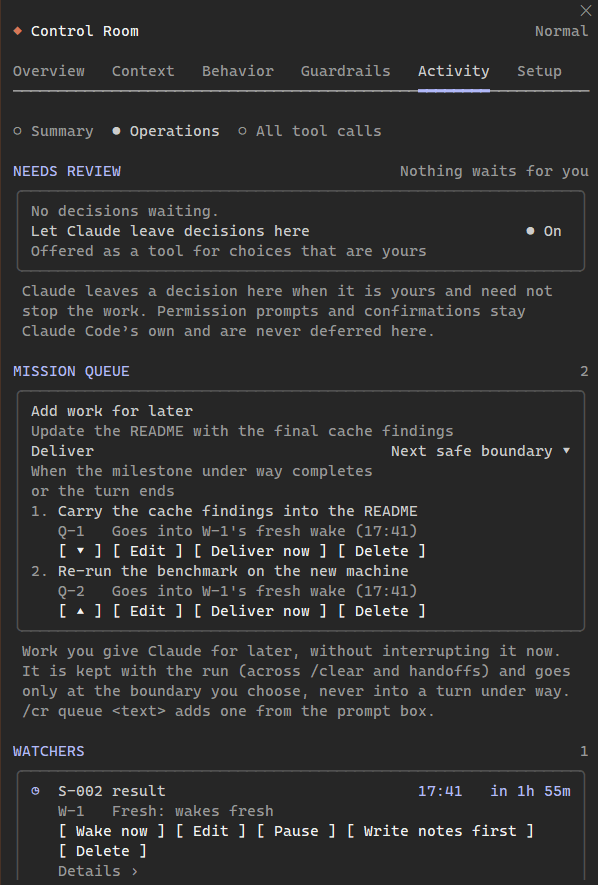 | 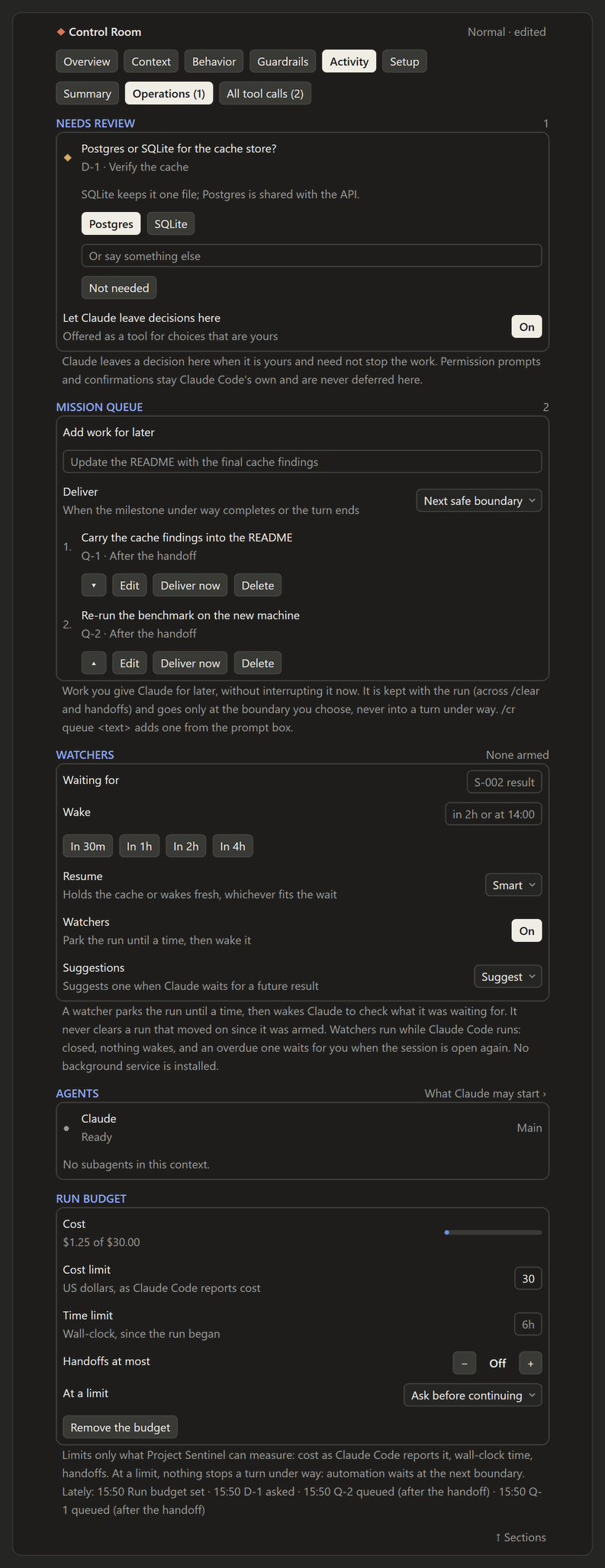 |
| In the terminal: two items queued for the fresh context that watcher W-1 will start when it wakes the run at 17:41. | On Desktop, in the preview: a decision Claude left for you, a button per option and a field for your own words; below it the queue, the watcher form, the agents and a run budget. |
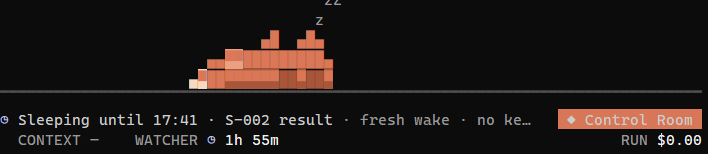


Project Sentinel 1.6.0. The terminal images are captures of Claude Code 2.1.295 in a 150-column
Windows console, set up with /cr commands alone (/cr queue --handoff, /cr watch in 2h … --fresh,
/cr budget $30), so no model turn ran. The Desktop images are drawn by
tools/desktop-preview from the trees the plugin draws on the
desktop surface, with the app's own layout rules; its font and colors are close guesses, and
Operations has not been photographed in the app yet.
Features
| System | What it does | Default |
|---|---|---|
| Status bar | A mission HUD above the prompt. The headline says what the run is doing in words, with a mark for its state: working, thinking, running a check, waiting for you, waiting for a result that comes by itself (a background job, a scheduled wake-up), blocked, handing off, done. On its right, only what needs a look (a failing check, issues, a busy machine, agents), then the Control Room button. Below, the instruments, each its own shape: Work (a track of milestones), Context (a bar with Autopilot's handoff notch), Cache (a clock face, only while it matters) and 5H, the plan's five-hour usage as Claude Code reports it (a thin bar, the percentage, the time to the window's reset). A handoff that needs you takes a line of its own above, with its buttons, and while subagents run the agent band sits above everything: a line per agent saying what it is doing, opening Activity → Agents. On Desktop the readings sit in a grid of cells and always keep their places. | On |
| Control Room panel | Six sections: Overview, Context, Behavior, Guardrails, Activity, Setup. A section with several views (Activity) has a second level that never looks like a setting: Activity › Summary over View [ Summary ] Operations Agents (2) Tool calls (a bordered group of buttons on Desktop). Color means something: green verified, amber waiting for you or worth a look, red a failure or a blocker, blue what is current or under way, gray the rest. In the terminal: switches, segmented choices, choices that open in place, and − / + steppers. Every control works with a click or with Tab and Enter, and there are no popups to get stuck in. On Desktop: native buttons and popups, plus graphical meters. | /cr opens it |
| Autopilot (Context Autopilot) | At a threshold (a % of the window, or tokens), Claude finishes the step it is on. Then it runs a handoff: it records the run's milestones, updates the project's docs, keeps CLAUDE.md for durable instructions only, runs a minimal validation and writes NEXT_SESSION_PROMPT.md in its own words. Project Sentinel then checks that the notes were written for this handoff (wherever they landed: the project root, the working directory or a Desktop worktree, the repository root, or where Claude's editing tool wrote them; proven by Claude's own write, a change since the handoff began, or the time), runs /clear, seeds the fresh context with the run's milestones and objective, and Claude continues on its own. The prompts name the exact path. Every step moves on when its turn starts or ends, never on a timer. A handoff turn that ends while finite background work it started still runs (a render, a test run) waits for that work as Claude Code reports it (20 minutes at most by default), takes its result into the notes, then clears and continues by itself; a server or watcher is never waited for, and work left running is handed to the fresh context, which is told what still runs and since which session. Such work stays a dependency of the run, across any number of handoffs, until Claude Code reports its end, and never holds a later handoff. A fresh context that starts close to the threshold gets room to work before it may hand off again. Each context is measured on its own: a new context's size is unknown until Claude Code reports it, and the old context's figure never carries over. After three handoffs into fresh contexts within 30 minutes the next one, or a fresh context at its handoff point within two turns without growing, is refused (Handoff loop prevented: Recheck, Continue here, Start fresh, Pause Autopilot). A window that shrinks under a model switch (a 1M model reported as 200k) while the context already holds more than the new handoff point holds the handoff (Model window changed unexpectedly) until you take Claude Code's limit, switch back, start fresh or pause Autopilot; Project Sentinel never forces a window Claude Code does not report. Compaction is a choice, or the fallback when clearing is refused (in Desktop and other SDK sessions it runs as /compact). A reload of the plugin mid-handoff carries the handoff on; it never starts a second one. A reload during Project Sentinel's own /clear lets the next load adopt the run and give the fresh context its continuation once. | On, at 70% (Classic: Off) |
| Handoff Supervisor | Looks at a handoff under way every 30 seconds, with no model call and nothing added to the transcript: how long its step has stood and what holds it (finite work worth waiting for, work that outlasted its wait, a server beside it, a question open to you, a step whose event never came), the notes' state, the wait's deadline and what it does next. It shows in Context and on the line above the status bar with the ways out: Hand off now (leave the work running for the fresh context), Stop & hand off, Keep waiting, Call off; the same as /cr handoff now|stop|wait|cancel, and typing "handoff now" or "don't wait for the server" works too. Only a task nothing recognises is asked about, once, by a small isolated classifier (its command and description only). | With Autopilot |
| Handoff Health and Continuity | After each handoff, Context → Last handoff shows what it left for the fresh context (run state saved, the milestone under way, the notes, docs updated, validation recorded, whether the verified milestones' evidence is current, what it left running) and, once the fresh context's first turn ends, what it picked up (notes read, run state restored, milestone picked up, docs read, work resumed). Counted from tool calls, never from what Claude says. | With Autopilot |
| Run progress | The run's objective and milestones, done of total, counted from Claude's own task list and carried across handoffs, so the work meter keeps climbing while the context meter starts over. A milestone may also be verifying (with its evidence) or blocked (with what it waits for). Where Claude Code offers no task list (its task tools are off by default in 2.1.29x), Project Sentinel gives Claude a small milestones tool to keep one. Open milestones of an earlier context are carried until a later list names them (a reworded title is matched), Claude marks them dropped, or new work begins. | On |
| Milestone evidence | When a milestone is completed, what it stood on is kept: the checks green during its work, the files its work changed (and outputs Claude names) with Git's blob id of each, and HEAD. Never the whole repository. Later, a changed file makes that verification stale (never "wrong"), with what changed and which checks to rerun, in Run progress, Attention, Last handoff and Ready to resume; Claude is told at a handoff and in the fresh context. A later milestone changing the same file is quiet while under way and re-verifies it when its checks pass; a change made outside Claude's tools clears once the checks pass again, or when you accept it (/cr evidence accept). | On |
| Cache Guardian | The main conversation's prompt cache, from the token counts Claude Code reports for each request: how much is cached, how long it stays warm (the cache's lifetime is learned), the share read from the cache, and why each rebuild happened (a model or effort switch, changed policies, a new tool, compaction, idling past the lifetime), with what would avoid the next. Project Sentinel never switches the main conversation's model: a prompt cache belongs to one model. A switch you make that would re-send 100k+ warm tokens is confirmed first: a /model or picker switch in Claude Code's own dialog; a switch from Desktop's model picker, Remote Control or an IDE, which comes with no such dialog, at your next message (Model switch: Switch back, which runs Claude Code's /model and then sends the message; Send anyway; Start fresh, when the resume state is healthy; Cancel, which puts the message back in the prompt box). An effort change is seen at the request it goes with (Claude Code reports none before): Claude Code documents that Fable 5.1 and later, Opus 5.5, Sonnet 5.5 and Haiku 5.5 keep their cache across effort levels, other models likely rebuild, and a rebuild seen on this machine is learned; a large rebuild nobody confirmed is said in a toast. Thinking settings are traced only, never guessed. While the cache is warm, setting changes reach Claude as notes instead of rewriting the cached system prompt. | On |
| Keep warm | Refreshes the prompt cache shortly before it lapses while you are away, by re-sending the last request once (the transcript never sees it), for up to an idle limit you set. Each refresh costs tokens, mostly cheap cache reads. The refreshes are then checked against the conversation's own next request: VERIFIED when it read the cache after an expiry they replaced, FAILED (and Keep warm pauses) when it rebuilt with nothing changed. A refresh Claude Code had to retry through a network blip, answered only after the expiry, is not counted against it. /cr cache lists them. Two clocks, never mixed: the cache's lifetime, renewed by each request or refresh that reads it, and the idle limit, counted from the end of the last turn, which a refresh never resets. While Claude works, Context → Cache reads Ready (the countdown has not started); while you are idle, how long you have been idle, how much Keep warm has left, when it started and stops, the next refresh and when the cache expires without one, the cache's lifetime and where it came from, and the refreshes so far. On a 5-minute cache the limit in force is 45 minutes at most (past that, refreshing costs more than rebuilding), and a watcher can hold the cache past the limit until it wakes; either is shown beside the limit you asked for, with why. Readings only, never estimates. | Off |
| Mission Queue | Work you give Claude for later without interrupting it: from Activity → Operations (Add work for later, with when it goes) or /cr queue <text>. Each item goes only at a boundary: the next safe one (the milestone under way completes or the turn ends), after this turn, after the current milestone, or into the next fresh context. Never into a turn's reasoning: an item due mid-turn goes with the next batch of tool results, otherwise as a prompt of its own when the turn ends. Edit, reorder, deliver now or delete; kept with the run across /clear, handoffs, reloads and resumed sessions, delivered once. | On |
| Decision Inbox | Claude is offered one tool, decision_request, for a choice that is yours and need not stop the work (which approach, whether to delete generated files, whether to publish once CI passes). It waits in Activity → Operations → Needs review with its options and a field for your own words; /cr decisions lists them, /cr decide D-2 asks in Claude Code's own dialog. The answer reaches Claude with its next tool results while it works, as a prompt of its own when the run waits on it, else with your next message. Claude Code's permission prompts and confirmations are never deferred here. | On |
| Watchers | Park the run until a time, then wake Claude to check what it was waiting for: Operations → Watchers or /cr watch in 2h S-002 result (at 14:00, tomorrow at 9am; an ambiguous at 2:30 is asked, never guessed). Keep warm holds the conversation's cache to the wake, Fresh spends nothing and wakes in a fresh context from the handoff notes, Smart chooses and says why. A watcher never clears a run that moved since it was armed: it says Watcher due and offers Check now, Reschedule or Dismiss. A fresh wake needs healthy resume state. Watchers run while Claude Code runs (no daemon is installed); one due while it was closed waits for you when the session is open again. The Scout suggests one when Claude says it will check back at a time (Off, Suggest, or Arm explicit waits). | On (Scout: Suggest) |
| Cold Resume Guard | Before a message is sent into a large context (100k tokens by default) whose prompt cache has surely lapsed, Claude Code's own dialog asks first: Continue full session, Start fresh from resume state (only when Context → Ready to resume is ready), Compact first (it reads the context once more, then sends the message into the compacted one), or Cancel (the message comes back to the prompt box). It says why the cache lapsed and how many tokens would be reprocessed; a price only as Claude Code's own estimate for the model, as a floor (at least ~$0.46). It uses the cache lifetime Claude Code is configured for, and counts Claude Code's own requests while you are away (its away summary) as keeping the cache warm. The message goes once: the copy Claude Code puts back in the prompt box is cleared. Only messages a person sends are guarded, never a task notification, a scheduled trigger or a peer's message; the debug log says for every message why it did or did not ask. A lapsed cache on a model you switched to is asked about once, as a cold resume that says the model changed too. | On |
| Agents | Activity → Agents, while agents run or ran lately: each agent under its parent (a workflow's under its run), with its type, model and effort, status, time, what it is doing now (its latest call), its calls, its own plan as a track when it keeps one (never a made-up percent), its own compactions (how many, when, the size left), and its result or failure. An agent shows from its spawn, before Claude Code lists it; one whose spawn was not seen (begun before a reload) from Claude Code's SubagentStart, and an end not otherwise seen from its SubagentStop; workflow agents, which Claude Code never lists, show from their own loop. Stop and Message are Claude Code's own TaskStop and SendMessage, offered only for agents that take them; Resume sends your message to a subagent this session saw finish, and Claude Code resumes it from its transcript (never a workflow's agent, a fork or a teammate). Each subagent has its own context and compacts it itself; Claude Code reports no context usage per agent, so none is shown. No subagents in this context is said only when nothing at all was seen. The agent band above the status bar shows the same at a glance, each agent with its model. | Always |
| Plan usage (5H) | The plan's five-hour window as Claude Code reports it ($.session.usage().rateLimits): 5H 63% · 2h14m on the status bar, amber from 80%, limit in red at 100% or when a request is refused on the rate limit, reset · new window once the window resets until a response reads the new one, — before the first reading; nothing on an account with no five-hour window. Context → Run spells out the five-hour and seven-day windows. Never estimated. | On |
| Run Budget | Optional limits on the run's cost (as Claude Code reports it), wall-clock time and handoffs. Said once at 80%; at a limit: notify only, ask before Project Sentinel starts more work by itself, or have Claude finish the milestone and pause. Nothing stops a tool call or a turn under way. | Off |
| Activity | The run's milestones, then where this turn's time went (a strip colored by reading, editing, running and checking) and a few counted lines. What needs a look comes next: failures nothing has fixed (with the line of output that says why), refusals, slow calls. Then the checks (tests, build, type-check, lint), each run a dot, and every changed file grouped as code, tests, docs and config, each with its diffstat and its diff. Every tool call is the secondary view. | /cr, Activity |
| Session chain | Follows a run across context resets: sessions, times, peak context, cost per session as Claude Code reports it, total cost, handoffs. | On |
| Frontier Max | Senior-engineer standards in the system prompt (investigate, finish, verify, report honestly), plus the reasoning effort you choose (Extra High by default, Maximum one pick away) on each request where the model has an effort setting. It never changes the model, and no longer turns the lazy-exit guard on by itself. Models without an effort setting get none, never a fake one. It is in the first request of a session, after a /clear or a compaction, and when turned on mid-session (a note while the cached system prompt is held). Behavior → Frontier Max says how it reached Claude and at what effort, read from the requests themselves; /cr diagnostics shows it request by request (fingerprints only). | On, Extra High (Classic: Off) |
| Lazy-exit guard (No-Lazy-Exit Guard) | Continues the turn when Claude stops before the job is done: work handed back to you, "next steps" it could have taken, unverified claims. It leaves genuinely finished work, real blockers, your decisions and optional ideas alone. It has per-turn and per-session caps and stands down during a handoff. | Off |
| Release check | A verification-first policy: test before calling work done, and say plainly what was not checked. | Off |
| Answer styles | How Claude writes its messages to you: Standard; Brief (the answer first); Plain technical (Simplified Technical English, after the writing rules of ASD-STE100); Mission control (GO, NO-GO and HOLD calls, GO only for what was verified); Quest log. Never code, files or commit messages. A Claude Code output style you chose outranks them. | Standard |
| Quest log | A light game layer for the Quest log style: XP only for outcomes Project Sentinel counts (milestones done, checks turning green, finished plans, verified handoffs), never for lines or tool calls, with levels, achievements and the level in the status bar. Claude is told never to state points itself. | With the style |
| Agent Model Policy | Which model a subagent runs on, by its kind of work: explore / search, research, planning / architecture, implementation, debugging, review / QA, security, general. Each takes the agent's own model (its definition's, or Claude's choice), the session's model, Haiku, Sonnet, Opus, or Fable (once Fable has been seen answering in the session), with overrides per agent type. The kind comes from the agent type, then the words of its description, with no model call. A model Claude names in its Agent call is kept, a fork runs on its parent's, a workflow's agents keep the script's, and a family Claude Code refused this session is not asked for again. Turned on with nothing chosen, it starts from a suggestion: explore Haiku, research Sonnet, planning Sonnet, implementation the session's model, debugging Opus, review Sonnet, security Opus, general the agent's own. Behavior → Models and /cr models. The main conversation's model is never switched (the model router of 1.7 is gone; its subagent choices carry over). | Off |
| Advisor | Claude Code's own advisor (/advisor): a stronger model Claude consults at key moments. Behavior → Models shows what it is set to (advisorModel, read back from Claude Code's settings: the setting, never what was asked) and how often it was consulted in this context, by the main conversation and by subagents. Choosing one there or with /cr advisor runs Claude Code's own /advisor, which saves it in your user settings. Claude Code does not tell plugins which models this account has, so the documented ones (Fable, Opus, Sonnet) are offered as unconfirmed until /advisor's own reply names them; where Claude Code offers no /advisor, it reads Not available. It is session-wide: subagents inherit it where Claude Code pairs it with their model, and there is no advisor per subagent. Changing it keeps the cached conversation. | As Claude Code has it |
| Subagents | No limit, up to N at once, ask each time, or off. Live counts are shown. | No limit |
| Focus view | Presentation only. Tool calls become one compact line each, results and inline diffs are hidden, and the spinner reads Working · 27 tools · 6 files changed · tests running. Activity keeps every call and every diff. Claude still reads everything. | On |
| Machine load (Resource Governor) | Advisory CPU and memory ceilings (Low, Medium, High or Custom), from a lightweight machine-wide sampler. Claude is told about pressure mid-task, extra heavy jobs can be held back, and only Claude-started background jobs can be stopped. It is not an OS quota. | Off |
| Permissions (Permission Policy) | Default, Ask or Deny per category: package installs, network, downloads, project edits, edits outside the project, deleting files, commits, push, force push and resets, deploy and publish, and dangerous commands. Default leaves the action to Claude Code's own permission mode and rules (it is not "allow everything"); Ask always asks you first, in Claude Code's own dialogs, even in a permission mode that would not ask; Deny refuses. It never answers a permission prompt for you, and never loosens a deny, plan mode or your organisation's settings. Each value says what it means: Claude Code decides, or what Project Sentinel adds on top of Claude Code. Use the Guarded set (or the Guarded profile) adds Project Sentinel's own set: installs, downloads, edits outside the project, deletes, pushes and deploys ask; force pushes, resets and dangerous commands are denied. All to Default goes back. | All Default (Guarded: 2 Deny, 6 Ask) |
| Profiles | Normal (the fresh-install defaults), Guarded (Normal with Project Sentinel's Ask/Deny set), Frontier Max, Low Resource, Release / QA, Classic (Normal as it was before 1.7) and your own. Setup shows exactly what changed since you applied one. | Normal |
| Kit (the companion) | A small Claude-orange creature in a lane above the status bar, in the terminal and on Desktop, that shows what Claude is doing: pacing while it thinks, typing while it works, reading in round glasses while it searches, watching a check, a dance with confetti at a green finish, a facepalm at a failure, a question mark when the run needs you, fanning itself on a busy processor, tending a small fire while Keep warm holds the cache (or a watcher holds it to its wake), curled up asleep while a watcher parks the run, dozing as the cache nears its expiry, carrying the notes off at a handoff and walking back in, curled up asleep when nothing happens. What it does comes in short episodes picked at random per mood, never the same twice running, and it walks to where it has not been lately, so it uses the whole status bar. A touch reacts by where it lands: a pat on the head, a boop on the nose, a tail flick, a pet on its body (a purr, a roll for a belly rub, a blush…); a few in a row make it giggle, then dizzy. It never jumps: it walks, turns and sits down. Calm by design; Reduce motion holds it still. | Off |
| Git (terminal) | The branch, how far it is ahead of or behind its upstream, and the uncommitted files, in Overview and /cr status, from one read-only git status after a turn. Desktop's Git strip is the app's own; plugins cannot draw, hide or move it. | In a repository |
Cost is shown only as Claude Code reports it, and "—" means it was not reported. Progress is milestones done of the total Claude listed. The cache's expiry, hit ratio and causes are derived from the token counts Claude Code reports, and the panel says so. Nothing is estimated.
Requirements
- Claude Code 2.1.289 or newer with function-hooks plugins (mods). Check with
claude --version. - The terminal CLI, or Claude Desktop's Code tab for local sessions.
- Nothing else. Project Sentinel has no runtime dependencies and no build step, because Claude Code loads its TypeScript directly.
Install
Install it (terminal and Desktop)
Add the repository as a marketplace, then install:
claude plugin marketplace add Arjun0014/project-sentinel
claude plugin install project-sentinel@control-room
The marketplace keeps its name, control-room; the plugin in it is project-sentinel. Or do
both from inside a session (Claude Code 2.1.275 or newer):
/plugin install project-sentinel --marketplace Arjun0014/project-sentinel.
A local clone works too: claude plugin marketplace add /path/to/project-sentinel. The terminal
reads an installed folder marketplace straight from the folder, so after you pull changes, run
/reload-plugins in a session. Desktop's Code tab may load the copy Claude Code made when you
installed, so it needs claude plugin update project-sentinel@control-room after a new version,
then a new session.
Coming from Control Room
Installed as control-room@control-room before 1.4.0? Update the marketplace:
claude plugin marketplace update control-room
The marketplace maps the old name to the new one, so the update moves your install to
project-sentinel@control-room (your enabledPlugins entry included), and the next session
loads Project Sentinel. When it first loads it reads the store it kept as Control Room once (the
one written last, where Claude Code kept more than one) and copies your settings, runs, Quest log
and what it learned about the prompt cache into its own store; the old file is left as it was.
Sessions that were open during the update keep Control Room until they restart; Project Sentinel
stands by in them, so the two never act at once. Two things changed in behaviour: the Allow permission
state is gone (a saved Allow reads as Default: in Bypass permissions mode nothing changes,
otherwise prompts it answered come back unless your Claude Code allow rules cover them), and a
click on Kit no longer opens the panel (the status bar's button does).
Update
Each release raises the version, and Claude Code installs it when you ask:
claude plugin update project-sentinel@control-room
To get releases automatically, open Marketplaces in /plugin, select control-room and
choose Enable auto-update. It is off by default for marketplaces you add yourself.
Try it for one session
claude --plugin-dir /path/to/project-sentinel/plugins/project-sentinel
Nothing is installed. The plugin loads from that folder for that session, and edits to it reload live.
Claude Desktop (Code tab)
Desktop's local sessions run the same Claude Code engine and load the plugins installed above.
To load a working copy without installing it, name the folder in the env block of
~/.claude/settings.json. Claude Code reads CLAUDE_CODE_PLUGIN_DIRS there for sessions that
the Desktop app starts:
{
  "env": { "CLAUDE_CODE_PLUGIN_DIRS": "/path/to/project-sentinel/plugins/project-sentinel" }
}
Use your platform's path-list separator (; on Windows, : elsewhere) for several folders.
Remote (cloud) sessions have not been tested.
Uninstall
claude plugin uninstall project-sentinel@control-room
Settings and run history live in Claude Code's per-plugin store (see Configuration).
Use /cr reset confirm first if you also want the settings cleared.
Using Project Sentinel
The status bar
A mission HUD above the prompt: what is happening on top, the run's instruments below. Settings live in the panel.
◎ Linting · step 3 of 4                                                ▲ RAM 83%    ◆ Control Room
  WORK ●━●━◎─○ 2/4    CONTEXT ▇▇▇▇▇▇▇▇▇▇▇▇▇▇▇▇▇▇█▇▇▇▇▇ 47% · hands off 80%    CACHE ● rebuilt 446k      5H ▂▂▂▂▂▂ 63% · 2h14m
| Item | Meaning |
|---|---|
◎ Linting · step 3 of 4 | The headline: what the run is doing, with a mark for its state. While a turn runs: the milestone under way in Claude's words, else the running call, else Thinking; a check running or a milestone being verified is ◎; a call past 20 seconds adds its time; ◆ Waiting for you to approve: git push while a call set to Ask waits for your answer. Between turns, what the run waits for comes first: ◷ Waiting for the test run (a background job), ◷ Waiting to check back · wakes at 06:12 (a scheduled wake-up), ⊘ Blocked: … (something only you can give), ◆ Waiting for your answer (Claude asked you something). ◆ Needs you · 1 decision (a decision Claude left blocks the run), ◆ Watcher due: S-002 result (a watcher waits for you), ◷ Sleeping until 14:00 · S-002 result (a watcher parks the run, with whether the cache is held warm or the wake is fresh). Otherwise what the last turn did in counted words (✓ Changed 4 files · Ran tests 3×, passing after a fix), ✓ All 6 milestones done, or before the first turn the run's objective (○ Ready without one). A handoff under way reads ↻ Writing the handoff notes; one whose turn ended while background work still runs reads ↻ Handoff written · waiting for background work with the task and that it runs (Render the 16:9 master · running), then Handoff complete · checking the notes and Handoff complete · starting the fresh context. |
▲ RAM 83% | Chips: only what needs a look, the most pressing first. ✗ Lint failing (a check failing, by name), ▲ 2 issues (calls that need a look), Kept going ×1 (the lazy-exit guard continued the turn), ▲ CPU 91% or ▲ RAM 92% near or over a ceiling (the terminal; Desktop has a Machine cell), 2 agents, ★ Lv 4 with the Quest log style. The orchestration layer's chips are buttons that open Activity → Operations at their own card, the mark in its color: ▲ Review 2 (an amber mark: decisions waiting for you), ◷ Watcher 1h 42m (a watcher armed while the run is not asleep), ● Queued 3 (queued work due when the turn ends), ▲ Cost $25.00 of $30 (the run budget near or at a limit). None shows while there is nothing to say. |
◆ Control Room | Opens or closes the panel: a filled button, in Claude orange while the panel is open (◆ Open or ◆ Close when the bar is narrow). |
WORK ●━●━◎─○ 2/4 | The run's milestones, done of total, from Claude's own task list: ● done, ◉ under way, ◎ being verified, ◌ waiting or blocked (amber), ○ to come. It carries across handoffs, so it keeps climbing while Context starts over. |
CONTEXT ▇▇▇▇█▇▇ 47% · hands off 80% | How much of the context window is in use: a solid bar, green, amber near the handoff point and red past it (with Autopilot off, against 90% of the window), and the handoff point as an orange notch. It starts over after a handoff, and a handoff under way says so beside it (Handoff soon, Writing the handoff, Waiting for background work, Checking the notes, Starting fresh, Resuming, Waiting for you). A new context reads — until Claude Code reports its size (a request made in it answered, or the size a compaction or a resumed session reports): the old context's figure never carries over. After a reload of the plugin, with no context boundary seen, the session's figure is drawn with ~ (~47%): provisional, and never acted on. |
CACHE ● rebuilt 446k | The prompt cache, only while it can matter: when you are away, a clock face emptying as its lifetime runs out and the time left (◕ 42m left; lapsed? when it may have lapsed), amber near the expiry with no refresh coming; and for a few minutes after a costly rebuild, rebuilt 446k. While Claude works its requests keep the cache warm, so the terminal leaves it out (Desktop keeps its cell: warm · 345k), and it never reads lapsed? during a turn. |
5H ▂▂▂▂▂▂ 63% · 2h14m | The plan's five-hour window, as Claude Code reports it: a thin bar (blue, amber from 80%), the percentage and the time to the window's reset, redrawn each minute while it counts down. 5H — before the first reading; 5H reset · new window once the reset time passes, until a response reads the new window; 5H limit · 1h30m in red at 100% or when Claude Code ends a request on the rate limit (Rate limited when no window reads full), until a turn is answered again or the window resets. Nothing on an account with no five-hour window (an API key). The run's cost is in Overview, Context → Run, /cr status and the Run Budget. |
WATCHER ◷ 1h 42m | Only while a watcher parks the run: the time to its wake. On Desktop it takes the Machine cell's place (nothing runs, so the machine is not the story). |
Width decides the detail. The names (WORK, CONTEXT, CACHE) show from 72 columns (5H names itself at every width), docked
beside the panel included; the meter and the track shorten before the least important reading
drops. The empty part of the meter and the HUD's top edge are drawn in the theme's quietest gray,
the same in every terminal.
On Desktop the same readings sit in a row of five cells: Work, Context, Cache, Machine (CPU and
memory as slim level bars with their percentages, amber near a ceiling and red at it) and the
plan's 5-hour usage at the right edge (Plan usage — on an account with no five-hour window), each a quiet caption over its graphic and value, the button native.
The columns are weighted by what they hold (Work and Context wider), and the five always keep
their places, a dim word standing in for one with nothing yet (No milestones yet, —). Width
decides the detail: the labels and what the cache holds in a wide band, CPU · RAM in a narrower
one, the bars alone in a compact one. The graphics (the state's mark, the track, the meter, the
level bars, the clock, Kit) are drawn as images.
(▸) Running tests · step 3 of 10                                           ✗ Lint failing   [ ◆ Control Room ]
Work                       Context · hands off at 70%    Cache              Machine                   5-hour usage
●━●━◉─○─○─○  2 of 10       ▬▬▬▬▬▬▬▬▬┃▬▬▬  24%             ◔ warm · 345k      CPU ▮ 34%  RAM ▮ 85%      ▂▂▂ 63% · 2h14m
When a handoff is about to happen, a line above offers Hand off now and Later; if a
handoff ever waits for you, it offers Start fresh. A written handoff waiting for background
work offers Hand off now (the work keeps running for the fresh context), Stop & hand off,
Keep waiting (near the end of its wait, or once it stalled) and Call off; one the Handoff
Supervisor finds stuck says what holds it and offers what fits. A handoff loop Project Sentinel
prevented offers Recheck, Continue here, Start fresh and Pause Autopilot; a window
change it holds offers Use Claude Code's limit, Switch back and Pause Autopilot. The same line asks about a watcher that waits
for you (Check now, Start fresh when that is safe, In 30m, Dismiss), a message the
Cold Resume Guard kept (Put back, Send now, Discard), the run budget holding automation
(Continue anyway, Budget ›), and the Scout's suggestion (Claude seems to be waiting for a
future result. Check the leaderboard again in two hours? Create watcher, Change time,
Ignore). While subagents run, the agent band sits above all of it: a line per agent with its
model (researcher · Sonnet · reading docs · plan 2/4 · 3m; up to three, more are counted by what
they do, 5 agents · 2 reading · 2 editing · 1 checking), each opening Activity → Agents, and gone
when none runs. With the companion on (Setup →
Companion, /cr companion on), Kit lives in a lane above the headline: in the terminal it
stands on the status bar's top edge, on Desktop it is drawn in finer pixels. Give it a click.
Claude Desktop's Git strip is the app's own: plugins can neither draw, hide nor move it, so
Project Sentinel shows no Git UI on Desktop. In the terminal, Overview and /cr status carry the
branch and the uncommitted files.
The Control Room panel
/cr (or /control-room) opens or closes it, and so does the status bar's button. In the
fullscreen terminal from 110 columns it docks beside the conversation; otherwise it opens in a
frame above the prompt. A wide frame (a wide terminal, or a Desktop pane at full size) keeps the
page to 80 columns, centred. Opened by you, it seats at any width. If it opens on its own (Open
at session start), it waits for 144 columns.
Click anything, or move with Tab, choose with Enter, and return to the prompt with Esc. Choosing a section starts its page at the top, and every page ends with ↑ Sections.
| Section | Answers |
|---|---|
| Overview | How is this run doing? Anything that needs you sits on top (and, once after a fresh install, a short Sentinel is on card). Then the run (its number, the session, its cost and objective; in the terminal, the Git branch) with what is happening now right under it, an Operations card only while something is in it (Review 2 · Watcher · wakes in 1h 42m · Queued 3 · Agents 2 active · Budget), the three lifecycles as cards, Work, Context and Cache, each with how it starts over, and one card per section with its systems, each with its switch and one line of state (Se |
Details
- Author
- @Arjun0014
- GitHub Stars
- 59
- Sub-category
- Context & Memory
- License
- MIT
- Surfaces
- hooks/kit.client.tsx
- Added
- 1 months ago
- Last synced
- today
- Events hooked
session.startsession.endclassic.SessionStartclassic.UserPromptSubmitsession.attachsession.measuresession.compactclassic.SubagentStartclassic.SubagentStopprompt.submitprompt.contextprompt.compose
Weekly Mods Digest
Top new Claude Code mods and install commands, once a week. No fluff, unsubscribe anytime.

