
Ribbon
A slim band above your Claude Code prompt: usage left, reset times, and whether the prompt cache is warm or cold. By Jay E | RoboNuggets
claude plugin validate to auditGuide →Reads local project files, settings, transcripts, or environment variables.
Statically scanned from hooks & source. Learn how to audit

ribbon
A free mod for Claude Code. It adds a slim band above your prompt that shows:
- How much usage you have left in your 7-day and 5-hour windows, and when each one resets.
- Whether your prompt cache is warm or cold, and what your next message will cost.
It installs once and is there in every session after that. No commands to learn.


One row. That's the whole footprint.
Install
The easy way: send this link to your agent and say "install this".
https://github.com/robonuggets/ribbon
Your agent runs one command. The band shows up in your next session.
For agents
If you are an agent and your user asked you to install this, run this in a shell:
claude plugin install ribbon --marketplace robonuggets/ribbon
It installs for the user (all their projects) and adds the marketplace on its own. Then tell your user: "Ribbon is installed. Start a new session to see the band above your prompt." Do not edit their settings file by hand.
By hand
In a Claude Code terminal session, type:
/plugin install ribbon --marketplace robonuggets/ribbon
- Type
ywhen it asksAdd marketplace?. - Pick the user scope with Enter.
- Start a new session.
What you see
Usage left
- 7D (orange) is your 7-day window. 5H (yellow) is your 5-hour window.
- Each dot bar shows what is left, not what is used.
- Under each one is when it resets, for example
resets 3d 9h. - If a window drops under 15%, a bold LOW shows next to it.
The prompt cache
After your first reply, the band also tracks the prompt cache. The cache keeps your chat cheap to continue for one hour after your last message.
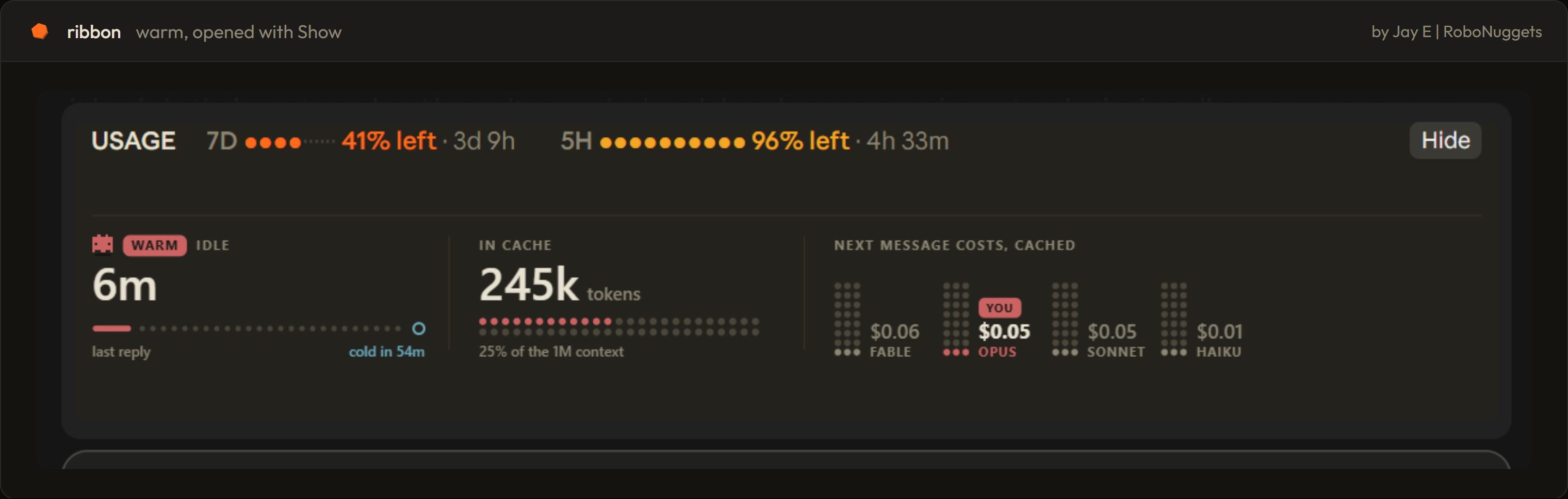
- WARM (red, the robot bobs): the cache is live. It shows the minutes left and what your next message costs.
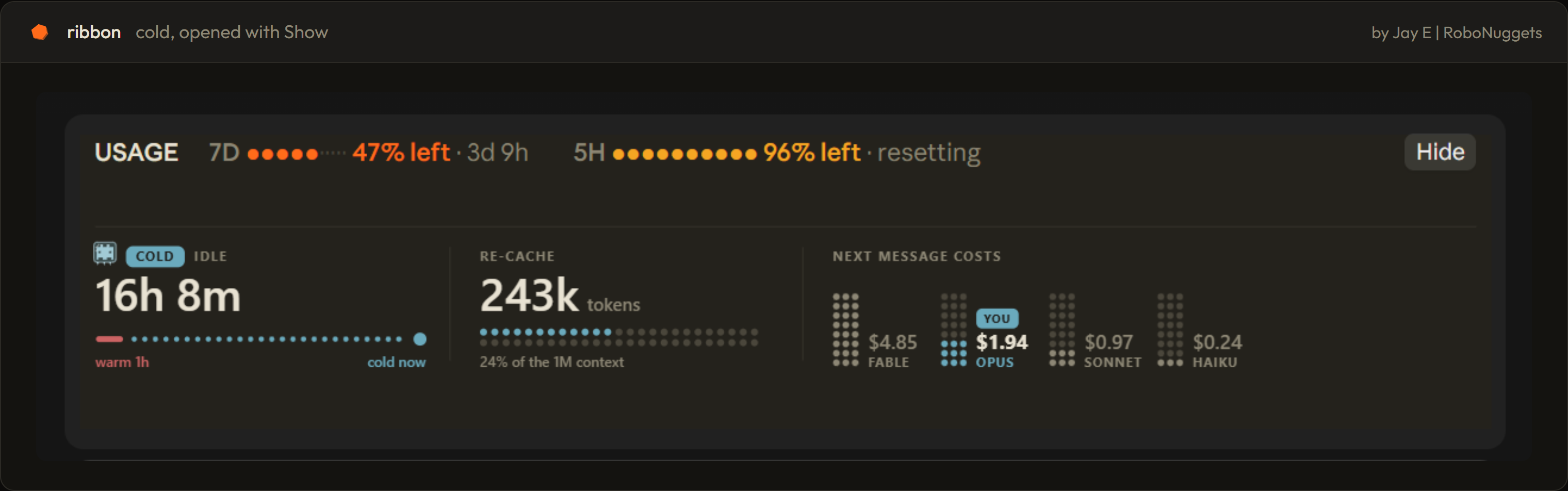
- COLD (blue, the robot is frozen): the hour has passed. Your next message re-sends the whole chat, so it costs more. It shows the price first.
Click Show to open the cache card, and Hide to fold it. Warm starts folded. Cold starts open, so you see the price before you send.
The card shows how long you've been idle, how many tokens are in the cache, and what the next message costs on each model. Your model is marked YOU. See Up close below.
Fits any width
- Wide: everything on one row.
- Half width: each window stacks into a small block.
- Narrow: the cache moves to its own row.
- Terminal: the same facts as plain text.
Good to know
- It costs nothing to run. It reads the app's own numbers and draws them. It never calls a model.
- Prices are estimates. They come from a price table in
hooks/cache-art.ts(MODELS), not from your bill. If prices change, edit that table. - Subagents don't count. Only your main chat resets the cache clock.
What is inside
ribbon/
├── .claude-plugin/
│   ├── plugin.json         the mod's name and version
│   └── marketplace.json    makes this repo installable
├── hooks/
│   ├── hooks.json          points to the module
│   ├── register.tsx        the band: usage, cache tracking, layout
│   ├── cache-art.ts        the cache card and robot drawings, the price table
│   └── font.ts             Outfit, embedded so the drawings render anywhere
├── types/index.d.ts        the shape of what the band remembers
├── tests/                  7 tests: layouts, warm and cold, terminal, cleared sessions
└── assets/                 banner, screenshots, hex icon
Remove it
claude plugin uninstall ribbon
Develop it
Load the folder without installing it:
claude --plugin-dir ./ribbon
Run the tests:
claude plugin test ./ribbon
Up close
Click Show and the band opens into the cache card.
Warm. The cache is live. Your next message is cheap.
Cold. The hour has passed. Your next message re-sends the whole chat, so it costs more.
License
MIT.
The embedded font is Outfit, under the SIL Open Font License 1.1.
Made by Jay E from RoboLabs. Learn more at RoboNuggets.

Details
- Author
- @robonuggets
- GitHub Stars
- 257
- Sub-category
- Context & Memory
- License
- MIT
- Surfaces
- terminal
- Added
- 1 months ago
- Last synced
- today
- Events hooked
session.startsession.measureclassic.SessionStartturn.stepturn.completeui.render
Weekly Mods Digest
Top new Claude Code mods and install commands, once a week. No fluff, unsubscribe anytime.

