
Storybloq
Project memory and workflows for Claude Code and Codex. Keep stories, plans, handovers, and review evidence in your repo. Resume across sessions and follow progress in the Mac app.
claude plugin validate to auditGuide →Reads local project files, settings, transcripts, or environment variables.
Statically scanned from hooks & source. Learn how to audit

Storybloq
Your project’s memory. Your agents’ workflow.
Project memory and workflows for Claude Code and Codex. Keep stories, plans, handovers, and review evidence beside your code. Pick up work across sessions and follow progress in the optional Mac app.





storybloq.com · Mac app · Review lenses · Privacy
The problem
A new coding session may be missing the decisions and unfinished work from the last. Project instructions describe how to work; handovers, stories, and review records capture what happened and where to continue.
The real cost isn't wasted setup time. It's repeated mistakes, relitigated design decisions, hallucinated context, and linear instead of compounding work.
The idea
Every project gets a .story/ directory of JSON and markdown files. Stories, issues, roadmap phases, session handovers, and lessons learned live there as readable files you can track with Git. Stories use ticket records in the CLI and file format.
- CLI:
storybloq- inspect and mutate.story/from the terminal. - MCP server: structured tools Claude Code and Codex can call directly to read and update the project and guide supported workflows.
- Skill: invoke
/storyin Claude Code or$storyin Codex to load project state at the start of a session. - Mac app: native sidebar that watches
.story/and updates live while your AI client works (separate product, free on the App Store).
From choosing work to the next session
- Choose the next useful story. Recommendations account for blockers, unfinished work, and what completing a story would unblock. Recorded decisions and a ranked digest of lessons give the agent context for the choice.
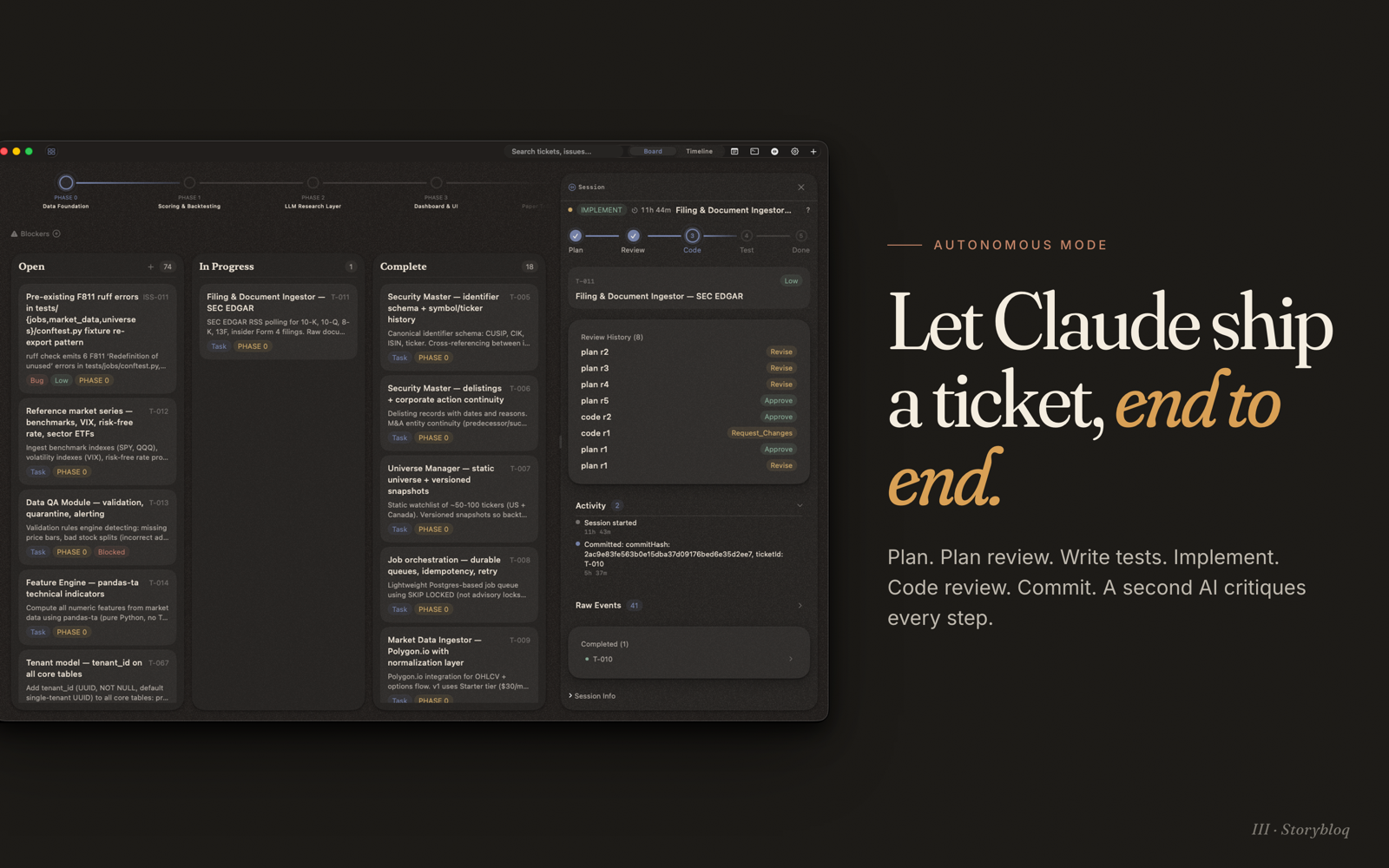
- Build against a reviewed plan. Autonomous mode guides planning, configured independent reviews, tests, and finalization. Approved plan snapshots preserve the approach that advanced to implementation. Confirmed review findings can become durable issues.
- See what was approved. Know what was checked. Gate acknowledgments in duet workflows can pin acceptance to a plan or staged code state. These records help you inspect the work; they do not guarantee correct code or replace tests, CI, and release checks.
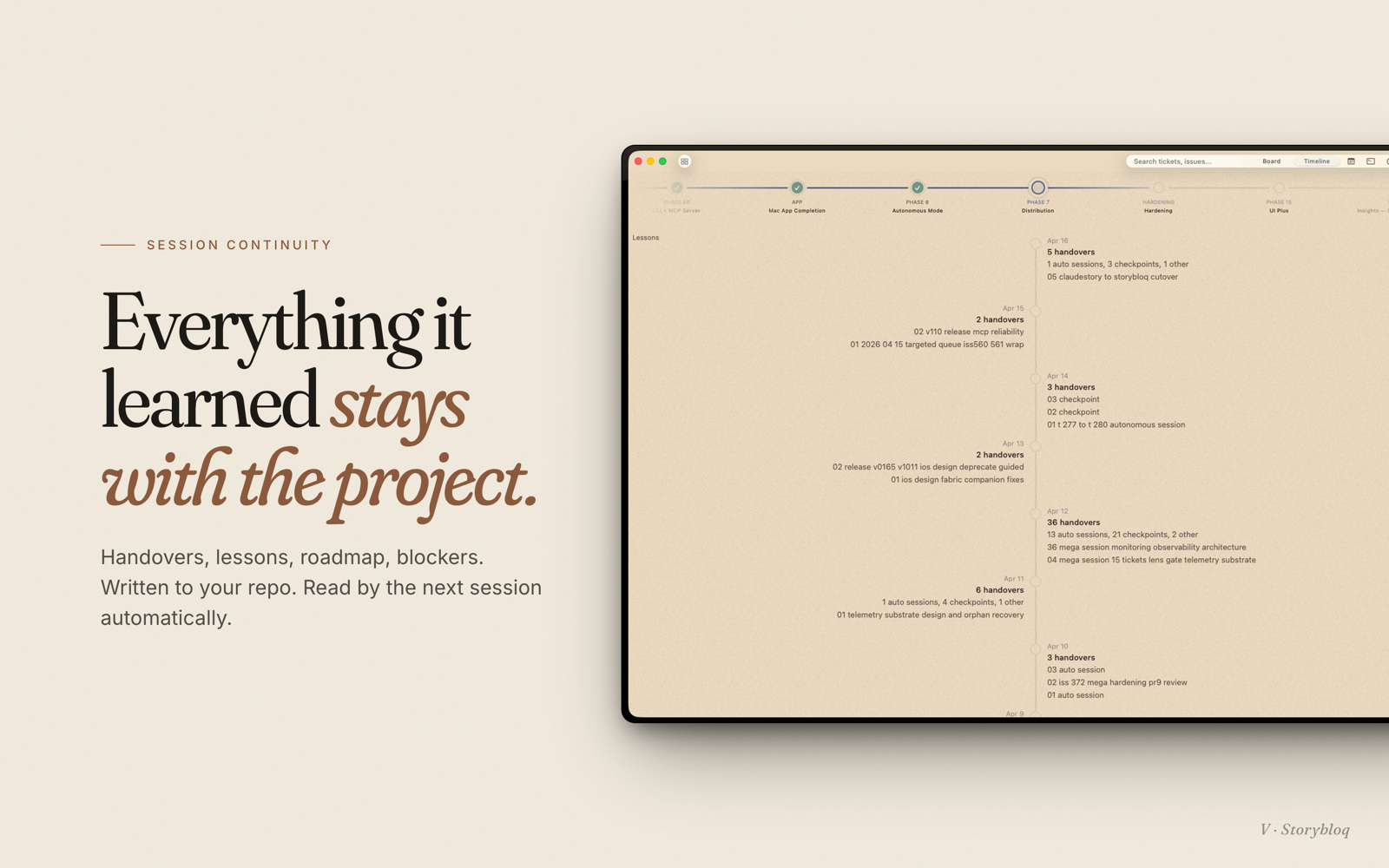
- Continue with the record intact. Handovers preserve decisions and next steps. Persisted session state supports guarded continuation; automatic recovery depends on the client and the interruption.
A lesson is a recorded pattern or mistake, with reinforcement to help useful guidance surface again. An approval records acceptance of particular work, within the workflow that requested it. Coordination records participants and assignments; the client or configured transport supplies dispatch and messages. Recovery uses saved state and checks before continuing, rather than assuming an interrupted action finished.
Start with one story and a handover. Add autonomous mode, coordination workflows, or federation when the project needs them.
Install
npm install -g @storybloq/storybloq@latest
storybloq setup --client all
Requires Node.js 20+ and at least one AI client: Claude Code or Codex CLI 0.130.0+. Package lives on npm at @storybloq/storybloq; releases are tagged on this repo at github.com/Storybloq/storybloq/releases.
setup --client all installs the Storybloq skill for Claude and Codex, registers this package as an MCP server, and configures available client hooks. It also registers the bundled codex-claude-bridge review backend as the codex-bridge MCP server when Codex is installed; the bridge ships as an optional dependency of this package, so a copy you registered yourself is left alone and storybloq health launches whichever one is registered and reports whether it answers. The bridge needs a Codex CLI login to review (or agy for its Gemini failover); without one it registers but reviews fail. Re-running it is safe. Codex reports installed hooks with trust unknown; open /hooks in Codex to review and trust them. setup-skill remains as a compatibility alias for Claude-only setup.
Setup also installs the ledger dashboard for Claude Code. On version 2.1.272 or newer, a project with a .story/ directory draws its tickets, issues, and progress in a pane beside the transcript, with no extra flags on the install command and nothing to configure. Projects without .story/ show nothing. Turn the dashboard off with /plugin configure storybloq. The context figure in the footer is how full the session is toward its automatic compaction point, not a share of the model's window, so it reaches 100% when compaction is due; it refreshes during a turn as tools run, at most every five seconds.
While a /story auto session runs, the dashboard shows where it is. The In progress card the session is working, a ticket or, while it fixes an issue, that issue, carries its stage after the id, as in T-001 [Code] Native canvas, document objects, and local saving. When no card on screen is the session's own (nothing picked yet, the item not in progress, or cut off by the column's limit), the In progress heading carries the stage instead, as in In progress 1 [Code]. There is no footer line for the session. The stage comes from .story/status.json alone. A status older than 12 hours, the presence TTL, is drawn dimmed with a question mark ([Code?]) because nothing has confirmed it since. When the pane is narrow the title is cut first, and the tag is dropped before the id is shortened or the heading's count is cut.
Your first two sessions
- Open your project in Claude Code or Codex. Type
/storyin Claude Code chat or$storyin Codex chat. For a new project, the skill guides you through setup. - Ask: “Record a story to add an empty calendar state. Record the decision that the API owns availability.”
- Before stopping, ask: “Write a handover.”
- Start a new chat and invoke
/storyor$storyagain to load the recorded project context.
See the work
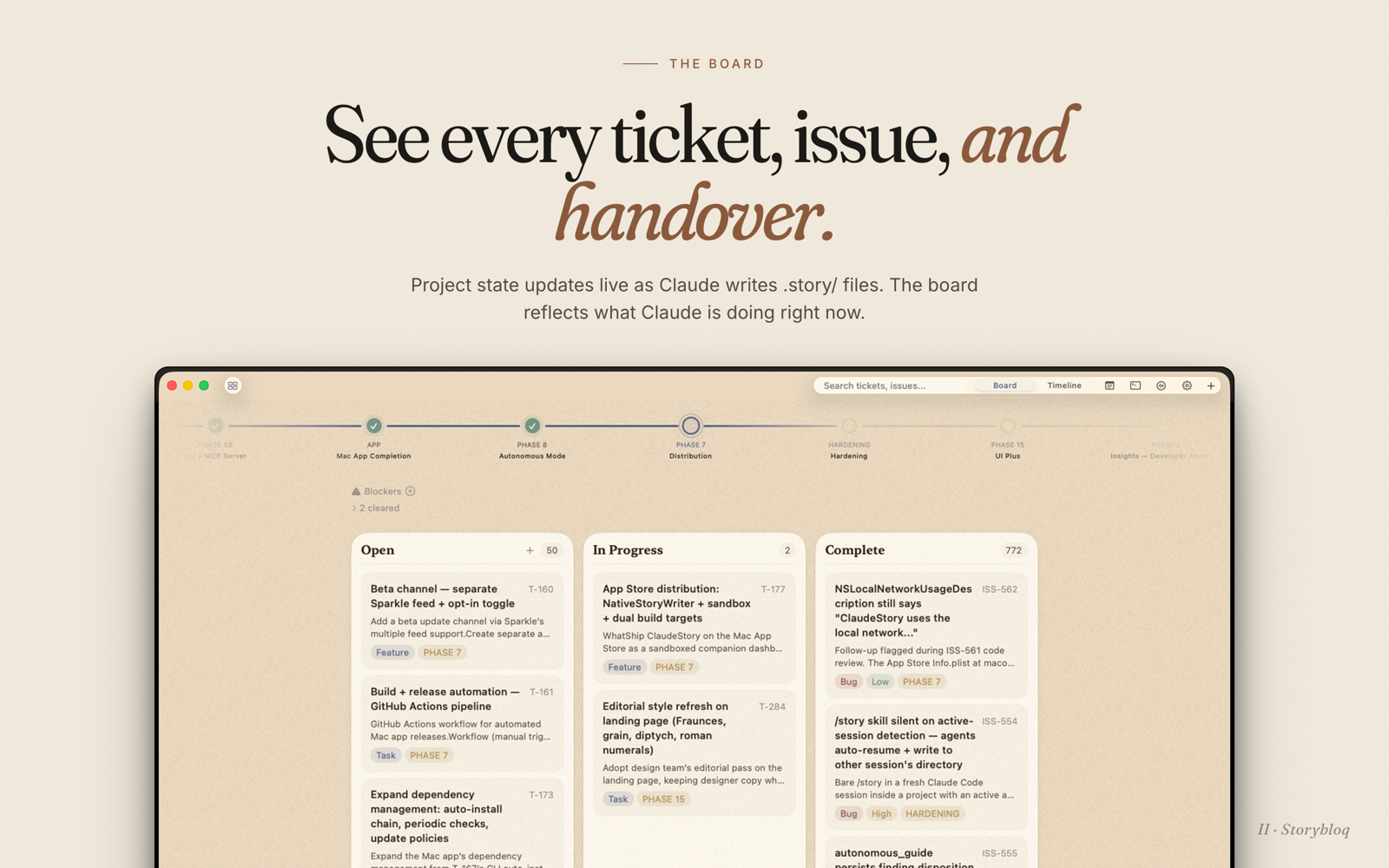
The optional Mac app shows stories, progress, and handovers from your project files. Explore the Mac app or follow the tutorials.
Add structure as your work grows
Start with one project and one agent. Add autonomous workflows, independent review, or connected repositories when the work calls for them. Review records preserve what was checked; they do not guarantee correctness. Tests, CI, and release checks still matter.
The CLI and MCP server are source-available under PolyForm Shield. Your coding client and optional review backends have their own data handling and costs. See the privacy policy and the license below.
Upgrading
npm install -g @storybloq/storybloq@latest
storybloq setup --client all
Same two commands as a fresh install: @latest pulls the newest version, and re-running setup refreshes the Storybloq skill files, re-registers the MCP server, and sweeps any stale hook entries from prior installs.
You'll usually see a one-line banner on the next storybloq invocation whenever a newer version is on npm:
storybloq v1.2.0 is available (you have v1.1.6).
Update: npm install -g @storybloq/storybloq@latest
The CLI also silently refreshes the skill dir and migrates any legacy hook entries (for example, from the pre-rename @anthropologies/claudestory package) on the first run after an upgrade — no manual cleanup needed.
Alternative install via the Claude Code plugin system: see Storybloq/plugin-archive (legacy path; storybloq setup --client all is the recommended install).
Codex plugin marketplace
For the unpublished local board candidate, use the dedicated local plugin installer. The repository marketplace below installs the older skill integration, not that board candidate.
codex plugin marketplace add https://github.com/Storybloq/storybloq
codex plugin add storybloq@storybloq
This installs the Storybloq skill only. It does not run this package's npm install, register the MCP server, or configure hooks -- those still need the CLI, which the skill's own bootstrap step installs for you the first time you invoke it: on your first $story, if the CLI or MCP server isn't set up yet, the skill runs npm install -g @storybloq/storybloq@latest followed by storybloq setup --client codex --skip-skill for you. --skip-skill skips re-copying the skill files, since the plugin already manages that copy -- passing it yourself only matters if you're driving storybloq setup directly instead of letting the skill's bootstrap step do it.
If you already have a standalone Codex skill copy from a prior direct storybloq setup --client codex (at ~/.agents/skills/story/ and/or ~/.codex/skills/story/), installing the marketplace plugin on top of it is an untested configuration, not a verified-harmless one -- Codex's handling of two same-named skill providers isn't something this project has tested. Recommended migration: move the existing copy OUT of the skills root rather than deleting it. A backup left under ~/.agents/skills/ (for example story.bak) still contains a SKILL.md and can be discovered as a second skill, which is the duplicate this procedure exists to remove, so park it one level up instead: mkdir -p ~/.agents/story-skill-backups && mv ~/.agents/skills/story ~/.agents/story-skill-backups/story.$(date +%s), and the same for ~/.codex/skills/story into ~/.codex/story-skill-backups/ if present. Restart Codex and confirm $story still works via the plugin-managed copy. To roll back, move the backup to its original path. Only then, separately and at your own discretion, remove the backup.
If the CLI or MCP server is still missing after installing the plugin and invoking $story once, run the bootstrap command yourself: npm install -g @storybloq/storybloq@latest && storybloq setup --client codex --skip-skill.
Bootstrap a project
cd your-project
storybloq init --name "your-project"
For multi-repo projects, see Federation below.
That scaffolds:
.story/
├── config.json         project config + recipe overrides
├── roadmap.json        phase ordering + metadata
├── tickets/            T-001.json, T-002.json, ...
├── issues/             ISS-001.json, ISS-002.json, ...
├── notes/              N-001.json, N-002.json, ...
├── lessons/            L-001.json, ...
├── handovers/          YYYY-MM-DD-<slug>.md
└── snapshots/          state snapshots (gitignored)
Commit everything except .story/snapshots/.
Guided setup and verification
On a project without .story/, /story (or $story) plans the project with you and writes it in one engine call, storybloq setup-apply, after you approve the package. storybloq setup-report --setup <id> shows the setup as it is now: one line per setup checkpoint (ready, or waiting on its blockers) and one per recipe stage the level uses (on, or off and why). --historical prints the report frozen when the setup finished.
A setup can propose a pointer block for CLAUDE.md and AGENTS.md. The engine never writes either file: it leaves <file>.storybloq-<setup>.proposed beside it and stops (pointer edit owed, one stop per file) until the block is there (applied) or you keep the file as it is (keep-current). A .proposed file setup did not write is a proposal conflict: it is never adopted or removed.
A stage the setup could not prove yet is established by a ticket that only storybloq setup-verify --ticket <id> completes. It runs the approved command and, on success, turns the stage on in .story/config.json:
| Stage | Verified when | Outcomes that write nothing (exit) |
|---|---|---|
| test | the runner's summary reports at least one test and no failures | failed or no tests (1), evidence unreadable (4: adapter, leave-off or stop) |
| build | the command exits 0 within its deadline, nothing it started is left in its process group when it exits, and the group is confirmed gone | failed, timed out or cleanup failed (1: stop), unsupported (4: leave-off or stop) |
| verify | 127.0.0.1:<port><path> answers 2xx from a listener the command's process group owns, checked before the request and after the response, with the command itself still running and everything within its startup deadline, then the group stops and the port is free | port occupied, exited early, not ready, foreign listener, ownership unknown, shutdown failed or cleanup failed (1: stop), unsupported (4: leave-off or stop) |
Every outcome that can be answered prints (run <hex>); answer it with storybloq setup-verify --ticket <id> --resolve <adapter|leave-off|stop> --owner-words '<words>' --run <hex>. A change to the ticket, its prerequisites, the record or the stages since that run makes the answer stale (exit 5): run setup-verify again. Build and verify are unsupported on Windows (no process groups to own), and verify needs lsof and ps; leave them off there. Ownership is observed, not proven: a foreign process that answers the request and leaves between the two observations, while the command's own listener stays bound, is not detected.
A project created by setup uses checkpoint schema 5: open it with CLI 1.16 or later and the matching Mac app.
Daily use
Inside Claude Code or Codex:
/storyin Claude Code or$storyin Codex - loads project status, reads the latest handover, surfaces open tickets and issues, lists blocked work, summarizes recent changes. When the client can run background agents and the actionable backlog is large, it also surfaces the orchestrate working style proactively (a recommendation, still gated by explicit opt-in)./story auto T-001 T-002 ISS-013/$story auto T-001 T-002 ISS-013- autonomous mode scoped to those items. Drives a ticket through plan -> plan review -> implement -> tests -> code review -> commit with handovers at each checkpoint./story review T-001/$story review T-001- runs the multi-lens review (see Storybloq/lenses) against a ticket's diff./story orchestrate/$story orchestrate- drives a multi-repo (or large single-repo) backlog when the client exposes exact callable workflow/subagent tools. Codex usesmulti_agent_v1.spawn_agent, its normalizedmulti_agent_v1__spawn_agentidentifier, or an exactspawn_agenttool. The Claude Agent View-backedstorybloq dispatchcommand is shipped; a product-managed Codex dispatch backend is not./story triage/$story triage- read-only triage of the open issue backlog: verifies each finding against the pinned current HEAD, flags already-fixed and duplicate issues, groups issues that share one verified root cause, and recommends a prioritized ticket plan. Mutates no issue and no ticket./story bus/$story bus- polls a task-bound local Bus endpoint so an implementer and an independent reviewer can exchange advisory findings without copy and paste./story handover/$story handover- writes a session handover capturing decisions, blockers, and next steps.
Both clients support context loading, autonomous mode, MCP, and compaction/status hooks. Codex Desktop can open an autonomous session's owning task and relay an exact owner response to it; Codex CLI safely falls back to a manual task switch. Autonomous code review defaults to a 12-round landing cap (clamped upward by ticket risk): unresolved critical findings and rejects still block, while non-blocking findings become follow-up issues at the cap. Set recipeOverrides.stages.CODE_REVIEW.maxReviewRounds to 0 for unlimited, which disables the cap and the ceiling below it alike. Otherwise, three rounds past the cap a hard ceiling ends the session: the outstanding findings are filed as issues, the work is left uncommitted in the tree, and a handover is written. The item returns to open when the session still owns its claim; if the claim has moved, the item is left exactly as it is.
recipeOverrides.compactThreshold accepts medium, high (default), or critical. The value selects both the pressure limits and the rotation trigger: medium uses lower limits and rotates at medium pressure, while critical uses higher limits and waits for critical pressure. At a clean COMPLETE boundary, threshold pressure ends the bounded session through HANDOVER because Storybloq cannot invoke a client compaction command. When the client itself compacts, the PreCompact and SessionStart hooks preserve the same session; pressure resets only after SessionStart confirms source: compact.
Outside the AI client, the same state is one storybloq invocation away.
Usage-limit auto-resume
Claude Code sessions stop at usage limits ("You've hit your usage limit"), and overnight autonomous work silently dies with them. Storybloq detects the stop through Claude Code's StopFailure hook, parses the reset time from the session transcript, records the stop in a global ledger (~/.claude/storybloq/limit-ledger.json), and resumes the session when the limit resets. On by default once hooks are installed.
- Autonomous sessions are parked on the same recovery lane as compaction and woken headlessly through the full state machine -- ownership rebind, git-HEAD validation, and recovery mapping all apply, so a wake after the workspace changed is validated, not blindly replayed. Sessions stopped mid-FINALIZE are never auto-resumed (commit replay is not proven safe); you get a notification with manual recovery steps instead.
- Plain sessions get a desktop notification at reset with the exact
claude --resumecommand. Per-project opt-in (limitResume.plainMode: "headless") wakes them headlessly instead. - Permission posture is never escalated. A session that ran with
--dangerously-skip-permissionsis only woken with that flag if the project explicitly opts in (limitResume.inheritBypass: true); otherwise it notifies.
The wake is driven by a transient detached waker process, not a daemon: it polls the ledger every 30 seconds, resumes what is due (attempt-capped, staggered, concurrency-bounded), and exits when nothing is pending. It survives laptop sleep but not reboot or logout -- after a reboot, the next storybloq invocation or hook fire in any project respawns it, so weekly-scale waits recover on your next activity. That trade is the cost of "no daemon."
Inspect and manage the queue with storybloq limit-status (--cancel <key> destroys a pending auto-resume, --requeue <key> retries a stood-down record). Disable globally with {"limitResume": {"enabled": false}} in ~/.claude/storybloq/config.json, or per project via limitResume in .story/config.json (also maxAttempts, staggerMs, maxConcurrent, notify, and more).
Prior art: the detection-and-reparse approach is modeled on unsnooze (MIT), which pioneered transcript-based limit detection and reset-time parsing for tmux-hosted sessions. Storybloq's version drops the tmux layer in favor of the documented hook surface and resumes autonomous sessions through its own state machine instead of a keystroke.
Storybloq Bus
Storybloq Bus connects two task-bound endpoints in one local checkout. One may implement while the other reviews, but routing follows the paired endpoints rather than role names. Runtime messages live under gitignored .story/bus/; confirmed findings remain canonical Storybloq issues.
Run setup from each participating client task, using its actual client identity. For example, inside a Codex CLI task:
storybloq bus setup --client codex --surface codex_cli --delivery poll
storybloq bus status
storybloq bus endpoint list
Setup initializes the local runtime and binds the current task id (normally discovered from the client environment). If discovery is unavailable, supply the validated client task id with --task-id; do not invent one. A second task runs setup in the same checkout to become the peer. Re-running setup is resumable. bus init and bus join remain lower-level commands; the legacy role argument to join does not select a message destination.
--delivery poll uses explicit polling. The default, --delivery live, requires supported client hooks and configures guarded delivery. Live injection also depends on the session’s available transport. bus auto-attach on is a separate project opt-in for later sessions. Neither configuration guarantees an inactive peer reads a message immediately.
Messages are hash-chained, idempotent, bounded, and delivered through recoverable recipient mailboxes. Critical notices participate in ship checks and require canonical issue handling. A message is peer advice; it never grants owner approval to merge, push, deploy, spend, or perform destructive actions. bus redeliver can move a hop-cap-parked message to a successor thread using its recorded content.
Optional idle wake: bus setup --wake idle opts a supported Codex CLI endpoint into a best-effort wake attempt after mail is committed. It requires a reachable compatible Codex app-server, an idle thread, and proven ownership. This implementation accepts app-server version 0.153.4; other versions are refused. It cannot wake Codex Desktop or Claude endpoints. Omit --wake to preserve an existing policy or pass --wake never to disable it. There is no Bus retry daemon: a failed attempt waits for a later send, and a wake request is not proof of receipt. bus endpoint list reports the policy and last outcome.
Claude usage-limit recovery, described above, is a separate mechanism. It is not Bus message delivery and does not establish equivalent usage-limit recovery in Codex.
Federation
Federation coordinates AI agent work across multiple repos. One project becomes the orchestrator. It declares which repos (nodes) are part of the system, how they depend on each other, and how they communicate at runtime. Each node keeps its own .story/ with its own tickets, issues, and handovers. The orchestrator reads across all of them.
# Create an orchestrator
storybloq init --type orchestrator --name "my-platform"

# Register nodes
storybloq node add api --path ../api --stack typescript --role "REST backend"
storybloq node add web --path ../web --stack nextjs --depends-on api
storybloq node add sdk --path ../sdk --stack typescript
Three relationship types connect nodes:
dependsOnon node config: build-order edges. The web app depends on the API.linkson node config: runtime integration. The web app calls the API over HTTP.crossNodeBlockedByon tickets: a ticket in one repo is blocked until a ticket in another repo is complete. Example:"crossNodeBlockedBy": ["api:T-012"].
From the orchestrator directory:
storybloq status              # aggregated view across all nodes
storybloq recommend           # federation-aware suggestions (bottlenecks, stale nodes, blockers)
storybloq ticket list --node api   # list tickets in the api node without cd-ing
The recommendation engine generates federation-specific suggestions: nodes blocking downstream work, bottleneck nodes depended on by many others, nodes with no handover in two weeks. Tickets with crossNodeBlockedBy refs never surface in recommendations until the blocking ticket is complete.
CLI reference
All commands accept --format json|md (default md). Pipe JSON through jq for scripting, read the markdown variant directly.
Project
| Command | Description |
|---|---|
storybloq init [--name] [--type orchestrator] [--force] | Scaffold .story/ (add --type orchestrator for multi-repo) |
storybloq status | Project summary with phase statuses, counts, and risks |
storybloq validate [--integrity-only] | Reference, schema, source-provenance, and loader-independent JSON checks |
storybloq setup --client claude|codex|all [--skip-hooks] | Install Storybloq skills, register MCP, and configure client hooks |
storybloq setup-skill [--skip-hooks] | Compatibility alias for storybloq setup --client claude |
storybloq recommend --count N | Context-aware work suggestions |
Phases
| Command | Description |
|---|---|
storybloq phase list | All phases with derived status (status is computed from tickets, never stored) |
storybloq phase current | First non-complete phase |
storybloq phase tickets --phase <id> | Leaf tickets for a phase |
storybloq phase create --id --name --label --description [--summary] --after/--at-start | Create a phase |
storybloq phase rename <id> [--name] [--label] [--description] [--summary] | Update phase metadata |
storybloq phase move <id> --after/--at-start | Reorder |
storybloq phase delete <id> [--reassign <target>] | Delete (reassign contained tickets) |
Tickets
| Command | Description |
|---|---|
storybloq ticket list [--status] [--phase] [--type] [--priority] [--waiting-on] | List leaf tickets (umbrellas excluded) |
storybloq ticket get <id> | Full ticket detail |
storybloq ticket next | Highest-priority unblocked ticket; unphased leaves are offered after phased work; items waiting on a role are never offered but always named |
storybloq ticket blocked | All currently blocked tickets |
storybloq ticket create --title --type [--phase] [--description] [--blocked-by] [--parent-ticket] [--priority p0..p3] [--waiting-on owner|external|none] [--node <name>] | Create (use --node from orchestrator); --phase defaults to the current phase, --phase "" leaves it unphased |
storybloq ticket update <id> [--status] [--title] [--phase] [--priority] [--waiting-on] [--cross-node-blocked-by] [--resolution-kind withdrawn --reason <text>] [--node <name>] ... | Update; --resolution-kind withdrawn closes a complete ticket as withdrawn rather than delivered |
storybloq ticket meta get|set|unset <id> [path] [value] | Manage custom passthrough metadata |
storybloq ticket delete <id> [--force] | Delete |
Issues
| Command | Description |
|---|---|
storybloq issue list [--status] [--severity] [--component] [--phase] [--priority] [--waiting-on] | List issues |
storybloq issue get <id> | Issue detail |
storybloq issue create --title --severity --impact [--components] [--related-tickets] [--location] [--source-ref <json>] [--dedupe-key] [--created-by] [--priority] [--waiting-on] | Create, with optional durable review evidence and retry identity |
storybloq issue update <id> [--status] [--title] [--severity] [--priority] [--waiting-on] [--source-ref <json>] ... | Update |
storybloq issue meta get|set|unset <id> [path] [value] | Manage custom passthrough metadata |
storybloq issue delete <id> | Delete |
Notes and lessons
| Command | Description |
|---|---|
storybloq note list · note get · note create · note update | Brainstorming and idea capture |
storybloq lesson list · lesson get · lesson create · lesson update · lesson reinforce | Reusable patterns and anti-patterns |
storybloq lesson digest | Compact summary of all active lessons for skill injection |
--format json is the round-trip-safe format for editing a ticket description, issue impact, or note/lesson content: piping a get's md rendering into update --stdin carries the render fence itself into storage (ISS-1192), since md wraps that field's content in code-fence backticks one longer than any run already inside it. update strips a whole-value 4+ backtick outer fence with no info string and warns when it does; get --format json never has this problem, since the field is a plain JSON string.
Glossary
| Command | Description |
|---|---|
storybloq term list [--core] [--thin] [--digest] · term get · term match --text | Read the glossary; --digest is the bounded names-only form a session load takes |
storybloq term add · term update · term remove | Maintain it; remove is refused while a capability references the term |
storybloq term check | Check every term's links and flag the thin entries (no distinction, or no capability link) |
Rulings
| Command | Description |
|---|---|
storybloq ruling list [--status <lifecycle>] [--format md] · ruling get | Read rulings; --format md renders the Decisions listing (accepted, proposed, withdrawn, quarantined) |
storybloq ruling create --text --attribution --date [--cites] · ruling supersede | Record a verbatim ruling and cite it from items; supersede links the replacement |
storybloq ruling propose --for · ruling accept --revision · ruling withdraw | The proposal lifecycle: a proposal binds nothing; accept records who ruled against the reviewed digest; withdraw retires a proposal |
Handovers, blockers, snapshots
| Command | Description |
|---|---|
storybloq handover list · handover latest · handover get <file> | Session continuity documents |
storybloq handover create --title --tldr ... | Write a new handover |
storybloq blocker list · blocker add · blocker clear | External dependencies blocking progress |
storybloq snapshot · storybloq recap | Capture state and diff against the last snapshot |
storybloq export [--phase <id>] [--all] [--format json|md] | Self-contained project document |
storybloq limit-status [--cancel <key>] [--requeue <key>] | Pending usage-limit auto-resumes (global across projects) |
Landing commits (CLI only)
| Command | Description |
|---|---|
storybloq land <sha> [--remote origin] [--branch main] [--repo <dir>] [--item <id>] [--no-secrets-scan] [--trailer-pattern <re>] [--hygiene-pattern <name>=<re>] | Push exactly one reviewed commit onto the remote branch, or refuse and name the failed check. Checks run in order: a one-commit fast-forward of the remote tip, no attribution trailers, no home paths, private IPv4 addresses or socket paths in added lines, valid .story JSON, and a gitleaks scan. The push is a compare-and-swap on the tip it read, and the remote branch is read back afterwards. --item records a landing receipt on that ticket or issue. Exit 0 landed, 1 held, 3 landed with the receipt not written |
storybloq landings [--since <ref>] [--limit N] | Commits that touched tickets or issues, with review coverage |
Storybloq Bus (opt-in)
| Command | Description |
|---|---|
storybloq bus init | Enable the local Bus and create gitignored runtime state |
storybloq bus setup [--client] [--surface] [--delivery live|poll] | Initialize and bind the current task to a paired endpoint |
storybloq bus endpoint list | Inspect endpoint delivery and wake state |
storybloq bus redeliver --predecessor-thread <id> --refused-entry-hash <hash> | Redeliver recorded, hop-cap-parked mail |
storybloq bus send ... | Create a thread or send a reply with a required idempotency key |
storybloq bus poll | Read unacknowledged messages for the task-bound endpoint |
storybloq bus ack <message-id> --disposition ... | Record accepted, rejected, or deferred delivery state |
storybloq bus thread show|update ... | Inspect or transition a participant thread |
storybloq bus hooks enable|disable [--client] | Control guarded live delivery for this project |
storybloq bus status|doctor | Inspect state and validate integrity |
storybloq bus check --ship | Fail when critical Bus work blocks release |
storybloq bus export <thread-id> | Explicitly export one runtime transcript |
Federation (orchestrator projects)
| Command | Description |
|---|---|
storybloq init --type orchestrator | Scaffold an orchestrator .story/ with a nodes map |
storybloq node add <name> --path <dir> [--stack] [--role] [--depends-on] [--link] | Register a node repo |
storybloq node remove <name> [--force | --prune] | Unregister a node (checks for dependents first) |
storybloq node update <name> [--stack] [--role] [--depends-on] [--health] | Update node metadata |
storybloq node list | Table of all configured nodes |
storybloq config set-federation --allow-node-writes | Allow orchestrator to write into node repos |
Team (team-mode projects)
See Team mode for the merge model these commands operate on.
| Command | Description |
|---|---|
storybloq team init [--id-allocator local|git-refs] [--claim-staleness-hours N] | Enable team mode on this project |
storybloq team setup | Install the git merge driver in this clone (each teammate, once per checkout) |
storybloq team doctor [--ci] | Team health checks; --ci exits non-zero on error findings |
storybloq team config show · team config set <key> <value> | Inspect or change team configuration |
storybloq team reserve <type> --count N | Reserve display ids via remote refs (git-refs allocator only) |
storybloq reconcile [--dry-run] [--ci] | Detect and renumber duplicate display ids |
storybloq conflicts list · conflicts show <id> | Inspect unresolved merge conflicts |
storybloq resolve <id> [--field <f>] [--use ours|theirs] [--value <json>] | Resolve conflicts (also resolve config, resolve roadmap) |
storybloq gc [--apply] [--retention-days N] | Purge deleted-item tombstones past retention; dry-run without --apply (default 30-day retention) |
MCP server reference
Register with Claude Code or Codex (done automatically by setup):
claude mcp add storybloq -s user -- storybloq --mcp
codex mcp add storybloq --env STORYBLOQ_CLIENT=codex -- storybloq --mcp
The server imports the same TypeScript modules as the CLI directly, so there's no subprocess overhead. It auto-discovers the project root by walking up from the working directory to the nearest .story/ parent.
Full-project tools are grouped below. Bus tools are registered even before Bus setup; calls return setup guidance while it is unavailable, so enabling Bus does not require an MCP restart. Run storybloq reference for the complete tool inventory and argument names.
Project queries
storybloq_status · storybloq_phase_list · storybloq_phase_current · storybloq_phase_tickets · storybloq_ticket_list · storybloq_ticket_get · storybloq_ticket_meta_get · storybloq_ticket_next · storybloq_ticket_blocked · storybloq_issue_list · storybloq_issue_get · storybloq_issue_meta_get · storybloq_note_list · storybloq_note_get · storybloq_lesson_list · storybloq_lesson_get · storybloq_lesson_digest · storybloq_term_list · storybloq_term_get · storybloq_term_match · storybloq_handover_list · storybloq_handover_latest · storybloq_handover_get · storybloq_blocker_list · storybloq_validate · storybloq_recap · storybloq_recommend · storybloq_export
Some queries also refresh gitignored runtime or presence metadata. storybloq_selftest is a diagnostic that creates, updates, and deletes temporary records.
Write (mutate .story/)
storybloq_snapshot · storybloq_handover_create · storybloq_ticket_create · storybloq_ticket_update · storybloq_ticket_meta_set · storybloq_ticket_meta_unset · storybloq_issue_create · storybloq_issue_update · storybloq_issue_meta_set · storybloq_issue_meta_unset · storybloq_note_create · storybloq_note_update · storybloq_lesson_create · storybloq_lesson_update · storybloq_lesson_reinforce · storybloq_term_write · storybloq_ruling_write · storybloq_capability_write · storybloq_checkpoint_write · storybloq_earmark_write · storybloq_phase_create
Each _write family takes an action. The former per-action tools (storybloq_ruling_create, storybloq_term_add, storybloq_earmark_reserve and the rest, storybloq_<x>_<action>) are still registered and callable by name; since 1.20 they are not listed, and servers before 1.20 list only them.
Autonomous mode + review + observability
storybloq_autonomous_guide drives the autonomous state machine (PICK_TICKET -> PLAN -> PLAN_REVIEW -> WRITE_TESTS -> IMPLEMENT -> TEST -> CODE_REVIEW -> FINALIZE -> COMPLETE).
storybloq_review_lenses_prepare · storybloq_review_lenses_judge · storybloq_review_lenses_synthesize orchestrate the multi-lens review loop (requires @storybloq/lenses).
storybloq_session_report · storybloq_register_subprocess · storybloq_unregister_subprocess surface session health to the Mac app.
Storybloq Bus (runtime opt-in)
storybloq_bus_send · storybloq_bus_redeliver · storybloq_bus_poll · storybloq_bus_ack · storybloq_bus_thread_get · storybloq_bus_thread_update
Every call requires a stable endpoint id and the current validated client task id. Poll and thread outputs mark peer content as advisory authority. storybloq_bus_poll and storybloq_bus_thread_get are read-only with respect to canonical tracked project state; poll may reconcile gitignored .story/bus/ runtime metadata. Mutating tools remain subject to the client’s MCP approval policy.
Federation (orchestrator projects)
storybloq_node_init bootstraps .story/ in a node repo from the orchestrator context.
storybloq_node_add · storybloq_node_list · storybloq_node_update manage the orchestrator's node registry.
Hooks
PreCompact (compaction preparation, set up by setup)
Runs storybloq session compact-prepare before context compaction so snapshots and resume breadcrumbs stay current where the client supports PreCompact hooks. Codex setup uses storybloq session compact-prepare --client codex with a manual|auto matcher so a Codex hook cannot compact a Claude-owned session; Claude Code setup leaves the matcher empty.
{
  "hooks": {
    "PreCompact": [{
      "matcher": "manual|auto",
      "hooks": [{ "type": "command", "command": "storybloq session compact-prepare" }]
    }]
  }
}
Skip with storybloq setup --client all --skip-hooks.
SessionStart (resume prompt injection)
Injects a compact-aware resume prompt. Codex setup uses the same command with --codex-hook-json and matcher startup|resume|clear|compact; its hook JSON also carries the current task id so same-task COMPACT recovery can continue without a copy/pasted Resume token. Hook trust cannot be verified by setup, so check /hooks in Codex after installation.
{
  "hooks": {
    "SessionStart": [{
      "matcher": "compact",
      "hooks": [{ "type": "command", "command": "storybloq session resume-prompt" }]
    }]
  }
}
storybloq bus hooks enable is a separate project opt-in. It adds endpoint metadata and pending counts to SessionStart, and permits the synchronous Stop hook to block once for each new mailbox cursor. Peer payload bytes never appear in hook output. Claude's shared hook structure is upgraded once and remains guarded by project-local policy; Codex uses storybloq hook-status --client codex.
Stop (live status for the Mac app)
Runs storybloq hook-status at the end of every turn, refreshing the gitignored .story/status.json that the Mac app and iOS companion read for live session state.
The write is content-gated: when the payload is identical to what the file already says (ignoring the observation timestamp and which writer produced it), nothing is written and the file's timestamps and inode are left alone. Idle turns therefore leave the working tree completely untouched. Genuine changes -- a workflow transition, a new MCP call, a health or lease change -- still write immediately.
Projects whose test harness treats any write during a run as a failure can turn the turn-end writer off entirely:
{ "statusWriter": { "stopHook": false } }
in .story/config.json. The hook then performs no status work at all: no session scan, no payload build, no gitignore self-heal, no write. Autonomous sessions keep refreshing status on their own MCP transitions, so the Mac app still shows live state while a session is running -- it just stops updating between turns of ordinary interactive work. The flag defaults to on, and any unreadable or malformed config leaves it on.
StopFailure (usage-limit detection)
Runs storybloq session limit-stop when a Claude Code session stops on a rate limit, recording the stop for auto-resume (see Usage-limit auto-resume above). Setup also adds a second SessionStart matcher group ("resume") carrying the same session resume-prompt command so a manual reopen of a limit-stopped session gets limit-aware guidance. Both entries are Claude-only, reconciled on every upgrade, and removed automatically when the global kill switch is set.
{
  "hooks": {
    "StopFailure": [{
      "matcher": "rate_limit",
      "hooks": [{ "type": "command", "command": "storybloq session limit-stop" }]
    }]
  }
}
Library usage
import { loadProject } from "@storybloq/storybloq";

const { state, warnings } = await loadProject("/path/to/project");
console.log(state.tickets.length);           // all tickets
console.log(state.phaseTickets("p1"));       // leaf tickets in phase p1
console.log(state.umbrellaChildren("T-014")); // children of an umbrella
Full type definitions ship with the package (exports.types).
File format examples
Story as a legacy ticket record (.story/tickets/T-001.json):
{
  "id": "T-001",
  "title": "Add search to sidebar",
  "type": "task",
  "status": "inprogress",
  "phase": "p2",
  "order": 10,
  "description": "Fuzzy match over ticket title + description.",
  "createdDate": "2026-04-12",
  "completedDate": null,
  "blockedBy": [],
  "parentTicket": null,
  "crossNodeBlockedBy": []
}
Issue (.story/issues/ISS-001.json):
{
  "id": "ISS-001",
  "title": "Drag handle hit target too small on trackpad",
  "status": "open",
  "severity": "medium",
  "components": ["mac-app"],
  "impact": "Dragging tickets on trackpad requires multiple tries.",
  "location": ["macos/Views/KanbanCard.swift:42"],
  "sourceRefs": [{
    "path": "macos/Views/KanbanCard.swift",
    "startLine": 42,
    "revision": "5ac37f94f7023b18f72d8e3fcf43dd64f54c11d7",
    "contentHash": "f5b1b1b65dca3d9d86adf7c5d49082aa4dc09e7903ab46ce50e8cc6b4812e4cf",
    "reviewId": "review-2026-04-15"
  }],
  "dedupeKey": "review-2026-04-15:finding-3",
  "createdBy": "external-reviewer",
  "discoveredDate": "2026-04-15",
  "resolvedDate": null,
  "relatedTickets": []
}
Glossary term (one entry of terms in .story/glossary.json):
{
  "id": "term-pen",
  "term": "pen",
  "aliases": ["pen tier"],
  "definition": "The session model that owns the judgement gates and files the ledger.",
  "distinction": "Not the inspector, which reviews, and not hands, which implement.",
  "capabilities": ["cap-orchestrate"],
  "core": true,
  "updatedAt": "2026-09-21T18:44:42.000Z"
}
The glossary is one file, { "version": 1, "terms": [...] }, unlike tickets and issues which are a file per record: it is read whole or not at all, and a single file is what lets one word belong to one entry. It is ADVISORY. A term match suggests the definition a brief should carry and never renames an item, rewrites a description or refuses a write; nothing in Storybloq consults it as a rule. Ownership is compared case-insensitively under Unicode NFKC across both term and aliases, so term add refuses a name another entry already owns and names that entry rather than letting two definitions share a word. An entry with no distinction or no capabilities link is THIN: storybloq term check and storybloq validate report it as a warning, never an error. core makes a term eligible for the digest a session load takes once the glossary is over its cap of 40 names; the digest stays capped, and core terms beyond it are counted in omittedCore rather than listed.
Capability entry (one entry of capabilities in .story/capabilities.json):
{
  "id": "cap-rulings",
  "name": "Rulings",
  "summary": "Record decisions, cite them from items, and deliver them to reviewers.",
  "surfaces": { "cli": ["ruling create", "ruling get"], "mcp": ["storybloq_ruling_get"] },
  "entryPoints": ["src/core/ruling.ts", "src/cli/commands/ruling.ts"],
  "contract": "A cited ruling reaches every review of the item that cites it.",
  "example": "storybloq ruling create --text \"...\" --cites T-123",
  "rulings": ["r-h12pxrb38g7asdxs"],
  "items": ["T-523"],
  "terms": ["term-pen"],
  "checkedAt": { "sha": "8443ad8711f5d2c33c1b0a4e5f6a7b8c9d0e1f2a", "date": "2026-10-18" },
  "status": "current"
}
The inventory is one file, { "version": 1, "capabilities": [...] }, and records what the project can already DO. example, rulings, items, terms and pendingNote are optional. The stored status (current or review) is what the file says; the effective status is what every read reports, and it is review when the stored status is review, when a nonblank pendingNote is set (capability defer), or when the check returns any result: a structural finding (a missing entry point, a dangling ruling, item or term reference), a freshness finding, or an incomplete or unverifiable checkpoint. Freshness compares the tree of the checkpoint commit in checkedAt with HEAD's, for the paths under the entry points; it never looks at uncommitted content. --skip-check skips only that comparison, and the output says so.
The pen inspects the entry points and confirms the contract, then runs storybloq capability check --stamp <id>, which records HEAD and the date in checkedAt and sets the stored status to current. Freshness findings are stampable, since the stamp is what re-certifies a moved entry; a structural or incomplete result blocks the stamp. A pending note blocks it separately unless --clear-pending comes with the stamp once the deferred work is done, and that flag bypasses no other check. Agents report capability candidates; the pen files them after verifying at HEAD.
Each record is its own file. Legacy records keep display-ID filenames such as T-001.json; newer records use canonical hash filenames such as t-*.json with a separate displayId. Both forms coexist and are updated in place. Display IDs are sequential within type, but concurrent branches can collide and need reconciliation. Use git status --porcelain .story/ to identify files to stage. Relationships are single-canonical-owner: a ticket's blockedBy field points at blocker tickets, and the reverse (who-blocks-me) is derived by scanning.
Create operations are safe to run in parallel. ID assignment and the create write happen together under a project lock, so concurrent creators are serialized and each receives a distinct sequential ID. A create can never silently overwrite an existing record; under heavy simultaneous contention a creator fails loudly with an error rather than colliding.
Issue sourceRefs preserve review evidence independently of mutable path:line display strings. Storybloq hashes only the normalized referenced line range and never stores source excerpts. A supplied revision is resolved to a Git commit; otherwise Storybloq captures the working-tree range and records HEAD only when those bytes match. storybloq validate reports an error when original evidence cannot be resolved, a warning when valid historical evidence moved or changed at HEAD, and no finding when it still matches.
Use storybloq validate --integrity-only when damaged config.json or roadmap.json prevents normal loading. This read-only preflight scans every .story/**/*.json file in one pass, reports parser positions where available, and separates critical singleton failures from skippable item and auxiliary-f
Details
- Author
- @Storybloq
- GitHub Stars
- 790
- Sub-category
- Context & Memory
- Surfaces
- terminal
- Added
- 7 months ago
- Last synced
- 4 days ago
- Events hooked
ui.rendersession.startturn.startturn.completetool.callsession.compactui.closeconfig.setprompt.submit
Weekly Mods Digest
Top new Claude Code mods and install commands, once a week. No fluff, unsubscribe anytime.


