
Texel
Typesets LaTeX math and typst blocks inline in Claude Code's terminal
claude plugin validate to auditGuide →Writes files, executes local shell processes, or programmatically drives Claude.
Statically scanned from hooks & source. Learn how to audit
texel
Built by Claude, for Claude.
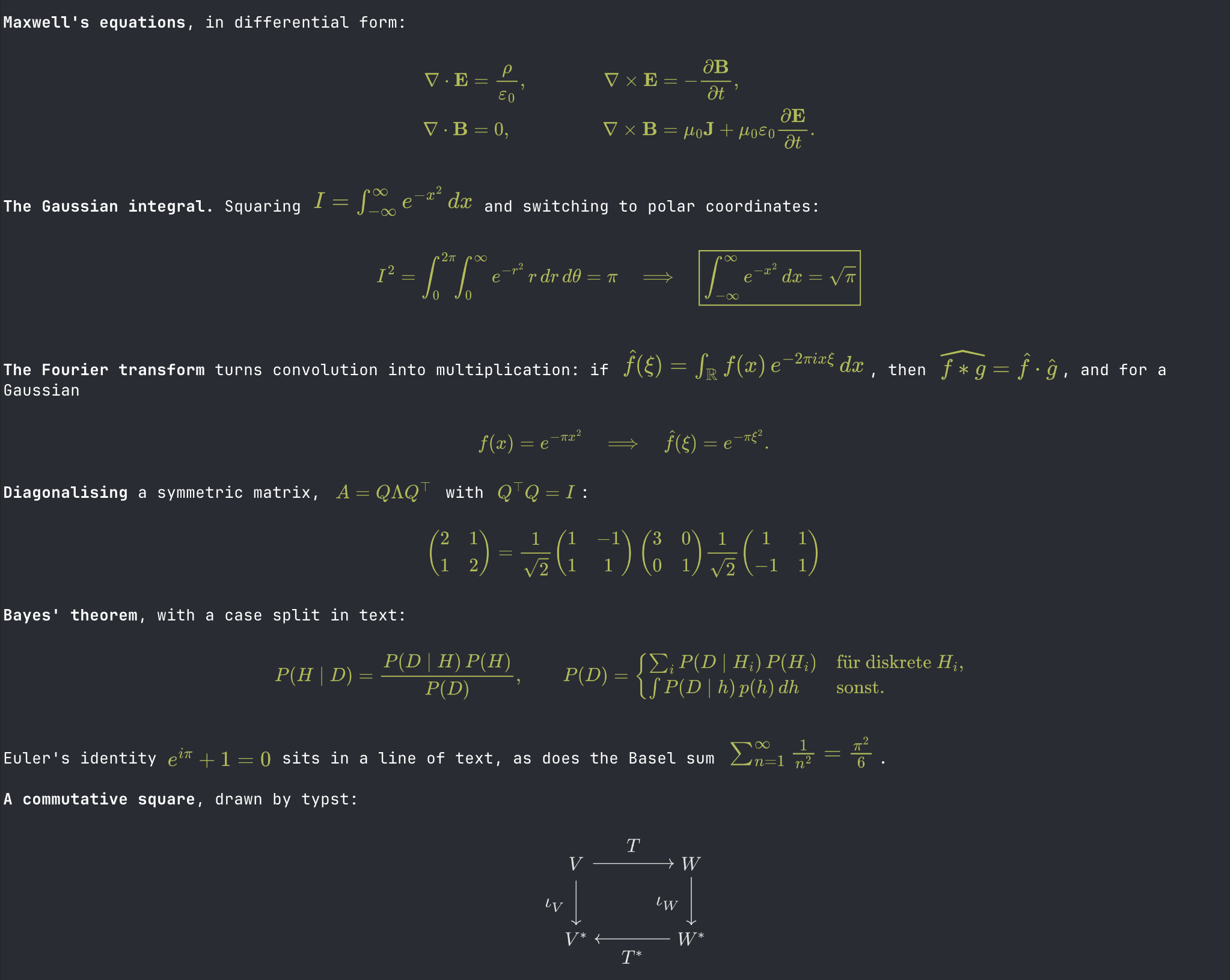
Typeset math in Claude Code's terminal. texel is a Claude Code plugin that redraws Claude's replies, and your own prompts, with LaTeX math and typst blocks rendered as images, inline with the text around them. Inspired by pi-math.
-
LaTeX, with nothing to install.
\( … \),\[ … \],$ … $,$$ … $$and```mathfences are typeset by MathJax, which runs inside the plugin.```latexand```texfences stay code, as LaTeX source to read or copy. -
Inline math sits in the line. Formulas sit on the text's baseline at a readable size; a tall one (a fraction, a matrix) gives its line the extra rows it needs, as LaTeX does, and the paragraph re-wraps around it.
-
typst blocks, if typst is installed: a
```typstfence is set by typst, as a figure (cetz diagrams, tables) or as prose laid out at the terminal's width, up totypstMaxWidth. A whole reply can be one: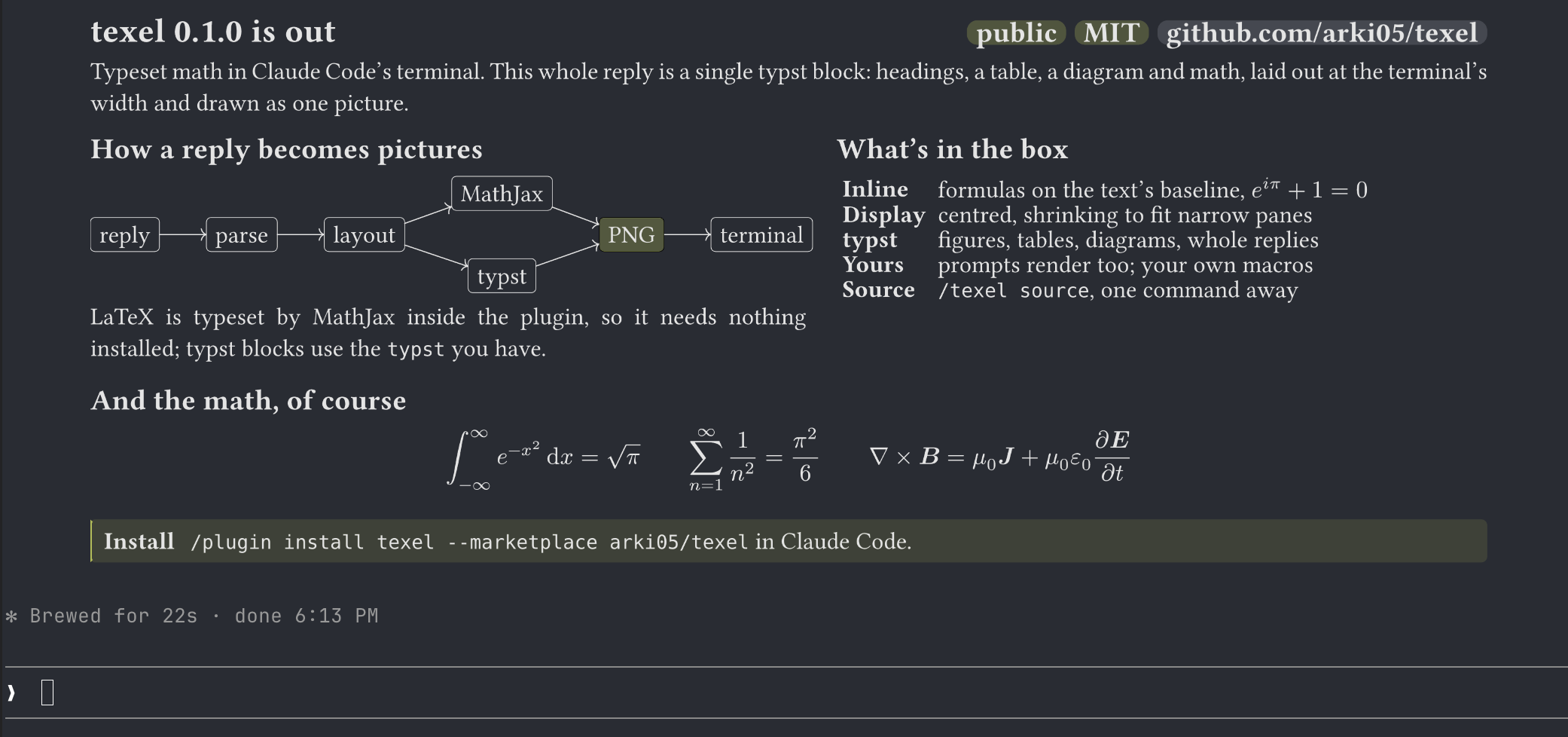
-
Claude knows. A short note in the system prompt tells Claude this terminal typesets LaTeX, and typst blocks where typst can draw them.
Requirements
- Claude Code 2.1.292 or newer, with plugin hooks (mods). They are early access, so texel may need updating as Claude Code changes.
- A terminal that shows Claude Code's images: kitty, Ghostty, or cmux (Ghostty-based). Not through tmux. Elsewhere texel steps aside and Claude Code's own rendering stays.
- Optional: typst 0.15 or newer (tested with 0.15), for
```typstblocks (brew install typst). Without it, LaTeX still renders; a typst block shows its source and says what it needs.
Install
In Claude Code:
/plugin install texel --marketplace arki05/texel
Answer y to add the marketplace, then choose a scope. texel is active at once.
From a shell: claude plugin install texel --marketplace arki05/texel.
Use
Ask Claude for anything with math in it; it writes LaTeX, and texel draws it. Your own prompts are rendered too.
| Command | What it does |
|---|---|
/texel | What texel draws with here: pictures on or off, typst found or not. |
/texel source | Shows every message as its source, for reading or copying, until you run it again. Selecting a rendered formula copies placeholder characters, not its LaTeX. |
The prompt's footer names texel among its modes: texel: rendered while messages are rendered, texel: source while they show their source. A click on it switches, as /texel source does. On a typst block or display math, the pointer shows its own controls: zoom (typst), its source, and a copy of it.
Your own macros. ~/.config/texel/macros.tex is read before every
formula, so \newcommands there work everywhere; Claude never sees the file.
\newcommand{\norm}[1]{\left\lVert #1 \right\rVert}
\newcommand{\inner}[2]{\left\langle #1, #2 \right\rangle}
Settings
All in /config, under texel.
| Setting | Default | |
|---|---|---|
promptNote | on | Tell Claude this terminal typesets math. |
mathColor | #b3bd5a | Colour of LaTeX math; empty follows the text colour. |
typstColor | empty | Colour of typst blocks' text; empty follows the text colour. |
typstPackages | on | Let typst blocks import packages (typst downloads them). Off: such a block shows its source; best effort, as an import whose path is held in a variable is not caught. |
typstMaxWidth | 120 | The widest a typst block is laid out, in columns: a wider terminal centres it, a narrower one fits it. |
typstScale | 1 | How large typst blocks are drawn: 1 sets their text at the terminal's size; 1.5 draws all of a block, a diagram in cm included, half as large again. Drawn at that size, so as sharp. |
inlineSize | 1.2 | Inline math's size against the text's x-height. |
inlineMinScale | 0.75 | How far a formula may shrink before its line gains a row. |
inlineMaxScale | 1 | How far a formula smaller than its row may grow to fill it. |
inlineShiftUp, inlineShiftDown | 0.5 | How far (in rows) a formula may sit off the baseline to save a row. |
terminalFont | JetBrains Mono | Your terminal's font, so math matches its proportions: JetBrains Mono (Ghostty's default), Menlo / DejaVu Sans Mono (kitty's), SF Mono, Monaco, or Custom with fontAspect, fontXHeight and fontBaseline. |
images | auto | Draw pictures: auto (in kitty and Ghostty, not tmux), always, never. |
Limitations
- One colour per formula.
\colorand\colorboxare read, but a formula is drawn in the math colour; a\colorboxshows its contents without the box's background. - Rendered math cannot be copied. Selecting it copies placeholder
characters;
/texel sourceshows the LaTeX. - Characters MathJax's fonts lack. In
\text{…}, accented Latin letters (ä, é, ñ, š, …) are drawn; ß, æ, ø, å, ç, Greek, Cyrillic and CJK are not, and a formula using them shows its source and names the character. - TeX packages: base, AMS, newcommand, boldsymbol, braket, mathtools, cancel, color and textmacros. An unknown command is an error, as in LaTeX.
- No equation numbers.
\tagand numbered environments show their source. - Not through tmux, which does not pass the pictures through.
- Formulas too wide for the line or the transcript shrink to fit, and ones that would have to go below half their size show their source.
How it works
texel hooks Claude Code's rendering of transcript rows. A reply's markdown is split into prose, inline math, display math and typst blocks.
- LaTeX goes to MathJax, bundled into the plugin, whose SVG texel fills into pixels itself: a plugin has no canvas and no WebAssembly. MathJax's SVG is read as outlines (strokes, clipping and its stylesheet's table rules included; anything else is refused, not guessed at), and a small rasteriser fills them by exact area coverage, the technique of font-rs and tiny-skia; the pixels go to the terminal as a PNG (compressed by the bundled fflate). Development checks the drawing against resvg over a corpus of formulas.
- typst blocks go to the
typstcommand line, a few at a time, and are cached by content in your cache folder (~/Library/Caches/texel, or$XDG_CACHE_HOME/texel). A block is laid out on the terminal's cells with its text at the terminal's size (attypstScale, on cells that much smaller), and drawn at 24 pixels to a column whatever its scale. - Inline formulas are measured, then fitted into their line in whole terminal rows; texel wraps those paragraphs itself so every row lines up.
- Nothing waits. A picture not ready yet shows its source and is drawn when it is, so a resize or a long reply never holds up the transcript.
What texel runs, reads and sends
texel draws what is already in your transcript. It sends nothing over the network, reads no credential, and passes nothing it reads to a program but a typst block's own markup to typst.
-
Reads: the environment variables
HOME,XDG_CACHE_HOME,TERM,TERM_PROGRAM,KITTY_WINDOW_IDandTMUX(where its cache lives, and whether the terminal shows pictures); your~/.config/texel/macros.tex, if you have one, which goes into MathJax inside the plugin; its owntexel.typ; and the pictures it cached, which go to the terminal. -
Runs, once when it loads:
uname -s(which system),defaults read -g AppleInterfaceStyle(macOS's light or dark appearance),typst --version(whether typst blocks can be drawn),mkdir -pon its cache folder, and a short/bin/shscript (ls,tail,rm) that keeps the newest 4,000 cached pictures there and removes the rest. For each typst block:typst compile, the block on its stdin and a PNG into the cache folder, thenmvto put the finished file in place. These commands carry the cache folder's path and the block's settings as arguments, so they are not all fixed text. LaTeX runs inside the plugin, no program at all. -
Sends: no network request of texel's own. typst downloads a package from the typst registry when a block imports one (
@preview/...); turntypstPackagesoff to stop that. A block'scopycontrol puts its source on your clipboard, as/copydoes, only when you press it. -
Hooks:
ui.render: redraws replies and your prompts, with a block's controls on hover, and adds texel's label to the footer's modes.prompt.compose: adds one short section to the system prompt (the note above, whichpromptNoteturns off); it changes nothing else there.session.startandcommand.run: register and answer/texel; any other command passes by untouched.
It keeps which way messages are shown, and each block's zoom, as session state; it reads Claude Code's theme as it draws, and hooks no setting.
-
Bundled code: MathJax and fflate, in the plugin's vendor folders, as readable ES modules, not minified;
npm run build:vendorrebuilds them byte for byte from the sources named inscripts/. The longest lines in them are MathJax's glyph outlines, one string per character. Their reflective code (prototypes,defineProperty, getters) is MathJax's and fflate's own.
Develop
npm install                   # build tooling: MathJax, fflate, esbuild, TypeScript, resvg (dev only)
npm test                      # the plugin's tests (claude plugin test plugin)
npm run typecheck             # after one `claude --plugin-dir plugin` session, which writes the types Claude Code gives a plugin
npm run smoke                 # both backends for real: the drawing against resvg, a typst corpus
npm run smoke -- --packages   # the same, with the typst blocks that import packages (typst downloads them)
npm run build:vendor          # rebuild the bundled MathJax and fflate (the plugin's vendor folders)
npm run check:vendor          # the same, failing if the committed bundle differs
claude plugin validate .      # marketplace, manifest and hooks
claude --plugin-dir plugin    # a session with this checkout's texel, reloaded on edit
License
MIT, see LICENSE. The bundled MathJax is Apache-2.0 and the
bundled fflate MIT, each with its licence and provenance in its vendor folder
(plugin/hooks/render/mathjax/vendor/, plugin/hooks/render/vendor/).

