
Worklog
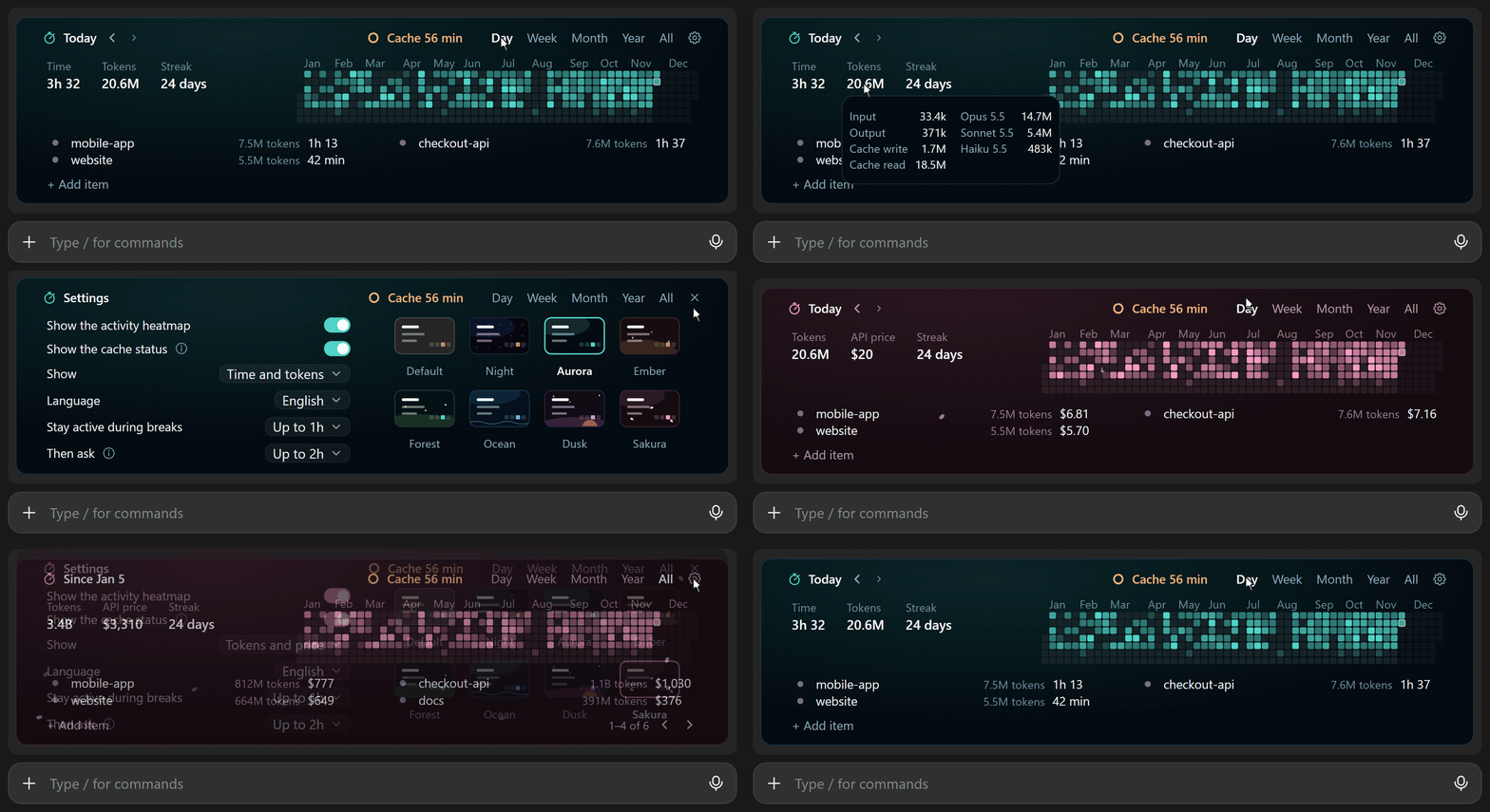
Worklog is a free, open source mod for Claude Code. It tracks your time and tokens for each project, and shows what they would cost on the API. It runs in the background, with nothing to start or stop. It knows when you take a break, and shows your whole year as a heatmap, with 8 themes to choose from.
claude plugin validate to auditGuide →Makes outbound network requests, calls MCP servers, or requests auth handles.
Statically scanned from hooks & source. Learn how to audit
Worklog
Automatically track the time, tokens and API price of each project in Claude Code, with a yearly activity heatmap and 8 themes to choose from.



Quick start · Update · Usage · How the timer works · Breaks · Project names · Tokens and price · Themes · Terminal · Settings · FAQ · Privacy
What it does
- Counts your time while Claude works: answers, subagents, background commands, Ultracode and more.
- Counts your tokens and shows what they would cost on the API.
- Shows your whole year as a heatmap, with 8 themes to choose from.
- Includes your past work: at install, it reads your Claude Code history for the time, the tokens and the price.
- Keeps your data on your computer.
Quick start
-
Install Worklog:
claude plugin marketplace add Abdoul-sudo/worklog claude plugin install worklog@worklog -
Restart Claude Code.
A small button then appears at the bottom of Claude Code, with your project and its time today, for example ⏱ mobile-app · 1h 12. This button, or the /worklog command, opens Worklog.
Worklog needs Claude Code 2.1.325 or later. Node.js is optional: with it, Worklog also imports your past work.
Update
By default, Claude Code does not update Worklog. You can turn on automatic updates one time:
- In Claude Code, type
/plugin. - Open the Marketplaces tab.
- Select worklog.
- Select Enable auto-update.
After that, each new version comes when you start a session.
You can also update by hand, with these commands:
claude plugin marketplace update worklog
claude plugin update worklog@worklog
Then restart Claude Code, or type /reload-plugins.
To hear about each new version, watch the releases of this repository: Watch > Custom > Releases.
Usage
Each line in the list is a name: a project or a task. The bright dot marks the name of this session.
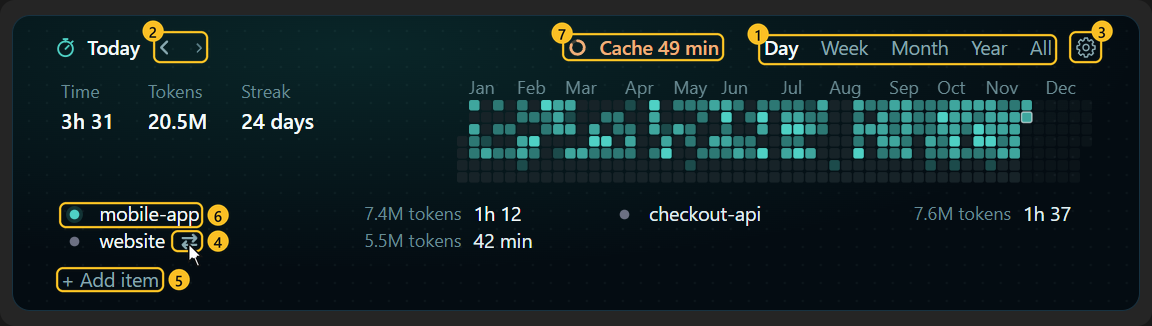
- Period. Day, Week, Month, Year and All change the period that you see.
- Back and forward. The arrows go to the period before or after.
- Settings. The gear opens the settings.
- Switch. Hover over another name and click ⇄ to move this session to it, from now on.
- New name. + Add item creates a name and moves this session to it.
- Rename. Hover over the name with the bright dot and click ✎. Past days get the new name too.
Hover over a day in the heatmap to see its numbers.
In the terminal, a click on a name moves this session to it, and ≡ opens the settings.
| Command | What it does |
|---|---|
/worklog | Shows or hides Worklog. |
/worklog <name> | Moves this session to <name>, from now on. For example: /worklog PROJ-142. |
How the timer works
- It starts with your first message. Opening a session does not count.
- It runs while Claude works, even for hours without you.
- It stops when Claude is done. A break starts. When you come back, Worklog decides if the break counts. See Breaks.
- Background commands count while Claude waits for them. If you come back before one ends, for example a dev server that never stops, the wait becomes a break.
- Many things at once in one project count once. 3 subagents that work for 10 minutes give 10 minutes, not 30.
- Two projects at once each get their time. The total shows the overlap, for example "incl. 1h 00 in parallel".
Breaks
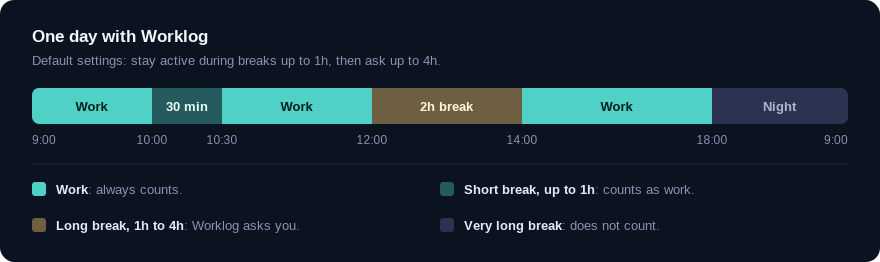
A break is the time between the end of Claude's work and your next message.
| Break | What Worklog does |
|---|---|
| Short: up to 1h | Counts the break as work. |
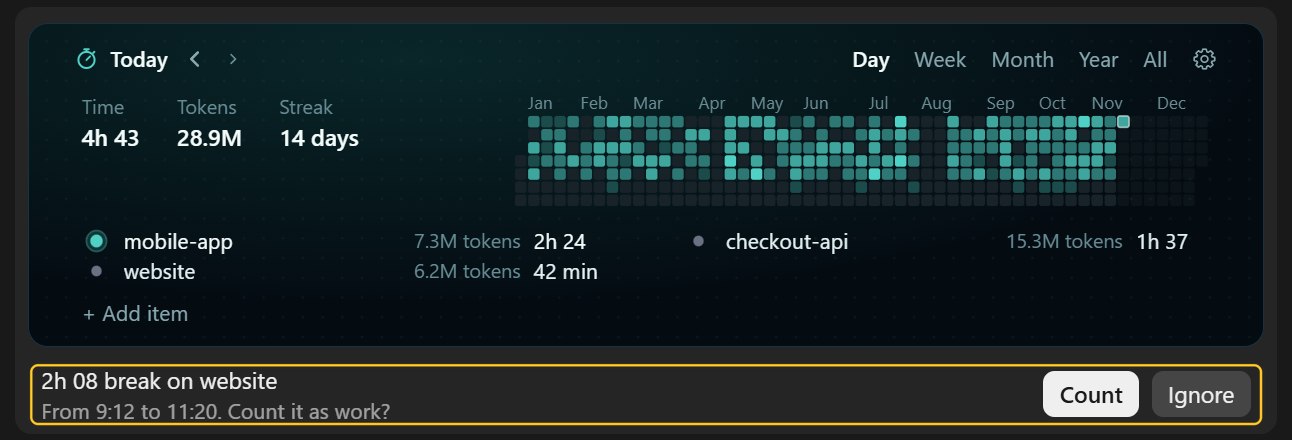
| Long: from 1h to 4h | Asks you if the break was work. |
| Very long: more than 4h | Does not count the break as work, and does not ask. |
For a long break, the question appears under Worklog:
If you close Claude Code during a short break, the break counts as work up to the moment you close Claude Code.
You can change the 1h and the 4h in the settings.
Project names
Worklog puts the time of each session under one name. It picks the name in this order:
- The name that you choose, with
/worklog <name>or in the list. - An ID in your messages, for example
PROJ-142. - An ID in the name of your Git branch, for example
feature/PROJ-142-login. - The name of the project folder. In a Git worktree, the name of the main project.
When Worklog finds the first ID of a session, the time before it also goes to this ID.
Tokens and price
If tokens matter more to you than time, set Show to Tokens and price in the settings. The API price then takes the place of the time.
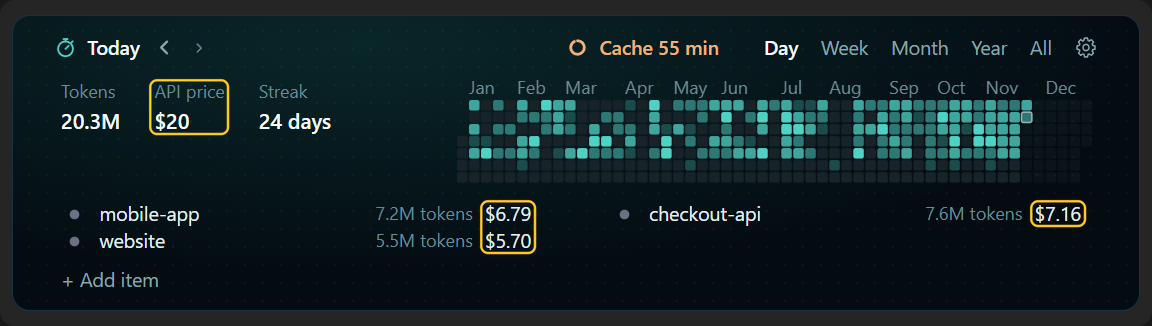
- The price is what your tokens would cost on the Anthropic API.
- On a Pro or Max plan, it is not what you pay. It shows what the same work would cost on the API.
- Worklog always counts the price, even when it shows the time. So your past days have a price too.
Token details
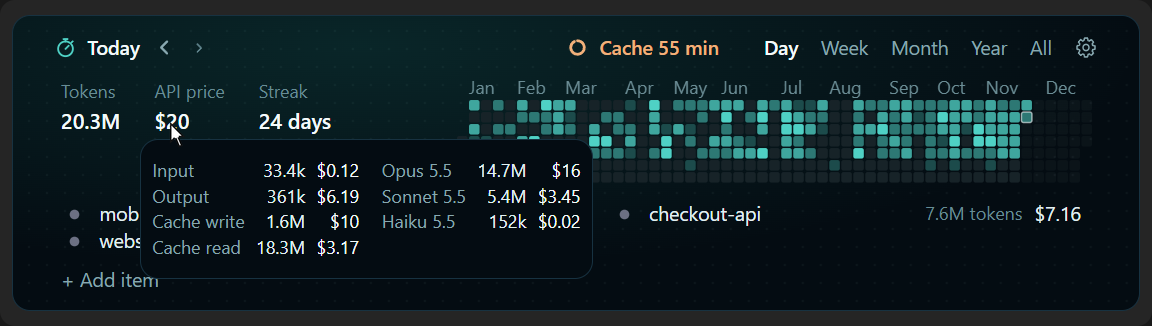
Hover over Tokens, API price or the tokens of a name to see your tokens by type and by model. This works in the desktop app.
Themes
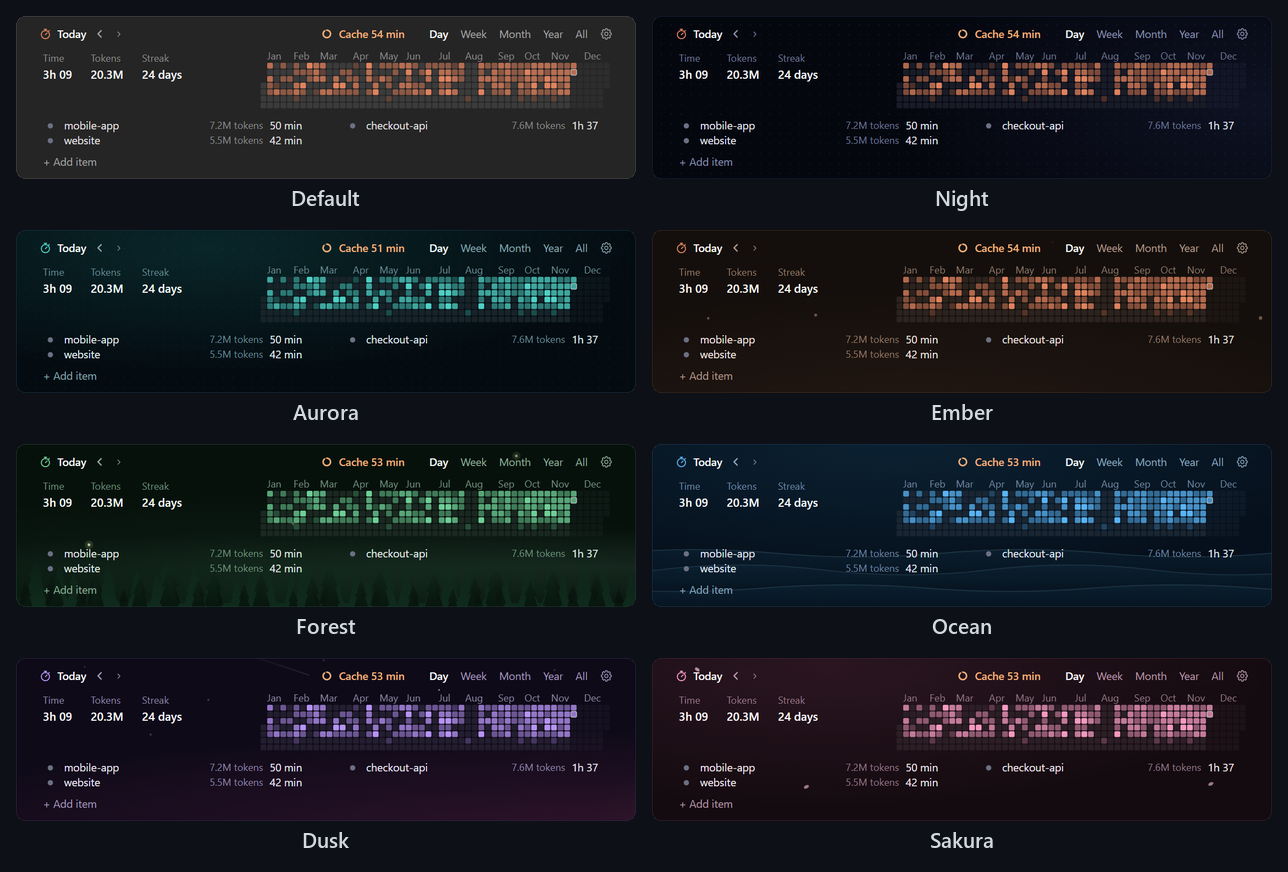
Worklog comes with 8 themes in the desktop app. You choose one in the settings.
In the terminal
Worklog works in the terminal too, with the same data.

Clicks in the terminal need the fullscreen mode: /tui fullscreen.
Settings
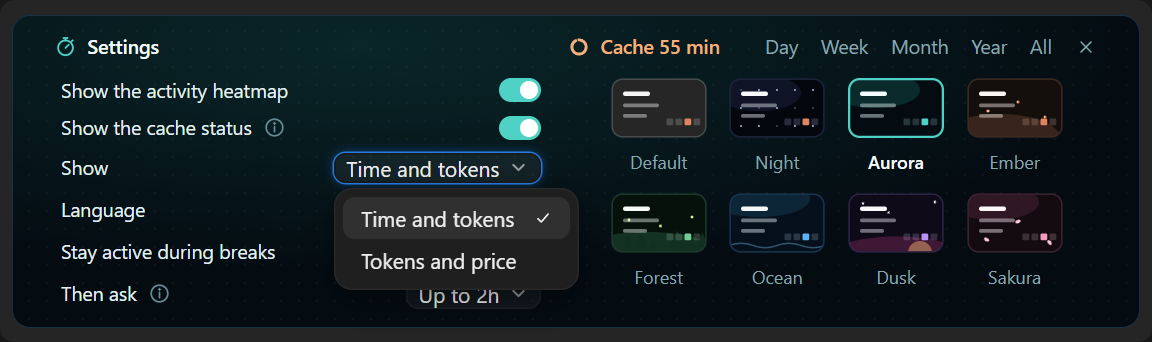
| Setting | Default | What it does |
|---|---|---|
| Show the activity heatmap | On | Shows or hides the heatmap. |
| Show | Time and tokens | Shows the time and the tokens, or the tokens and their API price. |
| Language | English | English or French. |
| Stay active during breaks | Up to 1h | A break up to this length is short: it counts as work. |
| Then ask | Up to 4h | Worklog asks you about a break up to this length. A longer break does not count. Never turns off the question. |
| Theme | Night | Desktop app only. |
FAQ
Does Worklog use my Claude usage?
No, Worklog never uses tokens and does not count toward your plan limits. It only reads the files that Claude Code already writes on your computer.
Where does the API price come from?
Worklog takes the prices from the public LiteLLM price list. It gets the list again once a day.
For your past work, Worklog reads the details of each answer in your Claude Code history. If Claude Code deleted an old conversation, the tokens of that conversation have no price.
Do all tokens have the same price?
No. The API gives a different price to each type of token, and Worklog uses each price:
- Input tokens (what Claude reads): the normal price.
- Output tokens (what Claude writes): about 5 times the input price.
- Cache writes (Claude saves your conversation for later): 1.25 times the input price for 5 minutes, 2 times for 1 hour.
- Cache reads (Claude reads the saved conversation again): only 0.1 times the input price.
In long sessions, most tokens are cache reads. They are cheap, so many tokens can still cost little.
Does a resumed or forked conversation count twice?
No. When you resume or fork a conversation, Claude Code can copy old messages into the new file. Worklog counts each message only once.
If I delete a conversation, do I lose its data?
No. Worklog keeps its own copy of your time and tokens in ~/.claude/worklog/. When you delete a conversation in Claude Code, this copy stays.
Privacy and access
Worklog runs on your computer and keeps its data there. This is everything it can access:
| Access | What Worklog does |
|---|---|
| Reads files | Its own data in ~/.claude/worklog/. Your Claude Code history in ~/.claude/projects/, for the time, the tokens and the model of each answer. |
| Writes files | Only its own data, in ~/.claude/worklog/. |
| Runs commands | git branch --show-current, to find an ID in the branch name. node, to read your past history. |
| Network | Once a day, it downloads the public LiteLLM price list. It sends nothing about you or your work. |
| Your messages | It reads each message to find an ID, for example PROJ-142. It does not keep your messages. |
Two environment variables change this: WORKLOG_PRICES=off stops the price download, and WORKLOG_DATA_DIR keeps the data in another folder.
Uninstall
claude plugin uninstall worklog@worklog
Your data stays in ~/.claude/worklog/. To remove it too, delete this folder.
License
Details
- Author
- @Abdoul-sudo
- GitHub Stars
- 45
- Sub-category
- Dashboards
- License
- MIT
- Surfaces
- terminal
- Added
- 11 days ago
- Last synced
- 1 day ago
- Events hooked
session.startprompt.submitturn.starttool.callturn.completeclassic.Stopsession.endcommand.runui.renderui.focus
Weekly Mods Digest
Top new Claude Code mods and install commands, once a week. No fluff, unsubscribe anytime.


