
Claude Code Harness
Chachamaru127's structured harness for managing multi-file Claude Code projects — task queues, context budgeting, file dependency graphs, and session checkpoints.
Claude Code Harness

Plan. Work. Review. Ship.
A disciplined delivery loop for Claude Code, Codex CLI, Cursor, and Grok.






English | 日本語
The problem
Claude Code Harness (CCH) is a development plugin for delegating planning, implementation, validation, and review to Claude Code or Codex. Provide the intended outcome and completion criteria; the assigned agents inspect the existing code and organize the work.
You decide what to build, what counts as complete, and which actions are authorized. Agents choose the method within that scope and continue the necessary fixes and checks. They return changes, verification results, and unknowns so you can judge the result against the criteria.
Install in 30 seconds
claude
/plugin marketplace add Chachamaru127/claude-code-harness
/plugin install claude-code-harness@claude-code-harness-marketplace
/harness-setup
Then hand it something small:
/harness-plan Improve the README onboarding flow
Harness drafts spec.md and Plans.md for you. Your job is not to write the
plan — it is to approve or correct it before execution continues.
Using a different tool? See install by tool below.
The loop
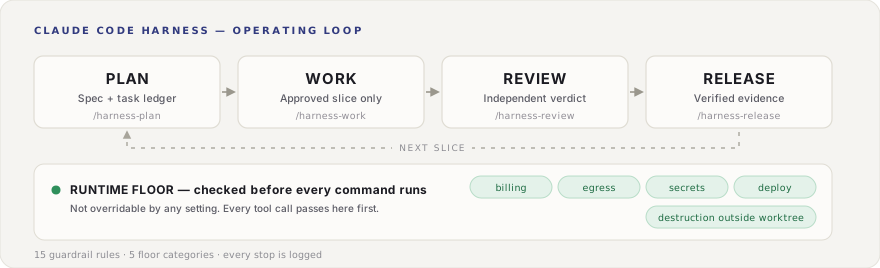
The 5 verb skills keep that surface small: plan, work, review, sync, release.
(/harness-setup runs once at install time, above.) Each stage leaves the
material the next stage needs, and each has its own gate.
| Command | What happens | Gate |
|---|---|---|
/harness-plan | Turns intent into spec.md + Plans.md: scope, acceptance criteria, dependencies, unknowns, stop conditions. | You approve or correct the generated contract. |
/harness-work | Executes the selected scope, choosing solo or team execution by task count. | Clarifies scope only when it is unresolved; runs required checks and review. |
/harness-work 3 | Implements task 3 only. | TDD required when the task says so. |
/harness-work all | Runs the whole approved plan. Use once the plan is clear and the repo baseline is known. | Same TDD gate, applied task by task. |
/harness-review | Reviews the result separately from implementation. | Major findings block completion. PR-ready is not release-ready. |
/harness-sync | Compares the plan against what is actually implemented and reports drift. | Reconciles status using observed evidence. |
/harness-release | Packages only verified evidence into CHANGELOG, tag, and release. | Release preflight must pass. |
Data the agent has not seen stays unknown instead of being quietly invented.
What happens after a request
For example, an order duplication bug can start with:
/harness-plan Fix duplicate orders. The completion criterion is that the same order is stored once.
Review and approve the scope and completion criteria, then run
/harness-work all. In Codex, invoke the skills as $harness-plan and
$harness-work all.
- Plan. Inspect the existing specification and code, then capture reproduction steps, scope, and completion criteria in
spec.mdandPlans.md. - Implement. Pass the original request, criteria, and observed evidence to the assigned worker. Independent work can run concurrently with separate file ownership.
- Verify and fix. Run required tests and reproduction steps. Send review findings back to the worker for correction within the configured iteration limit.
- Report. Return criterion-level results, changed files, checks actually performed, and remaining issues.
Agents first recover missing inputs from the specification and relevant code. Reversible work inside the authorized scope continues with stated assumptions. A new authorization or material specification decision blocks the dependent action; independent authorized work can continue. Major findings or an exhausted correction limit produce an incomplete result with evidence for the next decision.
Model roles and your choices
CCH assigns models by role. Reasoning effort controls how much processing a model allocates to thinking. These are role defaults; the main conversation also uses its session selection and the active skill's settings.
| Role | Model | Effort |
|---|---|---|
Claude difficult decisions and advice (deep / advisor) | Fable 5.1 (claude-fable-5-1) | high |
| Ordinary Claude implementation | Sonnet 5 (claude-sonnet-5) | medium |
| Dedicated independent Claude Reviewer | Sonnet 5 (claude-sonnet-5) | xhigh |
| Codex standard work, difficult decisions, review, and advice | GPT-6 astra (gpt-6-astra) | xhigh |
| Codex Breezing implementation Worker | GPT-5.6 luna (gpt-5.6-luna) | max |
The general Claude review route uses Fable 5.1 / high; the dedicated
Reviewer above uses a separate Sonnet 5 definition. Lightweight research has
its own routes. See the full role table.
Manual model and effort choices remain authoritative. Per-call selections
and role settings apply to their respective execution paths. Changing the
parent conversation does not retune every child role. Explicit Codex ultra
is preserved; stronger wording in a request does not authorize effort changes.
The safety layer
Operations connected to CCH's checks are inspected by a Go engine before execution. Network sends and deletions also need command-level checks because a file diff cannot establish those effects. Coverage depends on the host; see safety differences between hosts.
Two layers, deliberately different in strength.
| Layer | Decides | Configuration |
|---|---|---|
| Runtime floor — 5 categories | Allows or denies under category-specific rules | No global disable switch; limited allowlists exist for destinations, read targets, and other defined operations |
| Guardrails — R01–R16 | Deny / confirm / warn | Partly, by project config |
The floor covers billing, network egress, secret reads, production deploys, and destruction outside the task worktree. Allowed targets and release-operation settings are protected, operator-managed configuration. Agents must not rewrite them to make their own work pass.
Guardrails are the layer you tune. Direct pushes to main, writes to protected
paths, forced pushes, history rewrites — each has a defined verdict, and some
are configurable per project.
Known approvals can be collected at plan time. Operations that support preapproval can be scoped and approved with the plan. A newly discovered approval requirement is checked before that operation runs. Approvals carry an expiry, a task scope, and a use limit.
Stop reasons are recorded. Rule identifiers, categories, and verdicts in the decision log let you inspect what blocked an operation.
Sessions that can see each other
When several conversations work on the same repository, CCH's roster shows the active agents. A local message path can carry information to agents working in other worktrees.
| Piece | What it does |
|---|---|
| Roster | bin/harness session list shows live sessions registered across worktrees of the same repository. The store resolves from git --git-common-dir. Each row carries the team and agent a sender needs. |
| Send | bin/harness inbox send --team <t> --from <a> --to <b> --subject <s> "<body>", or the session-send skill, which also documents what is worth sending. |
| Receive | Messages arrive at the receiving session's turn boundary, wrapped as data with an explicit non-instruction envelope. A peer's message is a report to verify, never an order to follow. |
Message content checks are off by default. Setting
[livemsg] verification = "on" checks whether mentioned files and commits
exist and whether a "clean worktree" claim matches the current state.
Messages that fail the check are withheld, with the reason returned to the sender.
This is local-only and does not depend on harness-mem. If harness-mem is installed alongside, its roster entries are preserved untouched.
Decision surfaces for non-engineers
Three single-screen HTML views let a non-engineer sponsor judge without reading code.
| Surface | When | Shows |
|---|---|---|
| Plan Brief | Plan finalized | Understanding, options, risks, acceptance criteria |
| Progress | During work | WIP/TODO/done counts recorded in Plans.md and pending decisions |
| Acceptance | Before release | Per-criterion pass/fail with ship / wait / reject |
Use /harness-progress to inspect the current state. A status request alone
does not mark work complete or save a memory. Work handoffs carry completed
work, unresolved issues, verification results, and the next action to try.
Claude Code regenerates the page after editing or command execution, at most
once every 60 seconds. The completion percentage is a task-count ratio, not
an acceptance pass rate or an automatically detected implementation state.
Install by tool
Four install routes are not four identical guarantees. A setup script means a tool has an entry path, not a shared product promise.
| Tool | Tier | Route |
|---|---|---|
| Claude Code | supported | Plugin marketplace, then /harness-setup |
| Codex CLI | supported | scripts/setup-codex.sh --user; rerun after Harness updates, then restart Codex |
| Cursor | supported | scripts/setup-cursor.sh — containment is harness-side, see notes |
| Grok | supported | scripts/setup-grok.sh |
| Codex app | candidate | Candidate smoke only; CLI proof is not reused |
| OpenCode | internal-compatible | scripts/setup-opencode.sh; runtime parity not claimed |
| Hermes Agent | candidate | Manual symlink research route. harness gen now writes its turn-delivery hook when ~/.hermes exists; guardrail enforcement is still not wired, so the tier is unchanged |
| GitHub Copilot CLI | candidate | Manual profile research |
| Antigravity CLI | future/unsupported | No end-user install route yet |
What the tiers mean, and why we are strict about them
| EN tier | Japanese public wording |
|---|---|
supported | 正式対応 |
internal-compatible | 互換利用可 / 制限付き対応 |
candidate | 試験対応 / プレビュー |
future/unsupported | 非対応 / 将来検討 |
Claude Code, Codex CLI, Cursor, and Grok passed H1–H8 on their verified claim
paths (live H4 2026-07-17; H7 release-preflight fail-closed wiring 2026-07-19).
Every other row stays at its listed tier until it passes its own H1–H8
(docs/spec/planning-and-host-adapter.md, Phase 111).
Harness does not inherit support claims from Superpowers, Hermes Agent, or any other project. A host moves up only when Harness has its own bootstrap, trigger, runtime, and release evidence.
not_observed != absent — missing local proof means "not proven here". It does
not mean impossible, and it does not mean supported.
Already using Harness? Run the migration report first
bin/harness doctor --migration-report
It inventories stale Claude plugin caches, duplicate Codex skills, old symlinks, OpenCode backup paths, and harness-mem state — without deleting anything.
Advanced capabilities
Reach for these after the basic path is working.
| Capability | What it adds | Boundary |
|---|---|---|
| Breezing | Planner / Critic / Worker team execution for larger task lists | Still gated by plan quality and review |
| harness-loop | Repeats execution within a chosen limit, consulting an advisor when needed and retaining stop reasons and restart information | Reaching the limit or finding no runnable work is distinct from completing every task |
| Codex companion review | Schema-backed second opinion via scripts/codex-companion.sh | Raw codex exec is not the companion path |
| harness-mem | Project-scoped memory and recall across sessions | Optional; purge stays explicit |
| OpenCode bootstrap | Mirrors guidance into OpenCode-compatible surfaces | Runtime parity not claimed |
| auto-approve (experimental) | HARNESS_AUTO_APPROVE=on records the gate result in the orchestration ledger | Default OFF. Approval prompts are not skipped yet |
/harness-loop defaults to a limit of eight cycles. Claude Code normally
handles one task per wake-up; Codex runs a batch whose dependencies are met.
Use /harness-loop status to inspect the loop and /harness-loop stop to stop further execution.
Resume work with /harness-work --resume latest, recovering the plan, diff,
verification results, and remaining completion criteria.
Codex Breezing role routing. After setup is rerun and Codex is restarted,
Codex-native $breezing selects the managed Worker profile. $breezing --codex
uses the companion Worker route. Both implementation Workers use
gpt-5.6-luna / max; the routed Codex review route uses gpt-6-astra /
xhigh. The main Codex session model stays unpinned, and explicit backends such
as Cursor keep their own routing. See activation and
boundaries.
Native Codex children can inherit the parent's execution permissions. The Reviewer profile alone is not filesystem isolation. CCH's read-only review uses the companion path, which explicitly selects read-only execution.
Requirements
- Claude Code v2.1+ for the supported Claude path
- A repository with write access
- No Node.js is required for the Go-native guardrail engine
- Optional: harness-mem for cross-session memory
Documentation
| Resource | Description |
|---|---|
| Tool-first onboarding | Where to start, by host tool |
| Install routes | Per-tool setup and tier boundaries |
| Migration check | Existing-user impact and rollback |
| Skill trigger gate | How install success is verified |
| Capability matrix | Full host claim table |
| Distribution scope | Included vs compatibility vs dev-only |
| Hardening parity | Safety differences between hosts |
| Work All evidence pack | Verification contract for full-plan runs |
| Model roles | Role models, reasoning effort, and override priority |
| Task requests and handoffs | Completion criteria, evidence, correction instructions, and restart context |
| Language / i18n | Switching output language |
| Changelog | User-facing version history |
Contributing
Issues and PRs welcome. See CONTRIBUTING.md.
Acknowledgments
License
MIT. See LICENSE.md.
More Harnesss
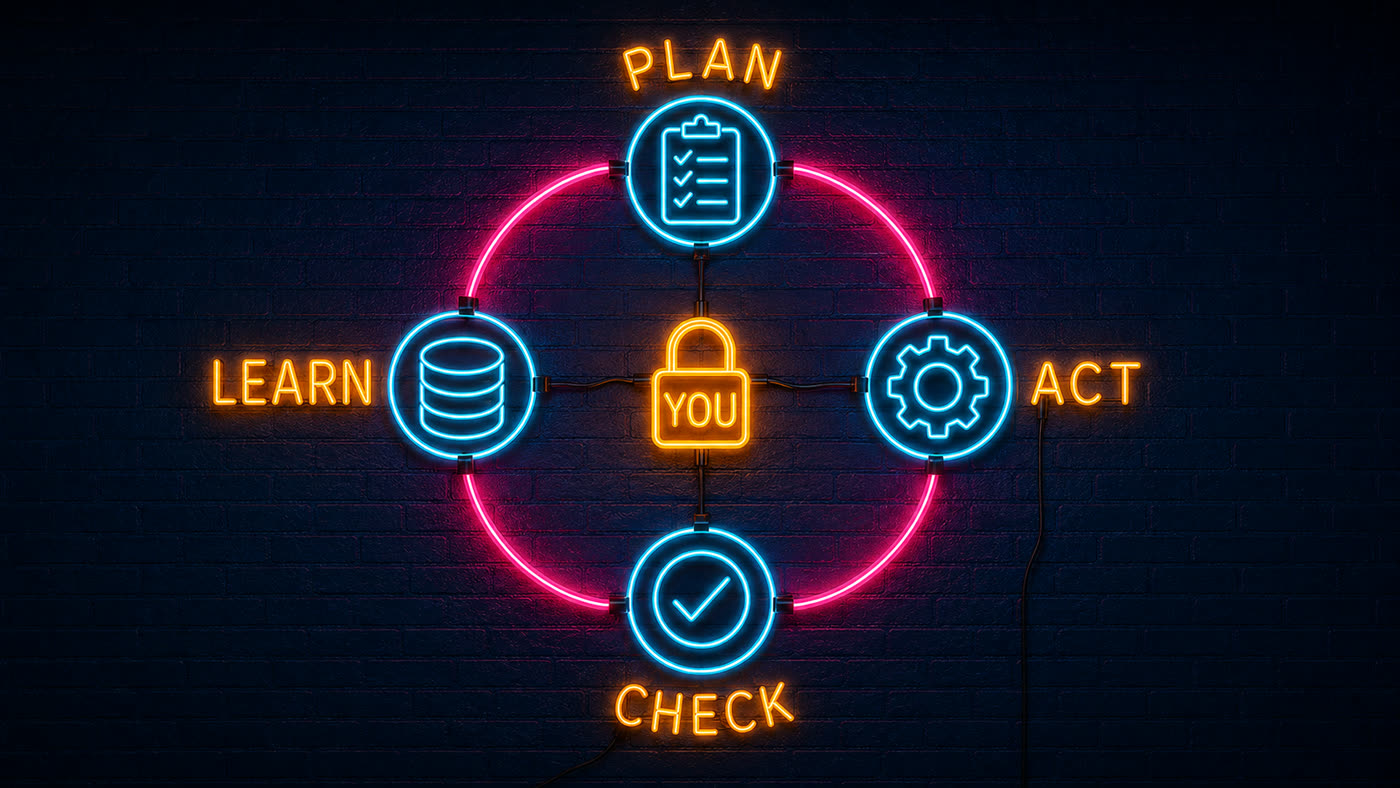
claude-flow
The #1 AI automation framework — 87.8% SWE-bench verified. An advanced multi-agent orchestration system for Claude Code with enterprise-grade agentic capabilities.
claude-simone
Structured project management harness for Claude Code — define milestones and sprints in markdown, then run execution loops that drive Claude through each task.
Awesome Claude Code Plugins
A community-curated directory of the best Claude Code plugins, harnesses, and tools — organized by use case with install instructions and community ratings.