
cship
Beautiful, blazing-fast, customizable status line for Claude Code with full Starship pass-through.
⚓ CShip (pronounced "sea ship")






A beautiful, fully customizable statusline for Claude Code
Starship-style TOML config, themeable colours, Nerd Font glyphs, and tunable cost/context/usage thresholds.
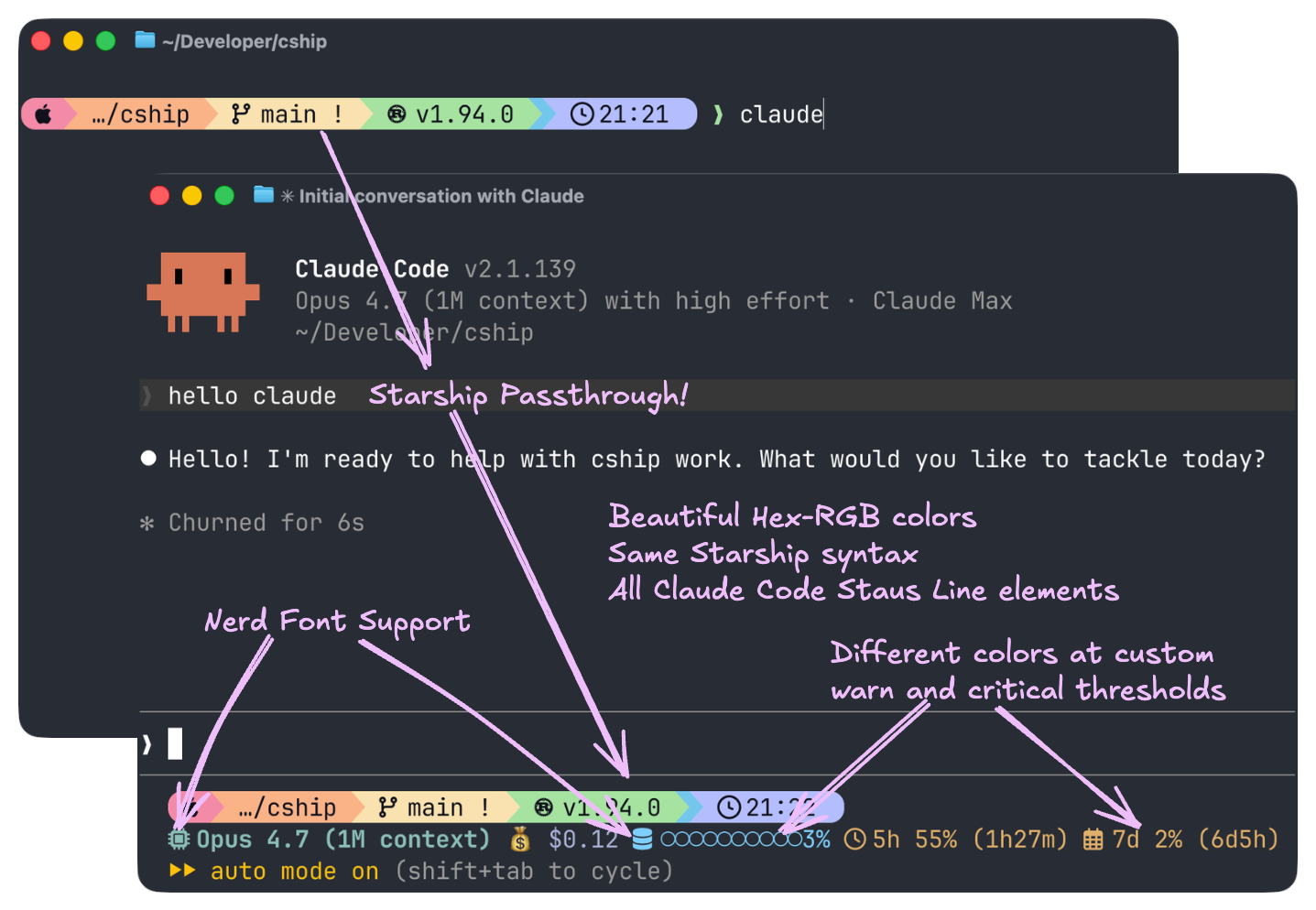
cship renders a live statusline for Claude Code sessions, showing session cost, context window usage, model name, API usage limits, and more — all configurable via a simple TOML file.
Key features:
- 🎨 Fully Customizable: Configure every module with Starship-compatible TOML. Colors, symbols, thresholds — your statusline, your rules.
- ⚡ Blazing Fast: Written in Rust with a ≤10ms render budget.
- 🔌 Starship Passthrough: Embed any Starship module (git_branch, directory, language runtimes) right next to native CShip modules.
- 💰 Session Insights: Track cost, context window usage, API limits, vim mode, agent name, and more — all from Claude Code's live JSON feed. Implement custom warn and critical thresholds with custom colors for each.
🚀 Install
⚡ Method 1a: curl installer (macOS / Linux)
curl -fsSL https://cship.dev/install.sh | bash
Auto-detects your OS and architecture (macOS arm64/x86_64, Linux x86_64/aarch64), downloads the binary to ~/.local/bin/cship, creates a starter config at ~/.config/cship.toml, and wires the statusLine entry in ~/.claude/settings.json.
Optional dependencies (Starship for passthrough modules, and libsecret-tools on Linux for usage limits) are handled as follows:
- Interactive terminal — the installer prompts you for each.
--yes/-y— auto-installs all optional deps without prompting:curl -fsSL https://cship.dev/install.sh | bash -s -- --yes- Non-interactive (Docker
RUN, CI pipelines, no TTY) — optional deps are skipped automatically; the installer prints instructions for manual installation.
🪟 Method 1b: PowerShell installer (Windows)
Run this one-liner in PowerShell (5.1 or later):
irm https://cship.dev/install.ps1 | iex
Installs to %USERPROFILE%\.local\bin\cship.exe, writes config to %USERPROFILE%\.config\cship.toml, and registers the statusline in %USERPROFILE%\.claude\settings.json.
You can inspect the script before running: install.ps1
📦 Method 2: cargo install
Requires the Rust toolchain.
cargo install cship
After installing with cargo on macOS / Linux, wire the statusline manually in ~/.claude/settings.json:
{
  "statusLine": { "type": "command", "command": "cship" }
}
After installing with cargo on Windows, wire the statusline manually in %APPDATA%\\Claude\\settings.json:
{
  "statusLine": { "type": "command", "command": "cship" }
}
⚙️ Configuration
- The default config file is
~/.config/cship.toml(on Windows:%USERPROFILE%\.config\cship.toml). - You can also place a
cship.tomlin your project root for per-project overrides. - The
linesarray defines the rows of your statusline. - Each element is a format string mixing
$cship.<module>tokens (native cship modules) with Starship module tokens (e.g.$git_branch). - See the Showcase below for ready-to-use configs you can drop straight into
~/.config/cship.toml.
🧩 Available modules
Everything in the Claude Code status line documentation is available as a $cship.<module> token for you to mix and match in the lines format strings. Here are the most popular ones:
| Token | Description |
|---|---|
$starship_prompt | Full rendered Starship prompt (all configured modules in one row) |
$cship.model | Claude model name |
$cship.cost | Session cost (configurable currency; default $X.XX) |
$cship.context_bar | Visual progress bar of context window usage |
$cship.context_window | Context window tokens (used/total) |
$cship.context_window.used_tokens | Real token count in context with percentage (e.g. 8%(79k/1000k)) |
$cship.cost.total_lines_added | Lines added this session |
$cship.cost.total_lines_removed | Lines removed this session |
$cship.usage_limits | API usage limits (5hr / 7-day, plus per-model and extra-usage when available) |
$cship.usage_limits.per_model | 7-day per-model breakdown (opus / sonnet / cowork / oauth) |
$cship.usage_limits.extra_usage | Extra-credits section with {active} indicator |
$cship.usage_limits.session / .weekly | The 5h / 7d window alone, colored by its own utilization (aliases: .five_hour / .seven_day; supports a {bar}) |
$cship.account | Authenticated Anthropic account (work/personal); map org names via labels |
$cship.peak_usage | Peak-time indicator (US Pacific business hours) |
$cship.agent | Sub-agent name |
$cship.effort | Reasoning effort level (low/medium/high/xhigh/max) |
$cship.session | Session identity info |
$cship.workspace | Workspace/project directory |
Full configuration reference: https://cship.dev
🔍 Debugging
Run cship explain to inspect what cship sees from Claude Code's context JSON — useful when a module shows nothing or behaves unexpectedly.
cship explain
To check the installed binary version:
cship --version # or: cship -v
✨ Showcase
Ready-to-use configurations — from the recommended full-featured setup down to a minimal single-line bar. Each can be dropped into ~/.config/cship.toml.
1. ⚓ Hero / Recommended
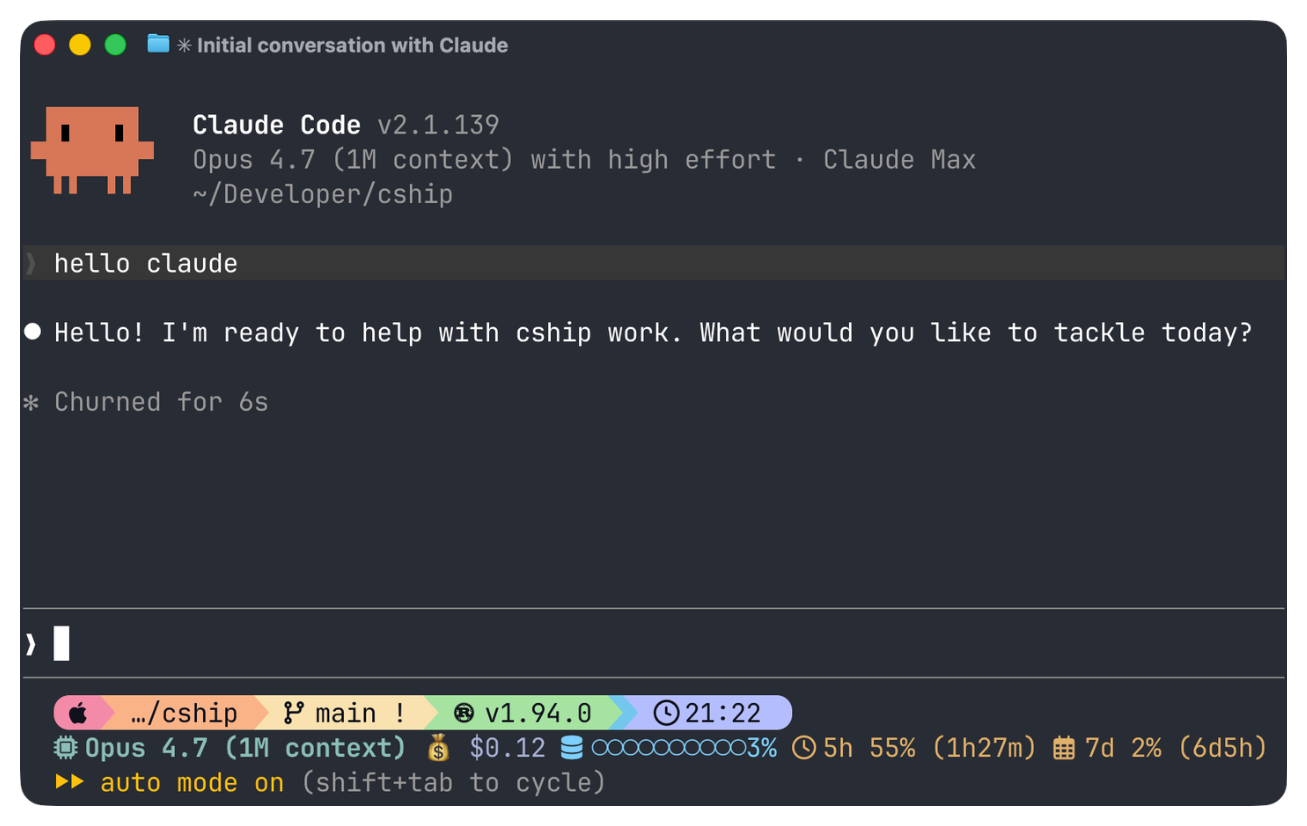
My personal setup, end to end. Top row: $starship_prompt running Starship's Catppuccin Powerline preset. Bottom row: model, effort, cost, context bar, 7-day per-model usage, extra credits, peak-hours indicator — thresholds escalate cool → warn → critical as budgets fill.
View config
~/.config/cship.toml
[cship]
lines = [
"$starship_prompt",
"$cship.model $cship.effort $cship.cost $cship.context_bar $cship.usage_limits $cship.peak_usage",
]
[cship.model]
symbol = " "
style = "bold cyan"
[cship.effort]
symbol = "⚡ "
style = "fg:#7dcfff"
high_style = "fg:#e0af68"
xhigh_style = "bold fg:#e0af68"
max_style = "bold fg:#f7768e"
[cship.context_bar]
symbol = " "
filled_char = "●"
empty_char = "○"
format = "[$symbol$value]($style)"
width = 10
style = "fg:#7dcfff"
warn_threshold = 40.0
warn_style = "fg:#e0af68"
critical_threshold = 70.0
critical_style = "bold fg:#f7768e"
[cship.cost]
symbol = "💰 "
style = "fg:#a9b1d6"
warn_threshold = 10
warn_style = "fg:#e0af68"
critical_threshold = 50
critical_style = "bold fg:#f7768e"
[cship.usage_limits]
five_hour_format = " 5h {pct}% ({reset})"
seven_day_format = " 7d {pct}% ({reset})"
separator = " "
warn_threshold = 50.0
warn_style = "fg:#e0af68"
critical_threshold = 80.0
critical_style = "bold fg:#f7768e"
~/.config/starship.toml — Starship's Catppuccin Powerline preset:
"$schema" = 'https://starship.rs/config-schema.json'
format = """
[](red)\
$os\
$username\
[](bg:peach fg:red)\
$directory\
[](bg:yellow fg:peach)\
$git_branch\
$git_status\
[](fg:yellow bg:green)\
$c\
$rust\
$golang\
$nodejs\
$php\
$java\
$kotlin\
$haskell\
$python\
[](fg:green bg:sapphire)\
$conda\
[](fg:sapphire bg:lavender)\
$time\
[ ](fg:lavender)\
$cmd_duration\
$line_break\
$character"""
palette = 'catppuccin_mocha'
[os]
disabled = false
style = "bg:red fg:crust"
format = "[$symbol ]($style)"
[os.symbols]
Macos = ""
# (full OS symbol list trimmed for brevity — see the preset link above)
[username]
show_always = false
style_user = "bg:red fg:crust"
style_root = "bg:red fg:crust"
format = '[ $user]($style)'
[directory]
style = "bg:peach fg:crust"
format = "[ $path ]($style)"
truncation_length = 3
truncation_symbol = "…/"
[directory.substitutions]
"Documents" = " "
"Downloads" = " "
"Music" = " "
"Pictures" = " "
"Developer" = " "
[git_branch]
symbol = ""
style = "bg:yellow"
format = '[[ $symbol $branch ](fg:crust bg:yellow)]($style)'
[git_status]
style = "bg:yellow"
format = '[[($all_status$ahead_behind )](fg:crust bg:yellow)]($style)'
[nodejs]
symbol = ""
style = "bg:green"
format = '[[ $symbol( $version) ](fg:crust bg:green)]($style)'
[rust]
symbol = ""
style = "bg:green"
format = '[[ $symbol( $version) ](fg:crust bg:green)]($style)'
[golang]
symbol = ""
style = "bg:green"
format = '[[ $symbol( $version) ](fg:crust bg:green)]($style)'
[python]
symbol = ""
style = "bg:green"
format = '[[ $symbol( $version)(\(#$virtualenv\)) ](fg:crust bg:green)]($style)'
[conda]
symbol = " "
style = "fg:crust bg:sapphire"
format = '[$symbol$environment ]($style)'
ignore_base = false
[time]
disabled = false
time_format = "%R"
style = "bg:lavender"
format = '[[ $time ](fg:crust bg:lavender)]($style)'
[line_break]
disabled = true
[character]
success_symbol = '[❯](bold fg:green)'
error_symbol = '[❯](bold fg:red)'
vimcmd_symbol = '[❮](bold fg:green)'
[cmd_duration]
show_milliseconds = true
format = "⏳ $duration "
style = "bg:lavender"
show_notifications = true
min_time_to_notify = 45000
# Catppuccin Mocha palette — full palette + frappe/latte/macchiato variants
# omitted for brevity. Grab them from the preset link above.
[palettes.catppuccin_mocha]
rosewater = "#f5e0dc"
flamingo = "#f2cdcd"
pink = "#f5c2e7"
mauve = "#cba6f7"
red = "#f38ba8"
maroon = "#eba0ac"
peach = "#fab387"
yellow = "#f9e2af"
green = "#a6e3a1"
teal = "#94e2d5"
sky = "#89dceb"
sapphire = "#74c7ec"
blue = "#89b4fa"
lavender = "#b4befe"
text = "#cdd6f4"
crust = "#11111b"
2. 🪶 Minimal
One clean row. Model, cost with colour thresholds, context bar.

View config
[cship]
lines = ["$cship.model  $cship.cost  $cship.context_bar"]

[cship.cost]
style              = "green"
warn_threshold     = 2.0
warn_style         = "yellow"
critical_threshold = 5.0
critical_style     = "bold red"

[cship.context_bar]
width              = 10
warn_threshold     = 40.0
warn_style         = "yellow"
critical_threshold = 70.0
critical_style     = "bold red"
3. 🌿 Git-Aware Developer
Two rows: Starship git status on top, Claude session below. Starship passthrough ($directory, $git_branch, $git_status) requires Starship to be installed. Each Claude family gets its own colour via haiku_style / sonnet_style / opus_style so you can tell which model you're talking to at a glance.

View config
[cship]
lines = [
  "$directory$git_branch$git_status",
  "$cship.model  $cship.cost  $cship.context_bar",
]

[cship.model]
symbol       = "🤖 "
haiku_style  = "bold green"
sonnet_style = "bold cyan"
opus_style   = "bold magenta"

[cship.cost]
warn_threshold     = 2.0
warn_style         = "yellow"
critical_threshold = 5.0
critical_style     = "bold red"

[cship.context_bar]
width              = 10
warn_threshold     = 40.0
warn_style         = "yellow"
critical_threshold = 70.0
critical_style     = "bold red"
4. 💰 Cost Guardian
Shows cost, lines changed, rolling API usage limits, and a peak-time indicator. Colour escalates as budgets fill. Displays the cost in GBP via currency_symbol + conversion_rate — thresholds are evaluated against the converted display value, so restate them in your display currency.

View config
[cship]
lines = [
  "$cship.model $cship.cost +$cship.cost.total_lines_added -$cship.cost.total_lines_removed",
  "$cship.context_bar $cship.usage_limits $cship.peak_usage",
]

[cship.model]
style = "bold purple"

[cship.cost]
currency_symbol    = "£"
conversion_rate    = 0.79
warn_threshold     = 0.8     # thresholds are in the display currency (GBP)
warn_style         = "bold yellow"
critical_threshold = 2.4
critical_style     = "bold red"

[cship.context_bar]
width              = 10
warn_threshold     = 40.0
warn_style         = "yellow"
critical_threshold = 70.0
critical_style     = "bold red"

[cship.usage_limits]
ttl                = 60        # cache TTL in seconds; increase if running many concurrent sessions
five_hour_format   = "5h {pct}%"
seven_day_format   = "7d {pct}%"
separator          = " "
warn_threshold     = 70.0
warn_style         = "bold yellow"
critical_threshold = 90.0
critical_style     = "bold red"

[cship.peak_usage]
style = "bold yellow"
5. 🎨 Material Hex
Every style value is a fg:#rrggbb hex colour — no named colours anywhere. Amber warns, coral criticals. Uses filled_char / empty_char to swap the default blocky bar for dotted glyphs (● / ○).

View config
[cship]
lines = [
  "$cship.model $cship.cost",
  "$cship.context_bar $cship.usage_limits",
]

[cship.model]
style = "fg:#c3e88d"

[cship.cost]
style              = "fg:#82aaff"
warn_threshold     = 2.0
warn_style         = "fg:#ffcb6b"
critical_threshold = 6.0
critical_style     = "bold fg:#f07178"

[cship.context_bar]
width              = 10
filled_char        = "●"
empty_char         = "○"
style              = "fg:#89ddff"
warn_threshold     = 40.0
warn_style         = "fg:#ffcb6b"
critical_threshold = 70.0
critical_style     = "bold fg:#f07178"

[cship.usage_limits]
five_hour_format   = "5h {pct}%"
seven_day_format   = "7d {pct}%"
separator          = " "
warn_threshold     = 70.0
warn_style         = "fg:#ffcb6b"
critical_threshold = 90.0
critical_style     = "bold fg:#f07178"
6. 🌃 Tokyo Night
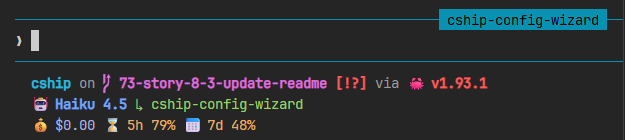
Three-row layout for polyglot developers. Starship handles language runtimes and git; cship handles session data. Styled with the Tokyo Night colour palette.
View config
[cship]
lines = [
  """
  $directory\
  $git_branch\
  $git_status\
  $python\
  $nodejs\
  $rust
  """,
  "$cship.model $cship.agent",
  "$cship.context_bar $cship.cost $cship.usage_limits",
]

[cship.model]
symbol = "🤖 "
style  = "bold fg:#7aa2f7"

[cship.agent]
symbol = "↳ "
style  = "fg:#9ece6a"

[cship.context_bar]
width              = 10
style              = "fg:#7dcfff"
warn_threshold     = 40.0
warn_style         = "fg:#e0af68"
critical_threshold = 70.0
critical_style     = "bold fg:#f7768e"

[cship.cost]
symbol             = "💰 "
style              = "fg:#a9b1d6"
warn_threshold     = 2.0
warn_style         = "fg:#e0af68"
critical_threshold = 5.0
critical_style     = "bold fg:#f7768e"

[cship.usage_limits]
five_hour_format   = "⌛ 5h {pct}%"
seven_day_format   = "📅 7d {pct}%"
separator          = " "
warn_threshold     = 70.0
warn_style         = "fg:#e0af68"
critical_threshold = 90.0
critical_style     = "bold fg:#f7768e"
7. 🔤 Nerd Fonts
Requires a Nerd Font in your terminal. Icons are embedded as symbol values on each module and as literal characters in the format string for Starship passthrough rows. You can use format to control how the symbol and value are combined for each module exactly like you'd do with Starship. Enables show_per_model = true to append the 7-day per-model breakdown to $cship.usage_limits, with a custom sonnet_format row.

View config
[cship]
lines = [
"""
$directory\
$git_branch\
$git_status\
$python\
$nodejs\
$rust
""",
"$cship.model $cship.cost $cship.context_bar $cship.usage_limits",
]
[cship.model]
symbol = " "
style = "bold fg:#7aa2f7"
[cship.cost]
symbol = "💰 "
style = "fg:#a9b1d6"
warn_threshold = 2.0
warn_style = "fg:#e0af68"
critical_threshold = 5.0
critical_style = "bold fg:#f7768e"
[cship.context_bar]
symbol = " "
format = "[$symbol$value]($style)"
width = 10
style = "fg:#7dcfff"
warn_threshold = 40.0
warn_style = "fg:#e0af68"
critical_threshold = 70.0
critical_style = "bold fg:#f7768e"
[cship.usage_limits]
five_hour_format = "⌛ 5h {pct}%"
seven_day_format = "📅 7d {pct}%"
sonnet_format = "🎼 {pct}%"
separator = " "
show_per_model = true
warn_threshold = 70.0
warn_style = "fg:#e0af68"
critical_threshold = 90.0
critical_style = "bold fg:#f7768e"
📚 Full documentation
Complete configuration reference, format string syntax, all module options, and examples.
If you found this project useful, please give us a star ⭐ on GitHub!
If you find bugs or have suggestions, open an issue or submit a pull request. Contributions are very welcome!
Before submitting a PR, run the following to match what CI checks:
cargo fmt && cargo clippy -- -D warnings && cargo test && cargo build --release
See CONTRIBUTING.md for full details.
💡 Inspiration
- Inspired by starship, built with Rust and the Claude Code status line API.
📄 License
Apache-2.0
More Plugins
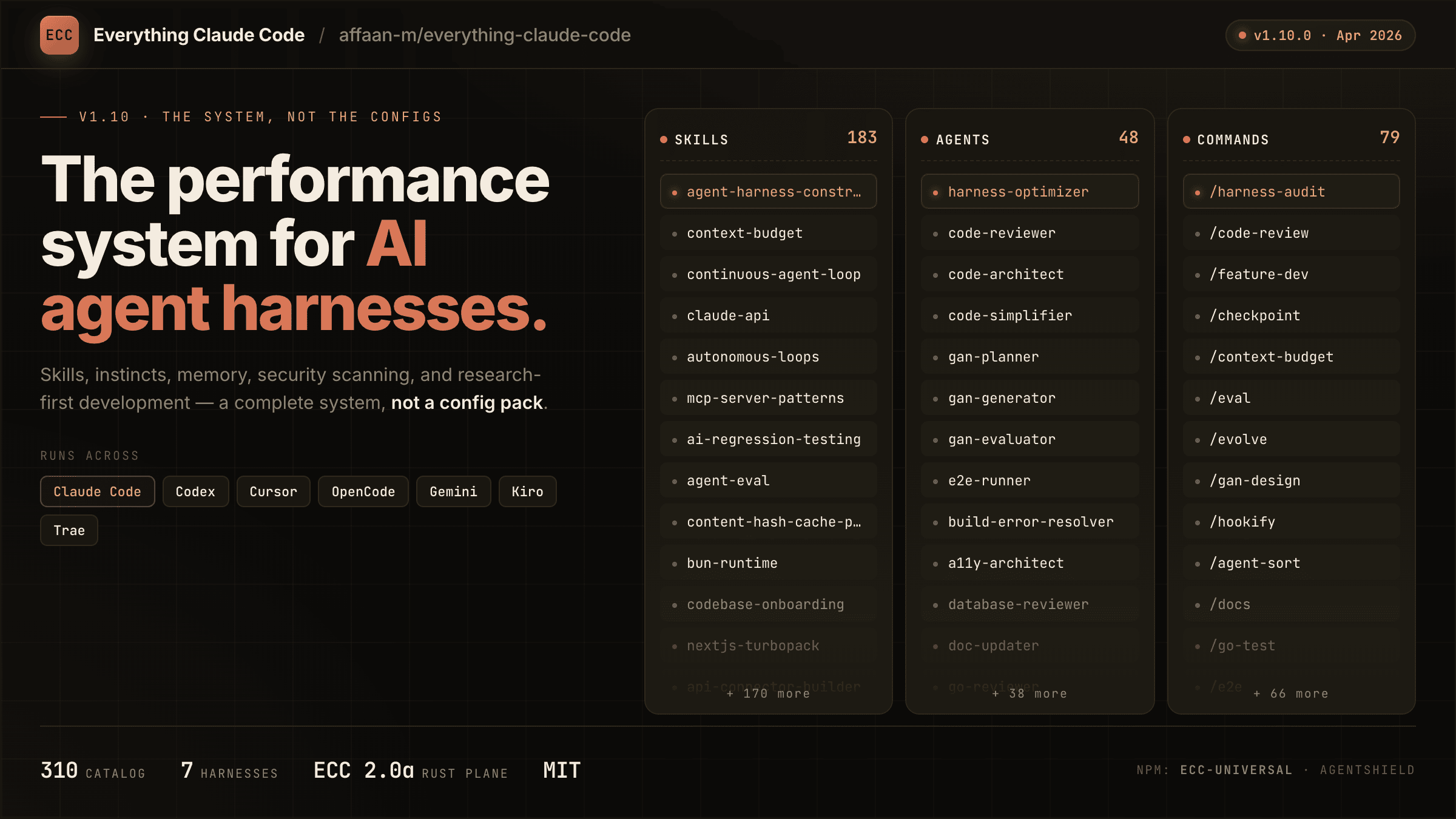
everything-claude-code
A comprehensive bundle of Claude Code optimizations: hooks, commands, CLAUDE.md configs, MCP setups, and workflow automations — everything you need in one repo.
Claude Supermemory
supermemoryai's persistent memory plugin for Claude Code — automatically indexes your codebases, conversations, and notes for semantic search across all sessions.
Claude Code Tools
CLI session utilities for Claude Code including tmux terminal integration, history wrappers, and automation helpers.