
Sideline
Declutters Claude Code's conversation: long commands, diffs and tool chatter step aside into a tidy pane with your changes, commits and commands.
claude plugin validate to auditGuide →Writes files, executes local shell processes, or programmatically drives Claude.
Statically scanned from hooks & source. Learn how to audit
sideline
Keeps Claude Code's conversation clean, and puts the details to the side



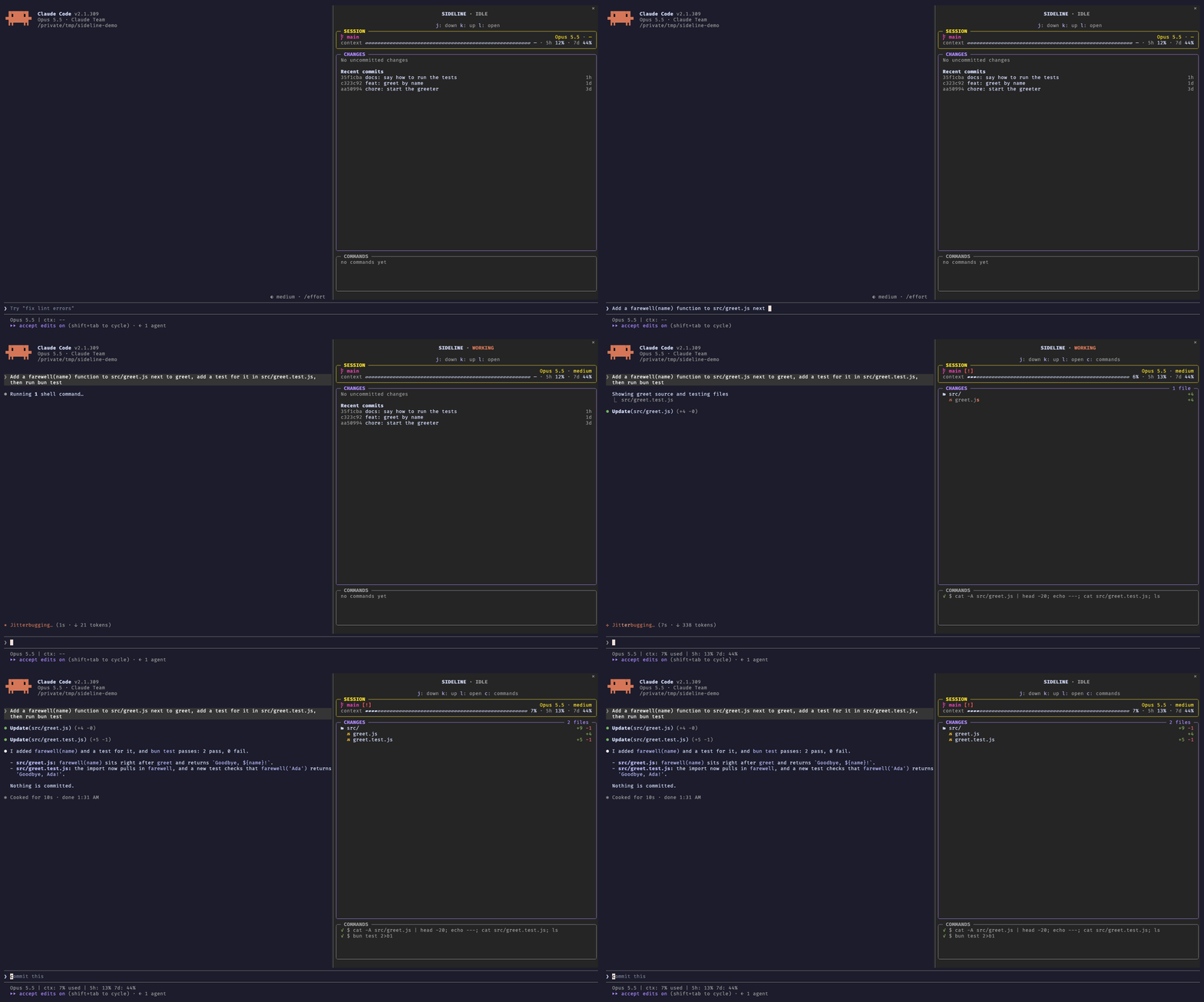
[!NOTE] sideline is a Claude Code mod and needs Claude Code 2.1.308 or newer. In the terminal its pane docks beside the conversation in the fullscreen layout (
/tui fullscreen); it opens by itself on a terminal at least 144 columns wide, and/sidelinetoggles it at any width. Claude Code Desktop docks it on its own. VS Code and the mobile app aren't supported yet: the pane doesn't open there by itself, and/sidelineopens a version that isn't laid out for them and can't be clicked. The transcript tidying doesn't depend on the pane.
Claude's conversation fills up with things you rarely read: whole shell scripts, every edit's diff, "Ran 1 shell command" lines. sideline clears them out, so the conversation reads as what Claude said and did, and keeps the details a glance away, in a pane at its side:
- a described shell command shows its description, not the whole script;
- an edit is one line with its counts,
Update(src/greet.js) (+4 -0), not the diff; - finished "Ran 1 shell command" and "Read 2 files" lines go.
ctrl+o still shows everything, and each of these can be turned off.
The pane stacks a SIDELINE · IDLE / WORKING / WAITING title and the key hints over three boxes:
- SESSION: the branch with Starship-style git status symbols, the model and effort, a context bar, and your 5-hour and 7-day usage.
- CHANGES: a tree of the changed files with
+N -Ncounts, a shimmer on the file Claude is editing, and each file's diff a click (orl) away. With nothing changed, it lists the recent commits, and each opens as its own tree and diffs. It scrolls with the wheel and the keys. - COMMANDS: the latest shell commands Claude ran,
●running,✓done,✗failed; click one to read it whole.
Install
sideline is in the artberri marketplace. Add it once, then install:
claude plugin marketplace add artberri/claude-plugins
claude plugin install sideline@artberri
or, inside a Claude Code session, /plugin marketplace add artberri/claude-plugins and
/plugin install sideline@artberri.
The pane opens by itself on a wide enough terminal and in Claude Code Desktop. /sideline toggles it (/sideline open
and /sideline close do one or the other); once you close it, it stays closed for the session until you open it
again. The transcript stays tidy either way.
Focus it with ctrl+x tab (the abovePrompt:focus keybinding), then use the keys in its hint line: j/k to move,
l to open, h to go back, c for the commands box.
Options
Set them in /config, or under pluginConfigs → sideline → options in your settings.
| Option | Default | What it does |
|---|---|---|
glyphs | auto | auto uses Nerd Font icons when a Nerd Font is installed; nerd or plain forces one set. |
background | (empty) | A #hex colour to paint the pane with, such as your terminal's background. |
transcriptDiffs | hide | hide folds an edit's diff into its counts; show keeps Claude Code's diffs. |
transcriptCommands | hide | hide shows a described command's description and drops finished group lines; show keeps them. |
sessionBox | show | hide drops the SESSION box and puts the branch line back in CHANGES. |
commandRows | 5 | How many commands the COMMANDS box shows, 0 to 20; 0 hides it. |
The file icons need Nerd Fonts 3.0 or later; with an older one, or none, set glyphs to
plain.
What it can see and do
sideline only watches and reads, and nothing it sees leaves your machine. Every hook passes its event on unchanged: it never approves, refuses or edits a tool call or a prompt, and adds nothing to what Claude sees.
| It sees | Through |
|---|---|
| each tool call's name and input, and whether it failed | tool.call |
| when a main turn starts and ends, and its model and effort | turn.start, turn.step, turn.complete |
| context and rate-limit readings | session.measure, $.session.usage() |
| the repo's status, diffs and recent commits | read-only git (status, diff, diff-tree, show, log, rev-parse, with --no-optional-locks) |
| untracked files' sizes and times, to count their lines | stat |
| your OS and installed fonts, to choose its icons | uname -s, fc-list or the macOS Fonts folders |
It never writes a file, commits, stages or pushes, makes no network requests, calls no model and has no dependencies;
everything it keeps is session state in Claude Code. What it hides in the transcript (long commands, diffs, finished
count lines) is display only: the full command is in the COMMANDS box, permission prompts still show it whole,
ctrl+o shows everything, and the transcriptCommands and transcriptDiffs options turn the hiding off.
claude plugin validate on the plugin's folder prints exactly what it hooks and calls.
What it sends
Nothing, to anywhere. Its only way out of Claude Code is $.process.run, and it runs just these fixed, local
commands, none of which reaches the network:
git, read-only, to draw the changes, diffs and commits (the full list is below);uname -s, once per session, to draw Claude Code's own row dot (⏺on macOS,●elsewhere);fc-list :charset=e0a0 file, once per session withglyphsonauto, to find a Nerd Font. Withoutfc-list, as on a stock macOS, it reads the file names in$HOME/Library/Fontsand/Library/Fontsinstead ($.fs.list).
It runs no shell.
Each git command starts git --no-optional-locks -C <folder>, runs with GIT_OPTIONAL_LOCKS=0 and a 10-second
timeout, and is one of these:
status --porcelain=v2 --branch -z --untracked-files=all       # the changed files and the branch
rev-parse --show-toplevel                                      # the repo's root
rev-parse --verify --quiet refs/stash                          # whether there is a stash
diff HEAD --numstat -z                                         # tracked files' line counts
diff --no-index --numstat -z -- /dev/null <untracked file>     # an untracked file's line counts
log -n50 --format=%h%x00%s%x00%ct%x00                          # the recent commits, with nothing changed
diff HEAD -- <file>                                            # a changed file's diff
diff --no-index -- /dev/null <untracked file>                  # an untracked file's diff
diff-tree -r --root --no-commit-id -m --first-parent --numstat -z <commit>      # a commit's line counts
diff-tree -r --root --no-commit-id -m --first-parent --name-status -z <commit>  # a commit's files
show --format= -m --first-parent <commit> -- <file>            # a file's diff in a commit
<folder> is the session's working folder or its repo's root; <file> and <untracked file> are paths git status
(or, in a commit, diff-tree) listed; <commit> is a hash git log listed. Nothing you or Claude type goes into a
command.
From the conversation it reads only what the table above lists: turn.step gives it the model and effort of each
main request, never the messages, and tool.call gives it each tool call's name, input and outcome, which it draws in
the pane (a shell command in COMMANDS, an edited file's shimmer in CHANGES). None of it goes into a command or
leaves Claude Code.
It reads two things from your disk besides git's output, and neither goes into a command or leaves Claude Code:
$.fs.stat: an untracked file's size and modification time, which only decide whethergitcounts that file's lines again; they're kept only for the session.$.fs.list: the file names in the two macOS Fonts folders, once per session withglyphsonauto, checked for one containingNerd. Only the answer, Nerd Font icons or plain ones, is kept; the names aren't.
Everything these commands print is drawn in the pane and nowhere else.
It reads no credential: no token, API key, login or key file. The only environment variable it reads is HOME, to
find $HOME/Library/Fonts. The 5-hour and 7-day usage come from Claude Code itself through $.session.usage(); the
mod never sees the account or the credential behind them.
Troubleshooting
The pane doesn't appear. Check claude --version is 2.1.308 or later, then run /reload-plugins and /sideline.
Below 144 columns Claude Code doesn't open a pane nobody asked for, so /sideline is needed there. Look in the
transcript for a dim line starting sideline:: it names the hook that failed; please
open an issue with it.
The pane doesn't open in VS Code or the mobile app. That's on purpose: sideline isn't laid out for them yet, so it only opens on its own in the terminal and in Claude Code Desktop.
Icons draw as boxes or blanks. The file icons need Nerd Fonts 3.0 or later: update your Nerd Font, or set
glyphs to plain.
The pane is grey. Claude Code draws docked panes on its own grey; set background to your terminal's background
colour, for example #1e1e3f.
I want to see the full command or diff in the conversation. ctrl+o shows everything; set transcriptCommands or
transcriptDiffs to show to keep them there.
Contributing
See CONTRIBUTING.md. sideline learned from claude-code-filetree and claude-flightdeck; see ACKNOWLEDGEMENTS.md.
Licence
Details
- Author
- @artberri
- GitHub Stars
- 2
- Sub-category
- Context & Memory
- License
- MIT
- Surfaces
- terminal
- Added
- 1 months ago
- Last synced
- today
Weekly Mods Digest
Top new Claude Code mods and install commands, once a week. No fluff, unsubscribe anytime.


